Showing posts with label Dynamic Actions. Show all posts

Sunday, 15 March 2020

Inspect Element Deep Dive, with Oracle APEX

In my previous post about tweaking APEX classic reports, most of the settings were "low-code" configurations. All except the final line of JavaScript that moved the radio group from its default location, to the region's title bar where we'd normally find buttons.

But how did I conjure that statement?

When I wrote my book on jQuery in APEX, my general premise was each web page can be queried like a database can, you've just got to learn how to apply the filters to find the relevant component.

Browser Tools


In most browsers, if you right-click on any component on the page, then choose 'Inspect Element', you'll see a window appear showing you what the web page looks like prior to markup.

I can also use F12 in Chrome on my laptop to bring up this console window, but don't presume that's the same anywhere - I borrowed a laptop for a webinar once, and it put the laptop in aeroplane mode. I digress... you can dock this console window to the bottom, side, or have it floating elsewhere.

Where is my item?

If I inspect the radio group, it will take me to the specific radio option, in this case 'Accounting'.

As I move the mouse up the tree, different portions of the page will highlight, signifying exactly what part of the page the HTML represents. Sometimes you'll also see orange & green, signifying margin & padding respectively.

Find the relevant component on the page with help from highlighting

I kept going until I found the P29_DEPT_Z_CONTAINER, which holds all of the contents of my radio group item P29_DEPT_Z. The id property allows us to 'query' this page using the filter (selector) #P29_DEPT_Z_CONTAINER.

I can wrap this selector with the $() function to return that portion of the page, a portion I would like to move somewhere else.

You can also see what happens when you enter this in the console window - it returns a result.
$('#P29_DEPT_Z_CONTAINER')

What function do I use?


I use this jQuery cheatsheet to help identify the relevant command I need. Sometimes there's alternates depending on what expression is on either side of the equation.

In this case, I want to take my radio group, and append it to somewhere else on the page.
$('the object I want to move').appendTo('where it is going');

Where is it going?


The next step is to identify the part of the page where my snippet of HTML will be going.

I can use the same inspect element technique to locate a region already dedicated to placing buttons.

Find the destination using the same technique

Here I've located my zhuzh region by the Static ID I've applied (purple), and there is a div the represents the location of the buttons. I can identify this part using one of the classes (red)

Classes are prefixed with a dot when used within selectors
.t-Region-headerItems--buttons

You need to take care when determining which selector to use. IDs should be unique (but aren't necessarily), and classes certainly aren't unique.

A pairing of ID and class is often an effective combination, but you need choose the right class. One you've added your own is often safe, and you can inject classes into the page using various APEX attributes. They can be anything.

This t-Region set of classes is defined within the Universal Theme. One early problem with APEX was these classes would change from theme to theme, as we didn't have a universal theme, so migrating custom code could be awkward.

The UT has changed some classes over time, but documented ones should remain constant.

Verifying the selector


Using the find function in the Elements tab allows you to test your selector, test how many results are returned on the page. If I just use the class, I actually get two results - one for each standard region I have on the page.

Count components on the page by searching in element tab

Combining these selectors will ensure I only get the button class for the relevant region. This is what forms my destination selector in the appendTo().

Testing the move


We can test the final command in the Console tab of the browser tools.

$('#P29_DEPT_Z_CONTAINER').appendTo('#zhuzh .t-Region-headerItems--buttons')

If I test this without using the #id selector, then the radio HTML will be appended to both regions.

Test your command within the runtime page

Once you're happy with the result, you can add it to the relevant portion of your page. In this case, I put it in the page attributes 'Execute on Page Load', though often it's within a dynamic action.

Playing with CSS


While we're here, it would be remiss of me to mention how you can play with the CSS attributes in the browser tools.

Play with styling on the rendered page

In this example I found the background colour property of the radio group label, and turned it green.

This was done without re-rendering the page, but it's only relevant until I do re-render the page, just like when we applied the console command to move the radio group.

But it's a great way to test/tweak CSS commands to see the result before applying it as CSS content rendered with the rest of your page.

The syntax would be similar, we would take a selector, but in the same syntax as what's found in the Styles sub-tab. You can copy/paste from the tab if you're not sure.

.t-Region-headerItems--title {color : red}

This CSS in the page would apply the styling during render of all page markup, but we could also do this on demand with jQuery, with just a slight adjustment to the syntax - and this is but one variation.
$('.t-Region-headerItems--title').css('color', 'red');

Conclusion


These concepts can arm you with some nifty behaviours, above and beyond what comes with APEX.

Or to think of it a different way, if can really empower your use of dynamic actions, as the same instruments can be wielded as a jQuery selector, dynamic action condition, part of set value action, to name a few.

Doing this with an Interactive Report also provided extra challenges.

See a video on how to action this blog here, and the app here.

Happy APEXing!

Tweaking Classic Reports

I like classic reports in Oracle APEX.

They're so versatile, and while it may not look it in this example, adjusting particular declarative settings can make a real difference in a small region displaying pivotal data.

And this still looks like a report. You should see what else they can do.

Left region is default settings, right region has a few options set

Base Behaviour

The classic report is straight out of the wizard, this example performs a cross join to inflate the data set.
select e.* from emp e cross join emp e2
where :P29_DEPT is null or e.deptno = :P29_DEPT


A where clause has been added to filter by Dept, if supplied.

Page Items to Submit

Note one of the most important properties in APEX - Page Items to Submit, in this case nominating the P29_DEPT item.

There is a Dynamic Action defined on Even Change for the item, which simply refreshes the nominated region.

Simple Dynamic Action

If we don't set Page Items to Submit on the region, then the database won't know about the change made on the browser. Any item specified in this list upon refresh will have the current value set in the browser sent to APEX session state (a key/value table in the database), so when the query binds the value, the database knows what the browser knows.

So when I select a department, the employee list refreshes to show the relevant department.

Make Left look like Right

This may seem like a long list, but it doesn't take long at all once you know where to click. I estimate 23 clicks, as of 19.2.
  1. Modify Region properties
    1. Change Template Options for region
      1. Tick Remove Body Padding
      2. Tick Show Region Icon
    2. Add Icon: fa-list
    3. Add Static ID: zhuzh
  2. Modify Report properties
    1. Change Template Options for report
      1. Tick Stretch Report
      2. Report Border Horizontal Only
    2. Change Pagination Type to Search Engine.
    3. Sometimes you may which to turn Heading Type from Custom to Off, or at least disable the sort (by adding order by to SQL, or disabling sort on columns)
  3. Modify Item properties
    1. Change Type to Radio Group
    2. Change Number of Columns to 4 (something relevant to your list. Usually useful for items with small number of options)
    3. Change template option Item Group Display to Display as Pill Button
  4. Modify Page Property
    1. Set Execute when Page Loads
      $('#P29_DEPT_Z_CONTAINER').appendTo('#zhuzh .t-Region-headerItems--buttons')
      This moves everything holding the radio group together, to a spot made for buttons in the region.
      Not something I do often, but can be an economic use of space.

Notes


We've found the search engine pagination style great for touch devices, but I tend to prefer the Display Position on the Left, and at the Top, or at least Top & Bottom.

Report Template Options offer a facility to hide pagination when all rows displayed, but I've never seen it consistently work as I expect, so I continue to use my own JS library call for that.

The static ID can be whatever you like, so long as it doesn't clash with other IDs on the page, such as item names.

See my next post for more detail on how I derived that line of JavaScript, and what you can do with the browser tools.

See a video on how to action this blog here.

Saturday, 21 September 2019

Change label dynamically in Oracle APEX

I was developing with Oracle Forms for an awesome project when I first heard about Twitter, and it was described to me by Jeff as a 'micro-blogging' site.

I think I did what could be my smallest blog post, as a tweet. A micro-blog, if you will.


Here is the snippet that dynamically updates a label, in this case, a floating label.
$("label[for='P1_NOTE']").text('Happy Friday!');

Which could also be written as
$("#P1_NOTE_LABEL").text('Happy Friday!');


This could be executed within a dynamic action, as a result of a change to some field on your page, perhaps to help instruct the user.

Happy APEXing!

Thursday, 5 September 2019

Paste from clipboard in Oracle APEX

Since APEX makes it so nifty, I've got a few pages simply used as query tools - handy to verify data during development.

I also use these pages to experiment with UX, and recently I thought I could save myself pressing ctrl+v to paste my ID into a field for lookup.

I knew we had done something recently for adding content to the clipboard, so I figured there would be a way to paste clipboard content into a field.


Sure enough, Dr Google had the answers, though it's bleeding edge. Good enough to experiment with.

For me, adapting this response to APEX meant setting the provided field name.

I added this to my JS global declaration.
async function paste(input) {
  const text = await navigator.clipboard.readText();

  $s(input, text);
}
And this when I clicked the button to action the paste, I nominate the item I want the clipboard data to be copied into.
paste('P105_EVENT_ID');

An on-change dynamic action on this field would add a member to the collection, and refresh a number of regions that query the collection.

Don't forget to add Page Items to Submit

I have an example here.
https://apex.oracle.com/pls/apex/f?p=32532:22

I thought I noticed a potential odd behaviour with this, possibly due to the async action.
Therefore I've created an example with a few regions, and I'll try throttling the connection to see if that highlights the behaviour.

And so now I have this as a handy reference, I'll demonstrate some APEX collections and regular expression behaviour while I'm at it.

Saturday, 30 March 2019

Hide Pagination if one page results - Oracle APEX

I love this period of development not long after an APEX upgrade, where I discover all these little improvements that will help us out. Stuff that's not quite noteworthy in the wonderful read that is the new features guide (that's not sarcasm. Read it. Now.)

Recently I made an observation regarding a handy new template option, one that hides pagination if there is only one page of records. I've had a bit of jQuery doing this for a while, and I thought I had blogged about it already, but it was a similar feature regarding no data found.

Sure enough, it was still sitting in an email labelled 'blog post'. Now I could write this off, like quite a few others where a built-in feature got released before I got around to writing up a post. But I decided to post about this one anyway, in part because it may take some time for some to reach 18.2, and I think it's part of an interesting conversation regarding the evolution of the product.

Some of the improvements in each APEX release are likely the result of
- a tweet about a feature
- a forum post asking about a quirk
- a conversation at a conference, likely while at least one person was holding a beer
-  a request on apex.oracle.com/vote

If you notice something odd, or think something you've done would help everyone, put it out there.  Chuck it on the forum. Make it your first blog post. You'll help the community, and reap the benefits yourself when the time comes to upgrade to that version with some delicious fruit.

--***

So, that being said, here was the template option, available in APEX 18.2, but only to existing applications only after refreshing your theme.

Classic Report Region Template Option

Applied to a classic report, it will hide certain pagination styles with there is less records than that specified per page on that report.

This will save me creating a dynamic action on the region, calling a small bit of jQuery I have in a library. It's also something I figured could be practice for turning into a plug-in, but I never got there, either.

The trouble is, this template option doesn't appear to work with my favourite pagination type (another reason for the post).

I like to use the Search Engine pagination style, on the top left - available to the user regardless of vertical/horizontal width of the region. I have chapter in my book describing how to turn standard HTML links in this search engine pagination for a legacy theme into buttons.


Trouble is, it seems a little superfluous when there's only one page of results. And it takes up vertical space. Hence the idea of the template option.

With a little JavaScript invoked in a dynamic action after refresh on the region - this is the default dynamic action when you right-click to create dynamic action on a region in page designer. Kudos to the APEX developers responsible for those little touches.


Here's the code I used to do the job.
if ($(this.triggeringElement).find('.t-Report-paginationText').children().length == 1
  && $(this.triggeringElement).find('.t-Report-paginationText').children().text() == 1)
    $(this.triggeringElement).find('.t-Report-pagination').hide();
A few points:

  • this.triggeringElement refers to the region, since that's what the dynamic action is firing off
  • find() is looking for page elements with the t-Report-paginationText class, in this case, the button group
  • children() counts how many buttons, so true if there is only one
  • I added the second condition when I realised it was hiding results when there were 11 pages of results, so I check if the button contains the text "1"
  • then it applies .hide() to the pagination group

Note, this is designed for Search Engine pagination in the Universal Theme, and the template option probably works with a different mechanism. There might be a clever way to solve this with CSS?

The real solution also belongs in a library so it can be re-used. I did it like this once, but I'm sure it could be neater.
function hide_pagination_iff_one_page (p_region) {
  if ($('#'+p_region+' .t-Report-paginationText').children().length == 1
  && $('#'+p_region+' .t-Report-paginationText').children().text() == 1)
    $('#'+p_region+' .t-Report-pagination').hide();
}
I would then put this in the after refresh dynamic action. It passes the ID of the region triggering the action, ready for embedding in the selector.
hide_pagination_iff_one_page($(this.triggeringElement).attr('id'));

So my open question is, how would you tidy such JavaScript? how would you place it in a library?
I'm still getting the hang of namespaces, and how to organise our stubs.

Thursday, 1 November 2018

Lazy Loading Menu Count

I've been using the lazy loading concept demonstrated in Maxime's post quite a lot recently, I'd love to see this as a declarative feature one day.

I also wondered if I could apply this concept to the badge count in the side menu - not slow the page load by a longer running query that populates the count.


Turns out it wasn't that hard, particularly since I already had the jQuery I needed from a previous requirement.

We first need to add a unique class to the link definition, so we can identify the menu item that needs updating.


The label contains the substitution string reference to an application item called LAZY_MENU, that is just computed to zero on each page load.
Surrounded by square brackets, this turns it into the count badge.

Add a dynamic action that executes PL/SQL on Page Load, probably to the global page, though this demo only fires when on page 15.


The demo populates the item based on a query that counts how many columns in my schema, plus a random number, so we can see it change each time.

A subsequent JavaScript action is where the real action is at
$('#t_TreeNav span.lazy-menu')
  .closest('div.a-TreeView-content')
  .find('span.a-TreeView-badge')
  .text($v('P15_COUNT'));
The selector identifies the menu item based on the lazy-menu class entered in the link definition, then traverses the tree to locate the relevant badge, which is then updated to the page item.

A more complete solution may also update LAZY_MENU application item, ready to have reasonably fresh information for the next page load.

Or we could make our queries faster ;p

Monday, 17 September 2018

Hide region if no data found

I have a diagnostic page where I hide classic report regions that aren't relevant - ie, have no data returned.

Here I create a dynamic action that executes After Refresh of the relevant region.

Dynamic Action definition

The client-side condition evaluates the presence of the .nodatafound class within a classic report, which is present only when no records are returned.

Inspect element of region with no records

The dynamic action then shows/hides the region, depending on the result of the JavaScript expression:
$(this.triggeringElement).find('.nodatafound').length == 1

The triggering element is the region, so find the class within that region, count the result set, and compare to value 1.


Instead of the region itself, this could relate to other components only relevant when records are returned.

As Maxime pointed out in the comments, here I was focussing on classic report regions. The relevant classes you may be looking for include:

  • Classic Report (versatile): nodatafound
  • Interactive Report (IR): a-IRR-noDataMsg
  • Interactive Grid (IG): a-GV-noDataMsg

This can mean there is no need for a server-side condition to test for existence.

With this dynamic action, the region could re-appear upon refresh with results, making the page more interactive without requiring full page submission.

Friday, 14 September 2018

Add record count to collapsed region

I have a diagnostics page where I wanted to display how many records are in a collapsible region's title.

The following is a simple solution, but will only work properly if all records are displayed, and no pagination is used.
Otherwise, check this past post for alternative methods to get the number of rows in a region.

Pick a column in the region and add a class. I chose "cnt".

Column attribute

To be selective, it's always handy to add a static ID to the region.

This is not an 'advanced' feature

Now we're ready to create an After Refresh Dynamic Action on the region, executing the following JavaScript, also firing on initialisation

$('#p99_share .t-Region-title').text('Sharing ('+$('#p99_share .cnt').length+')');

It will relabel region title with the amount of .cnt classes it could find in the region.

The final result looks like this:

Collapsible region with modified title

An alternative that skips the need for a static region ID would be

$(this.trigginerElement).find('.t-Region-title')
   .text('Sharing ('+$(this.trigginerElement).find('.cnt').length+')');

After Refresh Dynamic Action
Edit - Trent offered a more declarative example.

Relatively simple, but effective.


Wednesday, 5 September 2018

Client Side Dynamic Actions using jQuery Selectors

Consider a data entry page where it might be nice to capitalise the first letter of a person's name, for a number of fields.


I understand I may be anglicising a problem that contains minutia, but focus instead on the thought processes and options we have available using Dynamic Actions.

Let's say we want to create a dynamic action that responds to change on any of those name fields, then runs some JavaScript to apply sentence-case to the name value, before the user submits the page.

We can do this declaratively just using the mouse, APEX will construct a comma delimited list for you as you select page items from the list.

Declarative item selection

But that's not the only way we can nominate components on a web page. The example above might create a selector for those items that is a comma delimited list of IDs.

$('P18_FIRST_NAME,#P18_MIDDLE_NAME,#P18_LAST_NAME');

When we have a look at the underlying HTML defined for these items using Inspect Element, the selector would locate these fields based on the id="P18_FIRST_NAME"

Inspect Element to see underlying details of page components


Alternatively, we could use classes. This is how web developers of any ilk build their web pages. They make up a string that means something to them, then associate some behaviour with it.
You don't need to "define" a class anywhere, but it pays to ensure it's unique, and follows a standard.

In our case, if we could add a class to each item, then we would only need to list one class in the dynamic action.
In some circumstances, this style of coupling behaviour could be more advantageous.

To make "initcap" appear as a class, as shown in the item as highlighted above, add the string to the 'CSS Classes' in the Advanced section of the item properties.


APEX Page Builder makes this task quicker, thanks to behaviour inspired by Oracle Forms - well, some of us ex-Forms programmers will recognise it as such.

If you select multiple items, you can change some properties in bulk.


Over in the properties, we can modify CSS Classes attribute for all three items at once.

Multi-item select in Page Designer

Note the 'Value Placeholder' attribute - this is different for each field, so the delta symbol is shown with the attribute value blued-out. I love this concept.

So back on the dynamic action, we can change the 'Selection Type' to jQuery Selector, and reference the class with the relevant syntax - prefixed with a full-stop, as opposed to the hashtag for IDs.

.initcap

Dynamic action, only when item value all lower case

We also didn't want this behaviour to apply only when all the letters are still lower-case. If the user wants to enter "von Braun", I won't overwrite their particular usage.

So note the client-side condition, emphasis on the 'client'. Most conditions on APEX components are server-side, which generally means they are evaluated during page render - do we or do we not include this button/region/item? Dynamic actions have client side conditions to decide whether to apply the True actions, or the False actions.

$(this.triggeringElement).val().toLowerCase() == $(this.triggeringElement).val()

Here I've referred to the item being triggered using this.triggeringElement, mentioned in the inline help for this particular attribute. Wrapping that expression with $().val() gives me the item value, or I could have used apex.item().getValue. jQuery built in .toLowerCase() does what you would hopefully infer.

As with all things programming, there are many ways to cook an egg, and this goes for setting the value. Here I've define a Set Value action that uses a JavaScript Expression, as there is no need for a round trip to the database server.

True Action - apply change to item value

This expression uses a function I found on Stack Overflow that I was happy with

toProperCase($(this.triggeringElement).val())

I placed in an application level JavaScript file, included via User Interface attributes of the application.
// Turn mcdonald into McDonald
// only run/apply if current string lowercase
// $(this.triggeringElement).val().toLowerCase() == $(this.triggeringElement).val()
function toProperCase(s)
{
  return s.toLowerCase().replace( /\b((m)(a?c))?(\w)/g,
          function($1, $2, $3, $4, $5) { if($2){return $3.toUpperCase()+$4+$5.toUpperCase();} return $1.toUpperCase(); });
}
Most of the JavaScript usage I have in my applications these days tend to be one line, or is some form of expression, so commonly used there is only a small handful.

Don't let a little JavaScript scare you away from enabling useful interactivity for the end user. Dynamic actions do most of the work for you :p

Thursday, 23 August 2018

Pseudo Radiogroup in APEX Report

I'd be surprised if you've ever tried to put a radio group in a report, but if you've ever attempted it you might come across a post from Vincent Deelan.

When it comes to checkboxes and radio groups, the nature of HTML haunts us.

So it turns out it's possible to do the same task within a report, and we can build it so we don't even need to submit the page. It really just depends on how you want the page to interact. The following example simply logs the rating selected, rather than a rating being stored as an attribute of Emp.

This is no doubt even easier with Interactive Grids, but I'm not there yet, and I'm sure others aren't either.
And it's fun using Dynamic Actions to make applications more interactive, and revive draft blog posts from a good 18 months earlier. (I've got a few of these...)

I built a traffic light style report once before, but leveraging off the Universal Theme made this effort so much easier.

Consider the template options for creating a pill button group using standard button components.

Button Template Options

If you create three buttons, all with first, inner, last button sets respectively, you get something that looks like this:

Pill buttons
I refer to them as such because if you use the Inspect Element tool on these buttons, the template option classes are named as such
t-Button--pillStart
Check out the UT button builder for more examples.

So to utilise this in a report, I'll combine three manually constructed buttons, levering other existing classes.
select EMPNO,
       ENAME,
       JOB,
  '<span style="white-space: nowrap;">'
    ||'<a href="javascript:void(0);" data-emp="'||empno||'"'
    ||' class="high t-Button t-Button--success t-Button--simple t-Button--pillStart">H</a>'
    ||'<a href="javascript:void(0);" data-emp="'||empno||'"'
    ||' class="medium t-Button t-Button--warning t-Button--simple t-Button--pill">M</a>'
    ||'<a href="javascript:void(0);" data-emp="'||empno||'"'
    ||' class="low t-Button t-Button--danger t-Button--simple t-Button--pillEnd">L</a>'
    ||'</span>'  rate   
from scott.emp

If you remember to Escape Special Characters for the rate columnm you'll see something like this


Now you could slice and dice the dynamic actions in a number of ways, but here I created one for each type of button. So on click of the relevant class I associated with each button type, it will get the value from the data- attribute, put it in a hidden item, then insert a record.


The Set Value action would set some hidden item using the JavaScript expression
$(this.triggeringElement).data('emp')
The subsequent PL/SQL process would submit this item to session state, and insert the empno/rating selection into the log table. The third action refreshes the Rating region so we can see the new data.

We can make the buttons more pill-like but adding a border radius
span a.t-Button {border-radius: 10px;}


To dull the colours a touch
span a.t-Button{border-color: lightgrey; box-shadow: 0 0 0 1px lightgrey inset !important;}


It would only take a few more lines of jQuery to turn this into a status, leaving the active button highlighted. Plus a slight tweak to the SQL to match the relevant record.

Obviously I had a demo of this, but this draft was so old I've forgotten where I put it ;p

Tuesday, 11 October 2016

OTN Appreciation Day : APEX Dynamic Actions

I'm going to take advantage of the fact I live in a city so remote to many others in this amazing community, and schedule this post for my local 8am time. It's seems my schedule didn't work. Not the first fail from blogger... This might get me as one of the first posts in what's hopefully an interesting day amongst Oracle bloggers.

Tim Hall, a great producer of resources for Oracle technologists, suggested bloggers new and old post about their favourite feature, in appreciation for the professional network that is OTN.
https://oracle-base.com/blog/2016/09/28/otn-appreciation-day

I nominated APEX Dynamic Actions for sake of brevity in the subject line, and while they are pretty awesome as a whole, it does encompasses a range of sub-component features.

So I want to be more specific than that, I nominate the jQuery Selector attribute.

One of my favourite features
I could have selected one of a bunch of SQL functions (listagg, nvl2) or some PL/SQL features (%TYPE), or maybe something rarer like Oracle Text, but this one is a little more important to me.

For me it's a bridge between the Oracle world and the native web page we are generating.

With this attribute specifically, we can nominate, with precision, a component on the page and attach some event handler. We can make the web page communicate with the database.

Understanding how this feature operates I found like a gateway to building more interactive applications.

I looked back and it started with a post like this in 2012:
http://www.grassroots-oracle.com/2012/09/using-jquery-selector-in-apex.html
And took me so far as to write a book combining jQuery with APEX:
http://goo.gl/ZzQ0RP
(apparently chapter 9 has finally been corrected, more detail later)

Learning about this feature and further steering my career in an interesting direction required a community that blogged, participated in forums, tweeted, slacked, attended user group events, presented, networked, authored, and so on.

Giving also helps you learn. I do a little bit every now and then on the forums, and now I'm deemed a "legend". I read, watch interactions from interesting questions, and occasionally contribute. It helps in both directions, it's awesome, and it adds up. Same goes for presenting. A topic choice for next year is helping me learn what I need to keep my skills up to date.

#ThanksOTN

Wednesday, 21 September 2016

Show report tooltip as notification

Last week I described a method to make the tooltip on information more accessible to the end user.

Here is how you could make the same information available to touchscreen users.

1) First step, as before, is to define the HTML Expression of the column to include the title tag.
In this case I also stored my row identifier as an extra data- attribute.
<span title="#RECENT_NOTE#" data-key="#ROW_KEY#">#MY_COLUMN#</span>

2a) Create a dynamic action on click of the column cell.
jQuery Selector:
td[headers="my_column"]

2b) Set the value of a hidden page item.
This could be done a few ways, but here is how you can do it with Set Value, based on a JavaScript expression.
Set Value action example

What's pertinent is this.triggeringElement, which identifies the element being clicked. In this case it's the table cell, so .children() identifies the span from the HTML expression; .data() grabs the extra attribute; and .attr() grabs the title tooltip.
$(this.triggeringElement).children('span').data('key') + ': ' + $(this.triggeringElement).attr('title')

This expression extracts the a relevant key value (to identify the record) and concatenates it with the tooltip.

My P50_LAST_NOTE is hidden and unprotected.

2c) A Notification plugin could be used to display the value set in the hidden item, as a second action in the dynamic action. Other notification plugins are also available.
This 'gritter' style notification from APEX uses the hash syntax to get the client value,
#P50_LAST_NOTE#
As opposed to the value from session state while the page was rendered.
&P50_LAST_NOTE.
This information is documented in the relevant attribute help.

Now when you tap (or click) on the cell, the tooltip is displayed in the notification.

Wednesday, 14 September 2016

Extend column tooltip to table cell

Quite sometime ago while still on 3.x I described a simple way to add tooltips in a report using standard HTML in a HTML Expression.
<span title="#RECENT_NOTE#">#MY_COLUMN#</span>

However, it will only appear when hovering over the span content, not anywhere within the table cell.

To do so we can add a dynamic action to execute some JavaScript after refresh of the relevant region.
$('td[headers=my_column] span').each( // for every data cell in the column
  function() { 
     // copy the title attribute to the parent cell
$(this).parent().attr('title',  $(this).attr('title'));
  });
This JavaScript copies the title attribute from the inner span to the surrounding td tag, so you will see the tooltip when the cursor is anywhere within the cell. I find this relevant when there is a bit of spacing/padding in the report.

In this follow-up post I describe how you could display this tooltip on tap of the cell, useful when used within touch devices.

Tuesday, 21 June 2016

Hide nulls in Value Attribute Pairs report

If you have one record where you want to display multiple columns of information, the 'Value Attribute Pairs - column' report template is pretty nifty.

Some of the packaged applications use this within the breadcrumb bar, above a region display selector, and it looks really tidy.

Nulls shown with tilde

Note, I've modified region attribute setting 'Show null values as' to a tilde (~).

But what if I wanted to hide those null values for Mgr & Comm, similar to the 'show nulls' option within single row view of Interactive Reports?

Create an 'after refresh' dynamic action on the region. Conveniently, this is the default when doing so via the Page Designer.
Then create a JavaScript action with the following code.
// for each value cell found on the page, determine if contents = ~, then hide row if true
$('dd.t-AVPList-value').each(function() {
  if ($(this).text().indexOf('~') > 0)
    $(this).hide().prev().hide();
});
Save, then refresh your page. Done.

Nulls hidden
And if you have another event that refreshes the region, the JavaScript will re-apply and hide any nulls (represented as a tilde - something to find and hide).

The dd.t-AVPList-value is a selector for the Universal Theme. It uses a different class in other themes, so you would have to investigate using Inspect Element browser tool to check.

Right-Click -> Inspect Element

That's thinking with my jQuery hat. I have a new post in the works that uses a SQL solution - no post-render tinkering.

Tuesday, 7 June 2016

Synchronous Dynamic Actions in APEX 5.1

If you've ever used a PL/SQL dynamic action with the default 'wait for result', you would have seen the following warning if you have the browser console open.

Text for bots: Synchronous XMLHttpRequest on the main thread is deprecated because of its detrimental effects to the end user's experience.

Consider this scenario of dynamic actions on change of P42_ITEM:

Synchronous vs Asynchronous server calls
First JavaScript takes value of P42_ITEM, concatenates a letter and places result in another field. Let's say I entered "X":
$s('P42_NEW2', $v('P42_ITEM')+'a');
The value in P42_NEW2 would be "Xa"

The PL/SQL code concatenates another letter, passing current value of P42_NEW in and out of session state via page items to submit/return:
:P42_NEW2 := :P42_NEW2||'b';
The value will now be "Xab"

The second JavaScript concatenates another letter:
$s('P42_NEW2', $v('P42_NEW2')+'c');

On page load the value of P42_NEW2 would be "ac", since both JavaScript actions default to 'Fire on page load'.

If 'Wait for Result' on the PL/SQL action is 'yes' (default), then the communication will be synchronous and the JavaScript will only execute once the PL/SQL is finished. The final value would be "Xabc"

If the PL/SQL action 'Wait for Result' is set to 'No', then the subsequent JavaScript will execute immediately, not, um, waiting for a result. The value of P42_NEW2 would briefly be "Xa", then just "c" until the PL/SQL returns with "Xab".

Asynchronous DA result

Think about that. This impacts how you structure dynamic actions, pose questions to the user, and steer application workflow. Regression testing will be required when updating compatibility of your existing applications to 5.1.

In a tweet by John Snyders, who has posted some amazingly detailed posts on the inner workings of APEX, he suggested we can soon forget there was any other way.


I understood this to infer that synchronous actions would disappear. That screenshot is from 5.1 EA1, so it seems they're hanging around for now. It could be considered a backwards compatability thing, though it's still the default option. I'd say many applications would not work as expected should this behaviour disappear.

Synchronous activity on a website is usually non-preferrable for good UX, I understand that's inciting the change in the nature of the inherent browser behaviour (ie: the warning above). As far as I understand it, the way the APEX team has mitigated this warning is by modifying the JavaScript call to the PL/SQL callback as follows:
apex.server.process
  ("CB_AJAX" // name of AJAX callback
  ,{x01       : $v('P42_ITEM')}
  ,{async: false // deprecated synchronous option
   ,success: function(pData) {
     // deprecated wait for result
     $s('P42_NEW2', pData + 'c');
   }
).done(function(pData) {
  // 5.1 wait for result
  // ...
});
Well, this is the jQuery method for deferred callbacks. In future this will be done natively as promises. I've previously detailed some sample code on these variations.

So the end result to the developer appears to be very little, though I'm sure there were plenty of tweaks in the engine to make this happen. Though it does protect applications from when browsers do decide to no longer support the async parameter.

Edit: The end result for the user, as per John's comment, is the browser will not be locked up whilst waiting for the result. This behaviour probably will result in some behaviour differences in some applications, time will tell. Be on the lookout for it.

Actions are no longer synchronous, but you can still have JavaScript execute only after the PL/SQL finished.

Monday, 14 December 2015

Tutorial: Include action button in report

In reality, this 'add' button could represent any action you would like in a report that would execute PL/SQL upon press of a row level button.


In this example I click on a button in a report to add the row to collection, without submitting the page.

Prepare page

Add Static id to your report region:
p2_my_report

Add hidden page item: P2_ADD
Set protected = No if you need to submit the page for other processes.

Create before header process to initialise collection
APEX_COLLECTION.TRUNCATE_COLLECTION(p_collection_name => 'EMPS');


Add link column

Define a new column in your report that will serve as the link button, it only returns null. For classic reports you could create a virtual column for the purposes of a link.


My report on emp uses this SQL
select e.*, null add_btn from emp e

Modify the new column and set the column type to 'Link'.

Set URL to: javascript:void(0);
Link text: Add
Link Attributes: data-id="#EMPNO#" class="add t-Button t-Button--warning t-Button--simple t-Button--stretch"

The data tag creates an attribute that we can interrogate easily with jQuery, returning the ID of the record.
The classes represent the same classes that would be applied when choosing relevant template options. You can explore these with the UT button builder.
The 'add' class is added for our dynamic action.

Create dynamic action

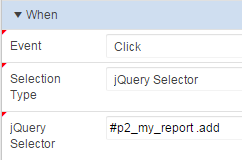
Create a new dynamic action that will respond to button press, using on click of a jQuery selector.


Use the following selector to identify add button clicks on your report.
#p2_my_report .add

Add an action to execute the following JavaScript. It sets the page item with the value of the ID set in the data tag.
$s('P2_ADD', $(this.triggeringElement).data('id'));

Don't forget to set this to not Fire on Page Load. this.triggeringElement represents the button pressed, which is generated as the following HTML.
<a href="javascript:void(0);" 
   data-id="7900" 
   class="add t-Button t-Button--warning t-Button--simple t-Button--stretch">Add</a>


Other JavaScript options

If other information was required, you could define more data tags, or traverse the DOM to find other values in the row. For IR you would need to first define static ID for the column as SAL. Classic reports automatically use the column alias.
$(this.triggeringElement).closest('tr').find('td[headers=SAL]').text()

If you were defining a remove function, then a second statement could be added to immediately hide the row from view without needing to refresh the report by locating the surrounding tr tag.
$(this.triggeringElement).closest('tr').hide();
Though this may make pagination feel a little strange, as the number of rows displayed won't add up.

Or you could add a declarative true action to hide the triggering element, so the button can't be double clicked by a frustrated user.

Partial Page Refresh

May 2017 - I've added this section in response to a reader comment. I can't believe I neglected this property in the first place.

You'll find a problem if the report is refreshed due to a range of actions such re-sorting, applying filter, or perhaps invoked as a refresh action in yet another dynamic action - the on click dynamic action on our action button no longer works!

This is easily adjusted using the Event Scope property for the on click dynamic action, using the 'Dynamic' option (formerly 'Live').

Set Dynamic Action Event Scope to Dynamic

This maps to a jQuery setting that, as the item help describes:
Binds the event handler to the triggering element(s) for the lifetime of the current page, irrespective of any triggering elements being recreated via Partial Page Refresh (PPR).
The default option is static perhaps as the lowest common denominator, favouring speed. Most reports would have this adjusted to Dynamic.

The second property allows you to define the surrounding container of what's being refreshed, ie, the region. It's my understanding that you would include the following value.
#p2_my_report

And this would reduce the search area required to find our particular buttons, but I thought that was the purpose of supplying this as a surrounding ID/repeating class combination.

Execute the PL/SQL

You could then define a second action that executes PL/SQL, including P2_ADD in 'Page Items to Submit', so you can then refer to :P2_ADD as a bind variable in the PL/SQL. Note, you should always explicitly convert any value from session state that is not a string.


Alternatively, you could define an onChange event on P2_ADD which does the same thing. This would allow different UI on the page to invoke the same action.


The onChange dynamic action should only execute when the item is not null, and an action after the PL/SQL should clear the item. This allows the same value to be selected successively, otherwise the value wouldn't 'change' the second time around.
In the screenshot & example below I also refresh the region containing the collection.

Outcome

So that describes a pattern I use frequently, and some variation of which is asked on the forums all the time. I plan to extend this example to include the collection report as a modal dialog with the ability to add & remove.


Run the demo to see it in action.


If you want to explore this further, you might like my book on jQuery with APEX. </shameless-plug>