Showing posts with label New Features. Show all posts

Monday, 26 April 2021

Kicking the tyres on Oracle APEX 21.1

 It's lockdown on a long weekend, and Oracle APEX 21.1 has just been deployed to apex.oracle.com, how could I not have a play?

We've been provided a link to New Features, but for some aspects I'll need some help from the documentation, when it becomes available - and perhaps some examples from people more knowledgable than I.

Native Map

This will be one of those features where I'll need some more guidance, and I suspect this AskTom Office Hours session that I haven't watched yet would probably be a good start.

The create page wizard looks promising

Create native map

And after fiddling around with the region attributes, I was able to plot three lat/long addresses onto a map.

Native map runtime

I also noticed there were some native Dynamic Actions associated with the map region, but I'll patiently await further information on this one. 

Good to see it's dark-mode ready, though. 

Lazy Loading

This is one feature I've been waiting to become native, and I probably would have been a little disappointed if it didn't arrive with 21.1, and here it is, nice and simple.

Lazy loading option

We can emphasise the behaviour with the browser's device toolbar options, for instance, throttling to 'Low-end mobile'.

Here I have an IR and Classic Report both using the lazy loading option.

Lazy loading runtime

Custom built solutions can use the no-data-found message to inform the users data is still loading, I would like this feature to offer some facility in that regard.

Code Editor

I like it when we're giving options on what code editor features are available, and it looks like we've been provided a few more keys to the playground with the 'Monaco' based code editor.

Code editor settings

There are some APEX specific improvements, too. For instance, we're now notified when a page item doesn't exist - thought I think it needs a bit more polish. It appears to be case sensitive, and doesn't clean up very well once you've corrected the problem.

Code editor item reference check

It seems we have a few more keyboard shortcuts available now for case transformations. That's always nice.

Universal Theme enhancements

If you like the Redwood Light theme, it seems that's been given more love compared to the first round.

There are some added declarative options, but I'll probably need more context as to how they're used. I don't think the UT application has those guidelines yet, or I didn't see them.

Row CSS classes seems like it should have been there all along with Column CSS classes. What would be an example of it's use?

Grid layout property addition

CSS classes against the Theme Style seems like it will allow more elegance, but again, I'd like to see an example.

Theme style property addition

Having even a cursory look at these new features also made me consider how I've been utilising existing behaviours. The File URL for a theme style seems a better spot than I've been using for custom CSS I've added to fill gaps in the dark mode.

Template Options have always had a few surprises in version upgrades, though I'm not sure what the region Heading Level is supposed to do.

Region template options

Universal Theme application

I notice the UT app has some extra options in the navigation bar.

The version facility sounds like a fair addition for those who may be a version or so behind. I wonder what this changes, exactly. Does it affect content, or just the styling that's applied. Though I notice you can't select an older theme while dark mode style is applied.

UT app navbar

The Style option is pretty cool. I've been playing with a similar feature in my app, but it seems like I've been submitting the page like a chump - I'm curious as to how this work.

Date Picker

It's always good to get improvements on such a common component. The Maximum Item seems like a more declarative facility compared to what we have now, but now it appears to be dynamic - responding to a related item's selection. Perfect for from/to selections.

New date picker settings

Display Inline really stands out, must be for when date selection is rather important.

Now that DanielH is on the team, it almost seemed inevitable that the time picker would be enhanced in some form. This could mean another plugin is no longer required, though I'll reserve judgement until after I play some more.

Time picker enhancement

Import export as ZIP

This seemed inevitable, but I don't think it will impact me so much.

Application Data Loading

I need to spend time to revisit this feature. The column mapping aspect intrigues me.

Faceted Search enhancements.

I haven't used this facility in production yet, but it's good to see it progress as it's such a ubiquitous web feature.

REST Data sources

Schedule frequent loading of CSV data from the web? Getting data into the database easier has gotta be good.
Juergen has a good way of putting this:
"Put your Excel Sheet in your Sharepoint, change it as you like and I give you an real time App on top of it" feature

Markdown upgrades

This will float some people's boat.

Miscellaneous

I like the sound of client side numeric formatting, and improved client side validation.

Conclusion

This release seems in line with the stated roadmap, though as Andre describes, there are also some long standing painpoints that exist for the developer that could use some attention at some point.

The Oracle APEX development team have had some quality additions recently, though the whole COVID situation has potentially slowed some general improvements. 

That said, the product continues to improve, and the team responds well to community feedback. I also look forward to seeing improvements in the feedback application itself.

Get in there, kick the tyres, and give the development team some constructive feedback. We can all help make this an even better product.

Hold the phone! 

Just as I was about to clean the post up for submission, I saw Juergen's tweet about client side conditions on individual dynamic actions. I think the team are underselling that feature on the New Features list!

Client side condition in DA actions

Though as handy as this feature will be, I suspect it could be abused - in regard to maintainability. It could leave to code/behaviour that's a little difficult to follow. We'll have to keep an eye on that.


Sunday, 15 March 2020

Friendly URLs in APEX 20.1

We can finally add 'native' to the list of choices when it comes to 'prettified' URLs, as Oracle APEX 20.1 honours the statement of direction with a simple checkbox in application properties.

APEX 20.1 Application Properties - Friendly URLs

I tried this with old & new applications, and it appears to be case insensitive.

https://apex.oracle.com/pls/apex/sage/r/SCOTT_UT/Zhuzh?P29_DEPT=10

APEX also appears to honour either format, regardless of the setting.

https://apex.oracle.com/pls/apex/sage/r/swesley_forum_ut/emp?p6_empno=7566&p6_mode=R

It contains the workspace name, application and page aliases (if present), however this obfuscates key reference information a developer users hourly ;p

I wonder if there will be a related API?

I know some people yearn for this, but is it really that prettier than the original?

https://apex.oracle.com/pls/apex/f?p=64956:6:::::P6_EMPNO,P6_MODE:7566,R

Time may tell. It usually does.

Tuesday, 12 November 2019

Things I learned at a user group event

Yesterday I attended a friendly, informative workshop by Shakeeb Rahman and Christina Cho, members of the Oracle APEX product team.

Reflecting on the worthiness of attending such an event, I thought I'd list out all the things I learned & observed.

  1. Everyone learns.
    It was observed that 'gurus' such as Trent, Lino, and myself were there, and maybe this might influence the level of detail content delivered. Sure, I like the details, and a particular pace, but I'm there to learn a bunch of things as much as the next person. My REST skills need a lot of work, it's always great to get a demonstration of features found in the new version. The APEX feature set has grown so much, I'm struggling to stay across it all. I attend these sessions because I know the value I can get out of them.
  2. Watching Shakeeb build.
    The last session involved Shakeeb using Quick SQL to build and populate data in seconds, then transforming the default output to look like a feed like Twitter. He did it in about 30 minutes, only using CSS once, maybe because his perfectionism was showing ;p
    As awesome as it was seeing the showcase that is APEX in action with declarative/low code techniques, I also get a lot out of seeing Shakeeb's thought processes, and how he moves about the IDE.
  3. REST Services.
    One of my attractions to this event was the workshop on REST services. I understand the mechanics, but have not had enough practice using the declarative features. Having a hands on lab where I not only receive instructions in person, but get to ask Christina deeper questions as I explore the workshop. This was invaluable to understanding the feature integration. I have a few posts in mind to help bake it in.
  4. Data is important.
    Our client would have appreciated Shakeeb's opening remarks. While we all know data is important, it can't be iterated enough to those decision makers that may not have enough understanding of the value of databases.
  5. APEX Longevity.
    I knew this one already, but I like the fact this slide has made it into Shakeeb's commentary. APEX has seen so many JavaScript frameworks come and go, with little resistance between versions. I think this is rarely seen in the programming world.
  6. Faceted search looks amazing.
    This will a boon for creating interactive applications that people are used to even quicker.
    I'm interested to see how this responds to more complicated queries, but there seems to be options for everything. I look forward to this feature, as we already build similar constructs already.
  7. The native Popup LOV looks even more suburb.
    They really have learnt from the two solid plugins that came before them. Based on the attributes I saw demonstrated, this has everything we need, and everything we didn't realise we should have. And this is iteration one. Awesome.
  8. I don't need to rely on a CSS overlay to remove toolips
  9. We can hide empty display positions in the layout editor
  10. The undo/redo tooltip was restored to native HTML in 19.x, different to the rest (thanks to sharing the love on Twitter).
  11. I was reminded of an auto-height template option for inline modals.
  12. There is a template option for 'icon and text' button templates to hide text for mobile devices.
  13. A component setting was introduced to transform application Switch items into the pill format - yet another application level optional upgrade between versions.
  14. Syntax in the code editor for SQL Workshop and Quick SQL is now highlighted. I think this improves readability and is a form of inline validation for your syntax.
  15. SQL Workshop Object Browser has a few more tables, including suggested sample queries for the tables - the same sort of group by queries that I use to help analyse what's going on in a table. The same queries that utilised in the faceted search analysis. Code & data re-use right there.
  16. We can now REST enable tables right from the SQL Workshop, with the flick of a switch.
  17. I was reminded Postman was a nifty tool for REST development.
  18. We can jump to the create application wizard from a table. I can't remember how, nor find the option, but I can't remember everything from the day... I make these notes to help, but hey.
  19. Data dictionary cache is a thing. Again, I can't recall exactly how it worked, but I've made a note to investigate later as I explore the faceted search facilities.
  20. The spotlight search has been expanded, and there are other nifty shortcuts that already exist. I use some already, but I now know to keep aware.
  21. Paged designer multi edit - I am looking forward to these improvements, which include the ability to change template options for multiple components at once - hallelujah! But I wasn't aware that some attributes were previously hidden during multi-edit mode, so this has eased.
  22. The ability to change the application logo has received all the declarative nick-knacks we needed.
  23. This application logo is separate from the one defined in the login screen, which as also received a wodge of declarative low code improvements.
  24. There is now a pre-built template style for dark mode. While I was aware of this, it's always beneficially for me to see Shakeeb operate the theme roller, since I don't use it enough.
  25. Theme roller facilities are more refined
  26. The Content Row report template - I'm looking forward to this so much I've retrofitted the template into 18.2, for demonstration
  27. All the interactive report dialogs have been re-written, with a fresh look.
  28. Menus UI can be tweaked with a 'callout' nature. We'll see how that's adopted in general...
  29. Inline regions have been given some upgrades. I've been playing with a page to experiment with these recently (post coming), so this event gave me the opportunity to ask some specific questions.
  30. Inline popups can be located near the invoking component, documented in the UT application.
  31. Lino showed me how to define inline region size with classes, instead of jQuery (to be included in post).
  32. Lino is approachable regarding my growing list of AOP questions.
  33. And as the session was beginning, I felt a little inspiration to solve a regular expression problem I was facing last week. Some interesting performance observations noted as I experimented further today, and had a regexp expert to review my work. (post coming)
  34. Christina is another solid member of the APEX family. I've had the pleasure of conversing with quite a few members of the team now, and they're a great bunch.
  35. Juniper berries are used to make gin - it was the drink'n'learn on the beer cap, in our afternoon wind-down.
And I reckon there might be a few I left off. The Q & A included some conjecture about 20.1.


Brisbane & Sydney also get the pleasure enlightment musings of Connor.

Not bad for a user group event, eh? 

It's a shame some people struggle to get support from their employers to attend such events, and more of a shame we don't see more students getting engaged. How do we reach them - the next generation?

I'm glad they came, and I'm glad I went. There are some growing APEX markets around here, and some with lulls. If we don't get the visits, the next round of students will not eventuate. It's not just the people who attend the workshops, but the flow on effect from those individuals who report back and share information with other team members. It's certainly what I did with my colleagues. Who knows who's ears could be listening in on that positive feedback.

Wednesday, 18 September 2019

APEX 19.x Dark Mode CSS Extension

There have already been some insightful posts about APEX 19.2 Early Adopter, plus an interesting feed of features on Twitter, as they're discovered.

Sven has a great summary.
Adrian comments on markdown.
Mike is really plugging faceted search on twitter. I particularly look forward to playing with that one.

I couldn't resist giving the dark mode a test spin.

I immediately experienced the same contrasting issues from the original clean skin that 5.0 gave us, plus a few minor adjustments.

Spot the difference

Tweaks so far include

  • Region header
  • Delta icon
  • Text field background
  • Scrollbar width
  • Save message location (not seen)

I'm still trying to decide what the best contrast is to break through the darkness on the vertical scroll, but it's a good start.

As Mike Hichwa suggested, the experts may give this a twirl in 20.1.

You can find the CSS I use in this Github respository, but switching between the two modes will require manual interaction with the style extender, since there are no dark-mode classes to utilise.
https://github.com/swesley/orclapex-builder-css

I'm trying to lift my game a little, get more organised, and improve my markdown game.

Edit: Since I'm currently doing most of my work in 18.1, I forgot 19.1 introduced dark mode, not 19.2.

That said, I think Vita - Dark style added to the 19.2 Universal Theme offers better contrast than the page builder itself.

19.2 Dark UT style

Why do the users get the good stuff? ;p

Wednesday, 1 August 2018

APEX 18.2 Statement of Direction

I've been thinking recently it's been a while since I remember seeing a revised Statement of Direction, and sure enough I see news of an update for 18.2.

It was back in 2015 that I last made my own conjecture about what each statement means (without the benefit of listening to as many conference sessions) and look at some of the outcomes now!

  • IG - well, I'm still a little late to that party, but missing out on early cuts & bruises ;p
  • Master detail detail - I was training people last week and it occurred to me this is another feature I don't really work with, but maybe should give a go.
  • New charting engine - well JET is going really well! Though I'm still experiencing teething issues with the data densification.

As for APEX 18.2, we now see:

  • Improved workspace provisioning wizard - not a big drawcard for myself, but I can see how some fresh attention in this space could be warranted.
  • New side-by-side master detail page type available in create page wizard - as I just noted, I need to experiment with recent master-detail development, to perhaps integrate with regular design patterns.
  • New dashboard page type available in create page wizard - Now I’m guessing this is just a wizard to help build an appropriate page – full of components already available to us, but used in an effective way. Either way, I'm interested.
  • Improved warnings with REST workshop to prevent loss of custom definitions - well, that sounds useful.
  • More comprehensive JavaScript API documentation - even more? I've barely had a chance at using the new set. I hope it comes with more examples. I think I saw a glimpse of Shakeeb's /ut application the other night with SQL examples inline for classic report variations. +1 from me.
  • Ability to update Font APEX stylesheets and font files independent of Oracle APEX releases - Maxime already showed us this was possible, and easy. I'm glad behaviour like this is enabled by the APEX team. 
  • Installing sample datasets now enables the creation of a complete sample application - well, that sounds intriguing.
  • EMP / DEPT sample dataset now available in different languages - sometimes I'm grateful my first language is English, but sometimes I really wish I was natively bilingual.
  • Updated productivity and sample apps - seems to go without saying now, but I haven't farmed them for ideas for a while.
They've always come through pretty well with these lists, plus a whole bunch of other extra stuff we find along the way. I also found this nugget from Oliver.

After recent experiences I thought I'd add a few examples of what I'd like to see, no doubt forgetting/neglecting some other needs & wants, includes:
  • IR - support for saved IR (& IG?) are still hidden away a few layers deep in a task menu. Saved IR are still inseparable from app_id. We could use some love here.
  • Excel2Collection - considering the efforts made in assisting Access & Forms users to migrate their information to APEX, perhaps it might be wise to integrate such a simple method of transferring Excel workbook content to a table in the database.
    The ORDS solution hung around for a while, and I find the data loading wizard somewhat clunky. 
  • PWA - Vincent recently published a comprehensive guide on turning APEX into a PWA. This technology is early days (certainly in my learning bubble), but I think APEX would benefit from internal support in regard to further penetrating the mobile market.
  • Native Super LOV - this one from Menno is great, but surely it's time this was baked in?
  • Dynamic Action support for inline modals - there are a few lines of JavaScript I repeat often that I'm sure could be replaced by declarative actions
Anything else? I've made wishlishs in the past (5.x, 4.2), but looking back they seem a little mundane.

Wednesday, 14 May 2014

APEX 4.2 Application builder icon size

A common bug-bear for me is the large distance on web pages between the browser toolbar and the start of any real content on the page.

I remember providing feedback during a tryapexnow beta release on the issue

Gimme content without scrolling!
I can't expect too much - while news websites are frequent offenders for this, newpapers have also been doing it for years.
Pravda 1912
Today I (re?)discovered how to make these buttons smaller - by accident, while clicking between windows.
This was on 4.2.0.00.27.

It rings a vague bell...
Some developers may prefer it. Some developers just do this
Samsung physical monitor rotation
I've finally go the opportunity to try it - I've always preferred height to width.
It's great for APEX and my text editor, but there is still software that works better in landscape - Balsamiq for instance.

Tuesday, 25 March 2014

APEX 5 first peek - What I missed

When tackling early adopter versions I've enjoyed having a play before reading too much about it. I did look through the EA1 feature descriptions to get a feel for the sort of things to expect, but I waited before watching David's videos to see how easy it was to adapt to the changes - even though I wasn't concentrating on the new page designer itself.

It was certainly worth watching the videos in the end because not only does he describe the new features in the page designer really well, he outlines the state of play for the early adopter release.

So while I haven't gone too deep into the new page designer functionality, here are some less obvious features I think are worth mentioning.

New context menu options

I didn't notice the new options under the right-click when viewing components in the rendering/processing accordion options. I guess I missed these because I rarely use the Tree View.

So when David Peake pointed them out in this video - I agreed it would be a simple way to improve developer productivity, and I know I'd use them all the time.
  • Duplicate 
  • Delete
  • Copy to other page
How many times have we thought - wouldn't it be great if this could be done in one click?
Well, now it's done in two - but super fast, and no wizards.
Component Context Sensitive Right-Click
Copying (& duplicating) is great, but we've always got to be sure not to encounter what we call a cut & giggle, where you forget to change something minor during the process of copying. This is made worse when APEX misses a few attributes, or doesn't change the page prefix.

I've been on a project where copying dynamic actions to other pages was done frequently, and since they're a little newer they haven't had the time to perfect minor copy glitches - similar to those that used to appear copying pages in 3.x. Time will tell if this is still an issue, but we've been promised improvement.

Undo - viewing last change

Undo is one of the first features you might spot in the new page designer, but what I didnt' realise was the tooltip text you see when there is stuff to undo. Of course, I spotted this after I logged feedback suggesting we see a list of outstanding changes when we leave an unsaved page.
Undo Tooltip
Thankfully undo also works to restore deleted components - which may be a frequent accident with the new context menu option.

Autocompletion

When editing page templates I noticed a message under the text area to press ctrl-space to activate autocompletion - nothing happened there nor when using the modal edit (EA1) - but when editing using the Text Editor in the page designer it invokes an autocomplete.
Text Editor Autocomplete
You've probably seen this in products like SQL Developer, some people love it. Personally it's the first feature I turn off because I can't stand the lag it introduces. At least here in APEX it is only on demand.

Page designer search

While I did appreciate the search application feature that came with 4.x, I'm really liking this new feature available near the gallery in the middle of the page designer.
Page Designer Search
Results are instant, and when you click on a result the component is automatically selected and properties shown. Another big productivity booster.

Multi-item updates

Former Forms developers will particularly like this one - using the CTRL key you can select multiple heterogenous components and then update common properties in the editor in one go.
Multiple components selected

The property editor (which no doubt I'll continually also call a palette) shows only common properties, and those properties that differ will be shown with a triangle/delta icon with value redacted under a blue shade.
Forms style property palette
I loved this feature in Forms because you could quickly identify any differences between items, of course in addition to making changes in bulk.

There are also little red triangles above certain properties, but I'm not sure what it indicates. In Forms we saw something like this indicate a value differing from default - but it doesn't seem that here, not are they identifying common attributes. Perhaps the APEX team might elaborate at some point, unless I forgot it mentioned in a video - anyone?

User interface

Something you may have noticed I've missed is commentary regarding other user interfaces. I've just neglected to mention it so far.

There are new features regarding the mobile UI which I'll cover in another post some other day - though there may be enough changes for a few posts.

And disappointingly for my current project interests, the tablet UI has been bumped to 5.1. This is a real shame because it's been an interesting challenge to adapt a desktop interface to a 10 inch touch screen environment. I'm keenly awaiting what goodies the APEX team may provide to make this task easier.

-- Is there something you've seen so far that has excited you that I haven't covered?

Monday, 24 March 2014

APEX 5 first peek - Features not yet implemented

It's an early adopter release, the APEX team have come a long way, yet there are still goodies to come.

What's on it's way

Some features aren't quite ready yet. Some you'll see, others you'll find out when you click on them - so no doubt we'll see a second, maybe even third early adopter release.

Notifications

The first you may notice if you've had a play is the notification message - this will be much nice once the development team are done.
A bunch more are already listed in the known issues.

Utilised Shared Components

In the current release I use the Shared Components section on the right often to click on templates used by the page. I already miss it's presence as I play around, and I noticed David delicately skipped over this one during two of the videos ;-)
Shared Components used by the page
Early adopter release 2, I guess.

I found a Tags plug-in item type but that doesn't seem to be quite ready. There are a few Region plug-ins built-in that you can play around with already.

What's not included

Some features have been bumped to 5.1, and fair enough - the amount of work it must have taken to get the Page Designer up & running, the team is making sure they get everything right.

Multi-row Edit Region

At the KScope14 conference Karen Cannell hedged her bets and lost - her submittion What the Muliti-Row Edit Region Type Means to You and Your End Users will probably have to wait.
Not that I'm going (most unfortunately), one year I'll make the trip...

To find solace in this, based on what we're seeing with the new Page Designer, I very much look forward to what this multi-row edit region type will deliver. No pressure team...

Wish list

I had a look through my APEX 4.2 Wish List post and I've remembered other features that I've been waiting/hoping/requesting for a while that are still absent. Some of these items are resolved with plug-ins; some have lost proirity; some we won't know until documentation is supplied; some have been nailed; some simply don't exist anymore with the new Page Designer. Some we just won't know until the use case comes up once more.

What I was hoping for though was enhancements to the Build Option infrastructure, thereby aiding release management.

There are currently 59 other features categorised as "Planned" in the APEX Feature Request application. For instance, feature "ACNA" suggests substitution string :APP_PAGE_ALIAS will be introduced in 5.0.
The new features documentation usually covers stuff like this - I reckon there might be a few other new substitution strings.

Other nuggets of gold will surely be discovered over time.

Friday, 21 March 2014

APEX 5 first peek - File Management

A number of changes have been made to dust off the file management facilities, some of which won't be immediately apparent until we get the chance to spread our wings in our own environments.

File Location

A Static File Prefix has been introduced and appears to use repository files when not specified, and virtual path for your webserver if specified.
It could be similar to the way you might parameterise your file locations with an application item like &F_FILE_LOCATION.
New User Interface property
Plug-ins will support the same behaviour.
I think this will probably make more sense to me when I can muck around in my own environment.

Shared Components

Thankfully the ambiguitity in shared components regarding static files has been removed.
Share Components
There is an Unzip File option, which I guess would make loading files in bulk really handy - but in the era of sprites you only need three files, right? CSS/JS & a massive image sprite ;-)

We also have the ability to define a directory for the static file location, which I didn't really understand at first...
Upload Static Files
... but it made more sense when I saw the file list, which has a very friendly Reference column showing how to identify the file.
Static file list
Perhaps you would synchronise with locations on your web server.

Templates

As I described in my themes & templates post, you can now associate supporting files with your template as you would currently for plug-in files.
Template definition
When referring to your files you can #MIN_DIRECTORY# to complement the #MIN# option - substituting /minified and .min respectively when not in debug mode.

These changes really seem to polish some of the slightly rough edges APEX has had in the past.

Thursday, 20 March 2014

APEX 5 first peek - Themes & Templates

Only a few reported changes in the themes & templates, but they are far reaching and show APEX is continuing to mature as a product.

Supporting Files

The main update mentioned in the new features list is the ability to associate your CSS files within your template definition.
Themes can now store all the files of a theme with the theme definition in the database.
This replicates functionality we already see in plug-ins.
Theme Property - File Location
We also have the ability to declaratively nominate the location of our files, making maintenance a little easier. Previously you may have defined this as an application substitution string and included in your page template.

New Themes

As versions of APEX go up, the number of new themes go down - this is a good thing. APEX 5 introduces one new desktop theme that is responsive and utilises a "navigation list" - this is their fancy term for a List Template (my favourite) that builds a menu that looks & behaves pretty much like the one in the application builder.
APEX 5 EA Desktop Themes
Keep reading on for how a quick way to convert your old Tabs to this format - yup, Tabs almost have their second foot in the grave. I'm not sure many APEX developers would attend that funeral.

When nominating a page template in the new theme you'll see a very succinct list of options. Well done APEX team.
Theme 31 Page Templates

Templates

While editing page templates you'll notice the syntax highlighter is making the content easier to read.
Syntax highlighting in page template property
I've provided feedback to the team requesting them to ensure they replicate this across all relevant properties in the theme maintenance pages - feel free to second this motion in the feedback.

Converting Tab to Navigation List

I think I've had this as a blog post idea for a while, so here's a quick & dirty go using the new tech.
  1. Change the theme of your sample application to 31 - you need the navigation list template
    I think all the template classes match ok without help.

  2. Create a List in Shared Components using something like the following SQL
    select 1, tab_label
      ,'f?p='||:APP_ID||':'||tab_page||':'
         ||sys_context('APEX$SESSION','app_session') target
    from apex_application_tabs
    where application_id = :APP_ID
  3. Brave the new page designer and add a new List region using the following properties
    (if only the OTN forums had an easy way to display a screenshot like this, now properties are tightly laid out)
List region properties
The template renders the menu like the following, where "Home" is current and the cursor is hovering over "Reports". Looks like it could use an order by clause.
Tab options rendered as List template
When a hierarchical query is provided, the menu neatly displays a tab-friendly sub-menu.
I think many people have waited for such a tidy list template to be built-in instead of relying on plug-ins or stitching together your own solution - here it is.

David Peake says the new theme consolidates the best bits of all the old ones, so I look forward to seeing how it treats us.

Wednesday, 19 March 2014

APEX 5 first peek - Navigation

The new Page Designer has brought with it a number of fundamental changes in how you move around the application builder.

I won't go into the designer itself because David Peake covers that well in his video - but some of the other things I noticed before watching David's videos. I will say, however, in addition to all this you'll find yourself using wizards a lot less

Moving around

If you start playing with property attribute values you'll find when it comes to moving between components & pages, we now have a warning for any unsaved changes. There have certainly been a few times when I wonder if I'm going crazy thinking - did I save? Now I'll know.
Though similar I believe to the way Oracle Forms used to behave, currently if the cursor doesn't leave an attribute before selecting another component on the page - it won't get recorded as a change.

By the way - you can check out people's feedback on the early adopter so far. I've put in a suggestion to potentially see a list of the outstanding changes we may have forgotten about, or wondering if we can ignore them all.
https://apexea.oracle.com/pls/apex/f?p=4840:5:0::NO:5:P5_ID:275492489463389040

Developer Action Bar

In regard to navigation options, this has probably undergone the most noticable change - I certainly spend a lot of time up there, pressing edit page or opening shared components - or typing a page number in the search widget.

APEX 4.2 action bar
This screenshot differs slightly when editing pages - it includes lock & export icons.

The new action panel currently has two distinctly different modes. The minimal toolbar shows the core options - on icons who's meaning we'll have to re-learn. (I hate learning new icons)

Amusingly (for me) the shared components icon is a triangle, circle & square - the original name of my blog. I also find it vaguely reminiscent of the old Electronic Arts logo.

Unfortunately the page number search doesn't allow entry when in the minimal mode - I presume this is just an early adopter bug.
When in the page designer, a swathe of options lies before us - including the all new & important save page and save/run options. This is starting to feel more & more like Oracle Forms development! In fact, if you're a former Forms programmer - watch this video from David Peake and tell me it doesn't remind you of the old days.

History conserved

For those like me who might like to occasionally find safety in the refuge of the past, you can find the 4.x Tree View and the 3.x Component View under the cog settings icon - which has been commandeered from shared components.
I've been laughed at on Twitter in the past for enjoying the use of the Component View, but I do appreciate & think it's right that the development team kept it in.
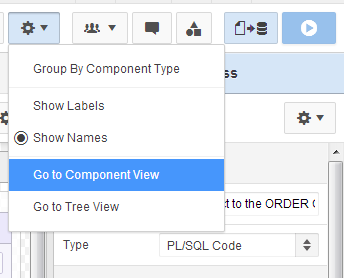
APEX 5 settings menu
I think the Group By Component Type is a good option to include, I'd say advocates of the Tree View in particular thought it an essential feature.

APEX 4.2 rendering icons
For me it kinda replaces the panel of icons to limit what we see. To be honest, the only one of these I pressed with any great frequency was the dynamic actions icon.

So I feelthis combined with the Page Designer's new accordion shows they got the options balance pretty good. Dynamic actions certainly deserve their own category.
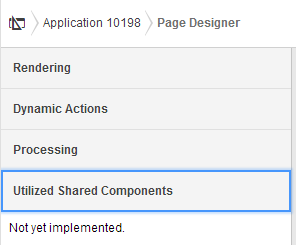
APEX 5 Page Designer Accordion
I wonder if the page designer will get it's own pretty icon in the old navigation bar; and what it might look like - perhaps something similar to the old Oracle Designer logo?

APEX 5 EA navigation bar
I want to add I notice the trees in the Tree View have a greater distance between nodes - anyone found that a problem? Maybe not now we have a categorised accordion?
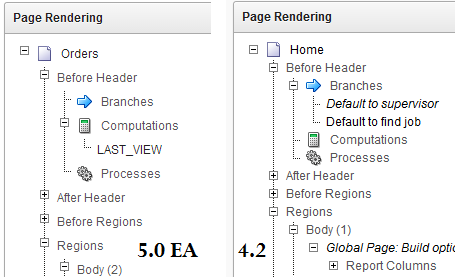
Tree View has extra spacing
You may also notice a few additions in the context menu - I'll bring those up in another post.

The rest of the the development environment has stayed pretty much the same - albeit with flatted UI.
The Application list; Shared Components; Utilities; Administration; SQL Workshop; Team Development - all have not fundamentally changed.

Popups

Anyone who used APEX 3.x can attest that date picker popups were annoying.
In 4.x bigger I think popup windows could use a little jQuery treatment
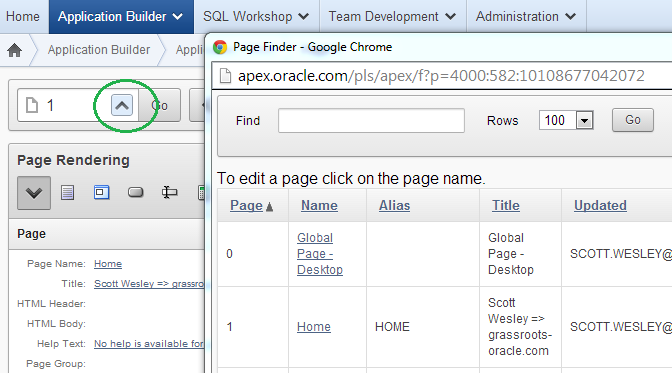
APEX 4.2 page find
... and so APEX 5 delivers. In a true test of the new modal page mode, the page finder is a good example of how this can work effectively - though I have requested the search facility auto-refreshes.
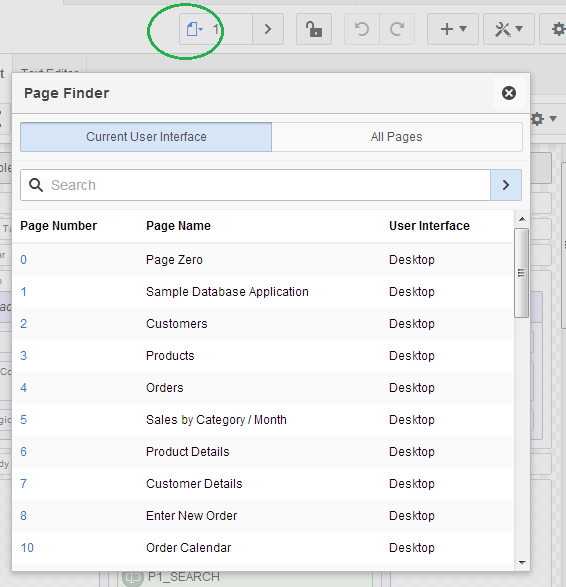
APEX 5 modal dialog
Interactive Reports now appear to be using this framework, but I won't show any screen-captures because I'd say they need a little more dressing up for EA2.

For further detail on using modals for your own applications, check out a post by Joni at iAdvise.

Runtime Developer Toolbar

Last century it was about saving keystrokes, today it's about saving mouse clicks.

If I had a dollar for every time I did this...
Now you'll find that the runtime links open in a new window - presumable thanks to the final class
<a href="f?p=4000:RUN_PAGE:15746635751085:BRANCH_TO_PAGE_ACCEPT:::FB_FLOW_PAGE_ID,FB_FLOW_ID:0,10198" class="launch-aut">

And at runtime you'll noticed the toolbar has been enhanced once again. For a start it doesn't take up the entire page width and has an option to auto-hide.

APEX 4.2 runtime

APEX 5 EA runtime
There is also a display position option, but I'd be interested to meet someone who didn't prefer it on the bottom. I also can't see myself using the show icons only option, but hey - different strokes...

The new Quick Edit feature replaces the Show Edit Links option. Now it greys out the runtime page and offers you to point a crosshairs cursor at an item or region - it will then jump back to the browser window with your application builder then highlight and open the properties component you select - cool!
Quick Edit

Conclusion

A whole suite of changes and I didn't even have a good look at the new page designer. They all made sense and all we'll need to do is get used to a few new icons - but good progress has been made in helping us be productive.
