Wednesday, 7 May 2014

The web we want

I'm not a huge user of Firefox anymore. My exodus from IE brought me to Firefox, but then Chrome came along and I've been happy ever since.

That's quite analogous to my mobile telephone experience - starting with Nokia, big jump to first generation iPhone, now happy with Android.

I still use Firefox, but only so I can have a separate browser with an independent development builder session for Oracle APEX development. The FireFTP extension was pretty good, too. It doesn't render our tablet application very well, though - has trouble with some JavaScript libraries.

Anyway, I upgraded today and the Firefox team is asking the world what kind of web we want. It has a short, clever video using young children asking us to think know about the internet of things we make for our future generations, then asks us we want from our web from a choice of seven options :
  • Creates opportunity
  • Safeguards privacy
  • Inspires learning
  • Is available to all
  • Puts me in control
  • Promotes freedom
Personally, I chose "Inspires learning" because I feel that grassroots education is very important and these other aspects will be borne from an educated young.

The most interesting part was looking at the world map showing the percentages distributed by continent. I think it highlights the geo-politcal boundaries we currently face, relevant to each region.
The continents that value learning 
I think the learning map shows the people who want it the most probably don't have the best access to quality education.

Check it out, look at the maps for the other options and have a think about what is important to you.

ps - I'd also like a web with bigger "refresh" buttons, just like Chrome.

Tuesday, 6 May 2014

APEX 101: Cascading Select Lists & Dynamic Actions

This post was inspired by a question on the OTN APEX forum, which contains requests for two fairly common scenarios:
1) A select list dependent on another select list
2) A report the updates based on the selections.

The original post submitted the page after each select change - APEX 4.x makes this unnecessaary thanks to cascading select lists.
And the report can also be refreshed without submitting the page thanks to Dynamic Actions.

So a solution can be formed declaratively without submitting the page, we just need logical SQL to go with it.

Open the sample page, modify the Dept list and see how Emp list changes.
Change the employee to see Dynamic action refresh report based on selection.

The final result doesn't have many components.
Page rendering properties
The P25_DEPT LOV definition is simply
select dname, deptno from dept
The P25_EMP item has a 'Cascading LOV Parent Item' of "P25_DEPT", and LOV which ensures employees are shown even with no dept selected.
select ename, empno from emp where deptno = :P25_DEPT or :P25_DEPT is null
I've enabled display of null values in both select lists.

My report SQL is
select empno, ename, job
from emp
where job = (select job from emp where empno = :P25_EMP)
or :P25_EMP is null
with 'Page Items to Submit' as "P25_EMP", and I've ensured 'Enable Partial Page Refresh' report attribute is Yes.

The dynamic action fires on Change of P25_EMP, and refreshes the report region.

Simple, effective use of declarative APEX features - so you can spend more time on stuff like jQuery ;-)

Saturday, 3 May 2014

Europa Report

Today I watched Europa Report - a movie that plays the same sport as Gravity, but seemed to go straight through to the keeper since I only heard about it while listening to a science podcast - which I think was StarTalk Radio hosted by the charismatic Neil deGrasse Tyson - of recent Cosmos fame.

Anyway - bloody brilliant movie. If you liked Gravity, you'll like this. And it does a fairly good job with the science, only a few minor issues if you really want to get picky. I'm often happy to ignore a few to help the plot along, though there was a horrible faux pas regarding 'absolute zero'.

A small cast includes Sharlto Copley of District 9 fame, who almost succeeds in hiding his thick south african accent. I love this critic's response:
"Claustrophobic and stylish, Europa Report is a slow-burning thriller that puts the science back into science fiction."
I recommend this review by Britney Schmidt - a planery scientist advising actual planned missions to Europa. Though I'd suggest only reading it once you've seen the movie - it's a movie worth not knowing much about before you see it, but soaking up some background detail after the fact.

The cinematography cleverly combines some real photos from NASA/JPL catalogues, including this iconic shot of Europa from the aptly named Galileo spacecraft.
Look familiar?

I find it gorgeously reminiscent of the Apollo 11 descent of the LEM.
Kudos 'merica

I won't include my favourite perspective/scene as not to spoil anything, but ever since I was a young space enthusiast I've dreamed of seeing Jupiter up close.

Keep looking up.

Friday, 2 May 2014

Thursday Thought: Are web clients getting thick?

I stumbled across this great post from a non-Oracle specific developer, and I thought I'd mention it here because it's worth a read.

http://zderadicka.eu/web-clients-are-getting-thick/

I've re-posted my comment here because they were thoughts rattling in my brain that I was going to rabble on about one day.
I've been thinking the same thing recently in regard to requests for Oracle APEX pages to not rely on connection to the database in order to operate for a time - using HTML5 storage in the meantime, then synchronising once connection is established. 
Essentially native mobile app behaviour in a web/hybrid application. 
I've also noticed issues in performance during my general mobile usage, particularly when it comes to web surfing. If you visit a news site in desktop format with your smartphone (particularly earlier models) it takes a while to render, yet open the same pages on your laptop using the phone as a data tether (to facilitate same download speed) - I've noticed rendering is much faster. 
The front end will also have to do rendering work, and browsers have been competing against each other for rendering speed for ages, but yes - they're getting thick again.

Is this the circle of life?

Wednesday, 30 April 2014

Shared authentication across multiple APEX applications

Quite a few times I see a questions regarding how to share authentication between Oracle APEX applications so the user does not need to log in a second time.

As long as your link between the applications share the session ID, the solution is simple - set the cookie name the same across your applications.
Shared components -> Authentication Schemes -> Edit current scheme -> Session cookie attributes -> Cookie Name
Set same cookie name across applications
This can help release management as you can modularise your applications. You could have a simple login/menu application that links to all your other applications.
Possible application map
If you wanted you could provide access to your application suite using different authenication mechanisms.
ie - if you log into application B using DB accounts, you can still hop across to application A.

The drawback I've found is that post-authentication will only fire during your initial login (in the relevant application). This means you need to be aware how to handle and share your authorisation mechanisms.

Divide and conquer!

Edits: 

If you're on 18.1 (5.2), you may be interested in the Social Login feature. Dimitri has a detailed post.

If you're on 18.2, you'll need to set Type to 'Custom', or (carefully) consider the Workspace sharing option.


APEX 18.2 options

(Oct18) I'm currently writing a presentation on this topic, stay tuned.

Tuesday, 22 April 2014

Adding CSS buttons to your report

I've liked this concept ever since I saw the packaged applications use this technique:


I've finally gotten around to posting this in part due to some feedback on my sample application.

Edit May 2018
It's still a great concept, but the Universal Theme allows you to just reference existing classes. Check out an example here.

I used Chrome's inspect element tool to extract the CSS required to create this effect.
According to my notes I first did this when the Bug Tracking application used Theme 24.

You can then modify this to suit your requirements. I've changed the buttons from orange to green in my sample application. You can also change the size of the buttons using the last three attributes (highlighted) - something I've done to suit people's fingers tapping the screen in tablet based applications .

a.uButton.uButtonGreen {
  border: 1px solid #55a955;
  border-bottom: 1px solid #55a955;
  background: #55a955;
}
a.uButton.uButtonGreen span {
  background-color: #e6f0e6;
  background-color: #e6f0e6;
  filter: progid:DXImageTransform.Microsoft.Gradient(GradientType=0, startColorstr='#e6fae6', endColorstr='#e6f0e6');
  -ms-filter: "progid:DXImageTransform.Microsoft.gradient(startColorstr='#e6fae6', endColorstr='#e6f0e6')";
  background-image: -webkit-gradient(linear, 50% 0%, 50% 100%, color-stop(0%, #e6fae6), color-stop(100%, #e6f0e6));
  background-image: -webkit-linear-gradient(#e6fae6,#e6f0e6);
  background-image: -moz-linear-gradient(#e6fae6,#e6f0e6);
  background-image: linear-gradient(#e6fae6,#e6f0e6);
  color: #404040;
  text-shadow: 0 1px 0 rgba(255,255,255,0.75);
  -webkit-box-shadow: 0 1px 0 rgba(255,255,255,0.5) inset;
  -moz-box-shadow: 0 1px 0 rgba(255,255,255,0.5) inset;
  box-shadow: 0 1px 0 rgba(255,255,255,0.5) inset;
  padding-bottom:10px;
  padding-top:10px;
  width:85px;
}
You could also rename the classes to help prevent clashes with existing usage.

You can place this CSS within the "Inline" CSS page attributes, or more appropriately in your own CSS file that you would place in your images folder, perhaps in /i/themes/my_app/custom/ or uploaded to your APEX workspace.
Some define their own custom virtual path /c/ in the application server.

You would then include this file in your application from within your page template, conveniently highlighted in red below.
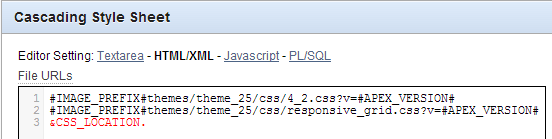
CSS referenced in Page Template

In this case I defined a substitution string in my application properties, that way I only need to define the location once and refer to it in a number of templates.
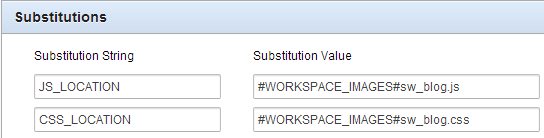
Shared Components -> Application properties

Now in every report you wish to use the classes you apply the following properties to the link column.
The link text could reference data from the report using the #COLUMN# syntax
<span>#ID#</span>
And the link attributes tag the span with the class you wish to reference.
class="uButton uButtonGreen"

These link attributes are a powerful tool, I use them frequently in conjunction with dynamic actions using jQuery selectors.

Have fun!

Wednesday, 16 April 2014

Show APEX IR detail view by default

Since the Detail/Icon views were introduced to Interactive Reports in Oracle APEX 4.0, I've used the detail view a number of times to represent information in ways that don't even look like your standard columnar reports.

One example you may have seen was the original apexblogs.info - this was a detail view IR showing aggregated posts of APEX bloggers.
It's now hosted at odtug.com/apex and this appears to use an alternative method - Named Column report template. I now feel this is probably more superior and deserves it's own post.

I also thought the APEX 4.2 builder application search was another candidate, but looking under the hood it doesn't appear so. If you were just observing as a user you'd say ifthis wasn't implemented with an interactive report detail view, it certainly could have been.

Trouble is these Detail Views aren't shown by default. Good thing is this has a simple solution, though the mechanism may change in APEX5 or other versions.

All you need is to add this when the page loads, either under page attributes or as a dynamic action.
gReport.data.view('DETAIL');
'ICON' is the other accepted actual parameter.
Page attributes - JavaScript
And you may wish to exclude the IR search bar - allowing you to provide your users with a very customised, dynamic layout as soon as the page opens, and they won't even know it's an IR - though depending on the speed of your browser you may see the standard view rendered before the JavaScript kicks in.

Suggested links

Oracle Docs - Enabling detail view
Understanding detail view [video]
Oracle APEX Techniques - video course that includes this clip