Monday, 31 March 2014

Off topic - 2014 predictions

Here are my predictions for 2014.

I realise that traditionally yearly predictions are made in the first month of the Gregorian calendar year... but I've been busy. So I'm going to make some predictions in my birthday month and see how things eventuate over the next 12 months. Many sites do this over the new year, and I do love the commentary when one looks back over the previous 12 months. It's amazing, well not really, how bad the "psychics" do.

While listening to my favourite podcasts over the new year I found myself thinking about stuff and I started noting some things down that while I didn't necessarily think would eventuate this year - I sure hope it comes soon! Other items just got me thinking where technology might eventuate at some point.

My evernote entry on these predictions were dated Jan 13th, and I promise I haven't cheated & backdated any predictions, not that any have already come to pass ... except one - see if you can spot it.
  1. Observational technology will enable astronomers to accurately determine the composition of exoplanet atmospheres and isolate even more "earth like" planets.
  2. There will be major outcomes regarding the sex scandals in the catholic church - broad statement, but outcomes that humanists will be agreeable to. Definitely Australia, hopefully worldwide. Faith in the church (pun intended) will recede further.
  3. In a similar vein, marriage equality will experience similar liberation racial issues received last century (some good news in March on this topic in the UK)
  4. Various worldwide easing of marijuana laws will facilitate more comparative studies which will eventuate into more targeted medical use with certain compounds.\
  5. A plane will go missing, sparking international interest and new conspiracies.
  6. In the nex twelve months we'll have another paradigm shift with smartphone capabilities - potentially relating to folding screen technology.
  7. Power storage technology is very slow moving, but we will overcome some big hurdles, providing order of magnitude increase in storage capacity and/or charging window.
  8. Augmented reality will become very popular in the "app" market, after experiencing slow and steady increases over the past few years, aided with Google Glass.
  9. We will learn key information about ocean ecosystems, such as cracking exactly what goes on with shark migrations - hopefully not too late due to us guiding selective pressures in the wrong direction
I think the faux-prediction is obvious, but I think you'll find none of the "professional" psychics & grief vultures will have predicted such a unique event.
My prediction on the outcome - few pieces of the wreckage will be salvaged, but confirmed as part of the plane. Conspiracy theorists will deny it & claim it all relates back to Rothschild. 
The black box will be recovered but possibly not for a few years and only by lucky, persistent searching. It will be determined the pilot went rogue.

My 5 cents

Wednesday, 26 March 2014

Advert: Packt celebrates 2000 books

No APEX5 blog post today, but it turns out today is the final day of Packt Publishing celebration of 2000 titles since their first book was published in 2004.
I like puns
I have the honour of being one of these titles with my Oracle APEX Techniques video series, and I've had the pleasure of reviewing a number of their books.

They have a buy one get one free offer but it ends today - which time zone I don't know so get in fast!

Tuesday, 25 March 2014

APEX 5 first peek - What I missed

When tackling early adopter versions I've enjoyed having a play before reading too much about it. I did look through the EA1 feature descriptions to get a feel for the sort of things to expect, but I waited before watching David's videos to see how easy it was to adapt to the changes - even though I wasn't concentrating on the new page designer itself.

It was certainly worth watching the videos in the end because not only does he describe the new features in the page designer really well, he outlines the state of play for the early adopter release.

So while I haven't gone too deep into the new page designer functionality, here are some less obvious features I think are worth mentioning.

New context menu options

I didn't notice the new options under the right-click when viewing components in the rendering/processing accordion options. I guess I missed these because I rarely use the Tree View.

So when David Peake pointed them out in this video - I agreed it would be a simple way to improve developer productivity, and I know I'd use them all the time.
  • Duplicate 
  • Delete
  • Copy to other page
How many times have we thought - wouldn't it be great if this could be done in one click?
Well, now it's done in two - but super fast, and no wizards.
Component Context Sensitive Right-Click
Copying (& duplicating) is great, but we've always got to be sure not to encounter what we call a cut & giggle, where you forget to change something minor during the process of copying. This is made worse when APEX misses a few attributes, or doesn't change the page prefix.

I've been on a project where copying dynamic actions to other pages was done frequently, and since they're a little newer they haven't had the time to perfect minor copy glitches - similar to those that used to appear copying pages in 3.x. Time will tell if this is still an issue, but we've been promised improvement.

Undo - viewing last change

Undo is one of the first features you might spot in the new page designer, but what I didnt' realise was the tooltip text you see when there is stuff to undo. Of course, I spotted this after I logged feedback suggesting we see a list of outstanding changes when we leave an unsaved page.
Undo Tooltip
Thankfully undo also works to restore deleted components - which may be a frequent accident with the new context menu option.

Autocompletion

When editing page templates I noticed a message under the text area to press ctrl-space to activate autocompletion - nothing happened there nor when using the modal edit (EA1) - but when editing using the Text Editor in the page designer it invokes an autocomplete.
Text Editor Autocomplete
You've probably seen this in products like SQL Developer, some people love it. Personally it's the first feature I turn off because I can't stand the lag it introduces. At least here in APEX it is only on demand.

Page designer search

While I did appreciate the search application feature that came with 4.x, I'm really liking this new feature available near the gallery in the middle of the page designer.
Page Designer Search
Results are instant, and when you click on a result the component is automatically selected and properties shown. Another big productivity booster.

Multi-item updates

Former Forms developers will particularly like this one - using the CTRL key you can select multiple heterogenous components and then update common properties in the editor in one go.
Multiple components selected

The property editor (which no doubt I'll continually also call a palette) shows only common properties, and those properties that differ will be shown with a triangle/delta icon with value redacted under a blue shade.
Forms style property palette
I loved this feature in Forms because you could quickly identify any differences between items, of course in addition to making changes in bulk.

There are also little red triangles above certain properties, but I'm not sure what it indicates. In Forms we saw something like this indicate a value differing from default - but it doesn't seem that here, not are they identifying common attributes. Perhaps the APEX team might elaborate at some point, unless I forgot it mentioned in a video - anyone?

User interface

Something you may have noticed I've missed is commentary regarding other user interfaces. I've just neglected to mention it so far.

There are new features regarding the mobile UI which I'll cover in another post some other day - though there may be enough changes for a few posts.

And disappointingly for my current project interests, the tablet UI has been bumped to 5.1. This is a real shame because it's been an interesting challenge to adapt a desktop interface to a 10 inch touch screen environment. I'm keenly awaiting what goodies the APEX team may provide to make this task easier.

-- Is there something you've seen so far that has excited you that I haven't covered?

Monday, 24 March 2014

APEX 5 first peek - Features not yet implemented

It's an early adopter release, the APEX team have come a long way, yet there are still goodies to come.

What's on it's way

Some features aren't quite ready yet. Some you'll see, others you'll find out when you click on them - so no doubt we'll see a second, maybe even third early adopter release.

Notifications

The first you may notice if you've had a play is the notification message - this will be much nice once the development team are done.
A bunch more are already listed in the known issues.

Utilised Shared Components

In the current release I use the Shared Components section on the right often to click on templates used by the page. I already miss it's presence as I play around, and I noticed David delicately skipped over this one during two of the videos ;-)
Shared Components used by the page
Early adopter release 2, I guess.

I found a Tags plug-in item type but that doesn't seem to be quite ready. There are a few Region plug-ins built-in that you can play around with already.

What's not included

Some features have been bumped to 5.1, and fair enough - the amount of work it must have taken to get the Page Designer up & running, the team is making sure they get everything right.

Multi-row Edit Region

At the KScope14 conference Karen Cannell hedged her bets and lost - her submittion What the Muliti-Row Edit Region Type Means to You and Your End Users will probably have to wait.
Not that I'm going (most unfortunately), one year I'll make the trip...

To find solace in this, based on what we're seeing with the new Page Designer, I very much look forward to what this multi-row edit region type will deliver. No pressure team...

Wish list

I had a look through my APEX 4.2 Wish List post and I've remembered other features that I've been waiting/hoping/requesting for a while that are still absent. Some of these items are resolved with plug-ins; some have lost proirity; some we won't know until documentation is supplied; some have been nailed; some simply don't exist anymore with the new Page Designer. Some we just won't know until the use case comes up once more.

What I was hoping for though was enhancements to the Build Option infrastructure, thereby aiding release management.

There are currently 59 other features categorised as "Planned" in the APEX Feature Request application. For instance, feature "ACNA" suggests substitution string :APP_PAGE_ALIAS will be introduced in 5.0.
The new features documentation usually covers stuff like this - I reckon there might be a few other new substitution strings.

Other nuggets of gold will surely be discovered over time.

Friday, 21 March 2014

APEX 5 first peek - File Management

A number of changes have been made to dust off the file management facilities, some of which won't be immediately apparent until we get the chance to spread our wings in our own environments.

File Location

A Static File Prefix has been introduced and appears to use repository files when not specified, and virtual path for your webserver if specified.
It could be similar to the way you might parameterise your file locations with an application item like &F_FILE_LOCATION.
New User Interface property
Plug-ins will support the same behaviour.
I think this will probably make more sense to me when I can muck around in my own environment.

Shared Components

Thankfully the ambiguitity in shared components regarding static files has been removed.
Share Components
There is an Unzip File option, which I guess would make loading files in bulk really handy - but in the era of sprites you only need three files, right? CSS/JS & a massive image sprite ;-)

We also have the ability to define a directory for the static file location, which I didn't really understand at first...
Upload Static Files
... but it made more sense when I saw the file list, which has a very friendly Reference column showing how to identify the file.
Static file list
Perhaps you would synchronise with locations on your web server.

Templates

As I described in my themes & templates post, you can now associate supporting files with your template as you would currently for plug-in files.
Template definition
When referring to your files you can #MIN_DIRECTORY# to complement the #MIN# option - substituting /minified and .min respectively when not in debug mode.

These changes really seem to polish some of the slightly rough edges APEX has had in the past.

Thursday, 20 March 2014

APEX 5 first peek - Themes & Templates

Only a few reported changes in the themes & templates, but they are far reaching and show APEX is continuing to mature as a product.

Supporting Files

The main update mentioned in the new features list is the ability to associate your CSS files within your template definition.
Themes can now store all the files of a theme with the theme definition in the database.
This replicates functionality we already see in plug-ins.
Theme Property - File Location
We also have the ability to declaratively nominate the location of our files, making maintenance a little easier. Previously you may have defined this as an application substitution string and included in your page template.

New Themes

As versions of APEX go up, the number of new themes go down - this is a good thing. APEX 5 introduces one new desktop theme that is responsive and utilises a "navigation list" - this is their fancy term for a List Template (my favourite) that builds a menu that looks & behaves pretty much like the one in the application builder.
APEX 5 EA Desktop Themes
Keep reading on for how a quick way to convert your old Tabs to this format - yup, Tabs almost have their second foot in the grave. I'm not sure many APEX developers would attend that funeral.

When nominating a page template in the new theme you'll see a very succinct list of options. Well done APEX team.
Theme 31 Page Templates

Templates

While editing page templates you'll notice the syntax highlighter is making the content easier to read.
Syntax highlighting in page template property
I've provided feedback to the team requesting them to ensure they replicate this across all relevant properties in the theme maintenance pages - feel free to second this motion in the feedback.

Converting Tab to Navigation List

I think I've had this as a blog post idea for a while, so here's a quick & dirty go using the new tech.
  1. Change the theme of your sample application to 31 - you need the navigation list template
    I think all the template classes match ok without help.

  2. Create a List in Shared Components using something like the following SQL
    select 1, tab_label
      ,'f?p='||:APP_ID||':'||tab_page||':'
         ||sys_context('APEX$SESSION','app_session') target
    from apex_application_tabs
    where application_id = :APP_ID
  3. Brave the new page designer and add a new List region using the following properties
    (if only the OTN forums had an easy way to display a screenshot like this, now properties are tightly laid out)
List region properties
The template renders the menu like the following, where "Home" is current and the cursor is hovering over "Reports". Looks like it could use an order by clause.
Tab options rendered as List template
When a hierarchical query is provided, the menu neatly displays a tab-friendly sub-menu.
I think many people have waited for such a tidy list template to be built-in instead of relying on plug-ins or stitching together your own solution - here it is.

David Peake says the new theme consolidates the best bits of all the old ones, so I look forward to seeing how it treats us.

Wednesday, 19 March 2014

APEX 5 first peek - Navigation

The new Page Designer has brought with it a number of fundamental changes in how you move around the application builder.

I won't go into the designer itself because David Peake covers that well in his video - but some of the other things I noticed before watching David's videos. I will say, however, in addition to all this you'll find yourself using wizards a lot less

Moving around

If you start playing with property attribute values you'll find when it comes to moving between components & pages, we now have a warning for any unsaved changes. There have certainly been a few times when I wonder if I'm going crazy thinking - did I save? Now I'll know.
Though similar I believe to the way Oracle Forms used to behave, currently if the cursor doesn't leave an attribute before selecting another component on the page - it won't get recorded as a change.

By the way - you can check out people's feedback on the early adopter so far. I've put in a suggestion to potentially see a list of the outstanding changes we may have forgotten about, or wondering if we can ignore them all.
https://apexea.oracle.com/pls/apex/f?p=4840:5:0::NO:5:P5_ID:275492489463389040

Developer Action Bar

In regard to navigation options, this has probably undergone the most noticable change - I certainly spend a lot of time up there, pressing edit page or opening shared components - or typing a page number in the search widget.

APEX 4.2 action bar
This screenshot differs slightly when editing pages - it includes lock & export icons.

The new action panel currently has two distinctly different modes. The minimal toolbar shows the core options - on icons who's meaning we'll have to re-learn. (I hate learning new icons)

Amusingly (for me) the shared components icon is a triangle, circle & square - the original name of my blog. I also find it vaguely reminiscent of the old Electronic Arts logo.

Unfortunately the page number search doesn't allow entry when in the minimal mode - I presume this is just an early adopter bug.
When in the page designer, a swathe of options lies before us - including the all new & important save page and save/run options. This is starting to feel more & more like Oracle Forms development! In fact, if you're a former Forms programmer - watch this video from David Peake and tell me it doesn't remind you of the old days.

History conserved

For those like me who might like to occasionally find safety in the refuge of the past, you can find the 4.x Tree View and the 3.x Component View under the cog settings icon - which has been commandeered from shared components.
I've been laughed at on Twitter in the past for enjoying the use of the Component View, but I do appreciate & think it's right that the development team kept it in.
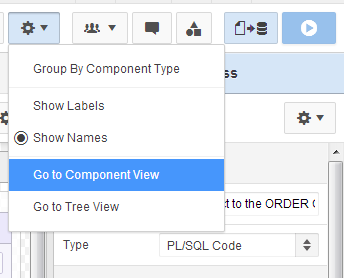
APEX 5 settings menu
I think the Group By Component Type is a good option to include, I'd say advocates of the Tree View in particular thought it an essential feature.

APEX 4.2 rendering icons
For me it kinda replaces the panel of icons to limit what we see. To be honest, the only one of these I pressed with any great frequency was the dynamic actions icon.

So I feelthis combined with the Page Designer's new accordion shows they got the options balance pretty good. Dynamic actions certainly deserve their own category.
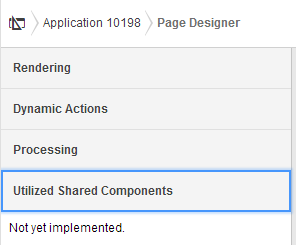
APEX 5 Page Designer Accordion
I wonder if the page designer will get it's own pretty icon in the old navigation bar; and what it might look like - perhaps something similar to the old Oracle Designer logo?

APEX 5 EA navigation bar
I want to add I notice the trees in the Tree View have a greater distance between nodes - anyone found that a problem? Maybe not now we have a categorised accordion?
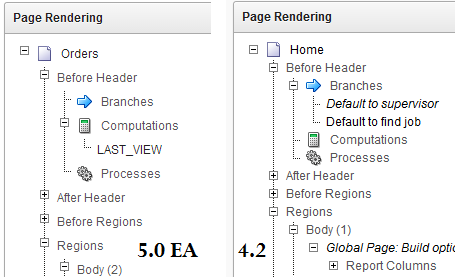
Tree View has extra spacing
You may also notice a few additions in the context menu - I'll bring those up in another post.

The rest of the the development environment has stayed pretty much the same - albeit with flatted UI.
The Application list; Shared Components; Utilities; Administration; SQL Workshop; Team Development - all have not fundamentally changed.

Popups

Anyone who used APEX 3.x can attest that date picker popups were annoying.
In 4.x bigger I think popup windows could use a little jQuery treatment
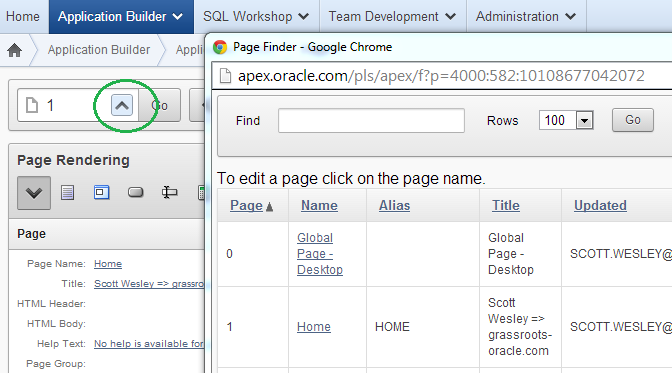
APEX 4.2 page find
... and so APEX 5 delivers. In a true test of the new modal page mode, the page finder is a good example of how this can work effectively - though I have requested the search facility auto-refreshes.
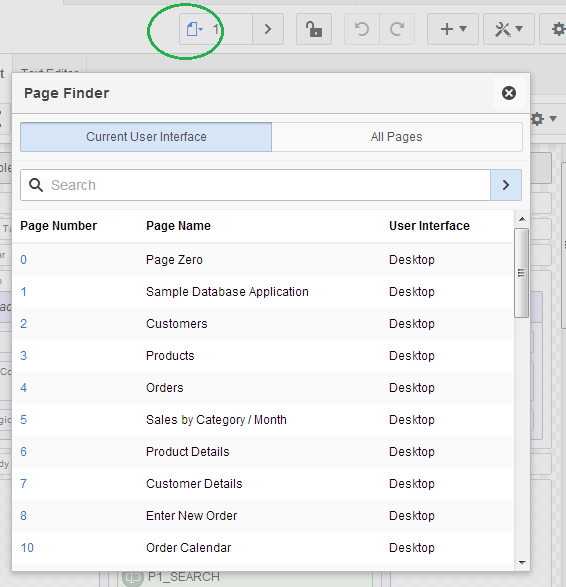
APEX 5 modal dialog
Interactive Reports now appear to be using this framework, but I won't show any screen-captures because I'd say they need a little more dressing up for EA2.

For further detail on using modals for your own applications, check out a post by Joni at iAdvise.

Runtime Developer Toolbar

Last century it was about saving keystrokes, today it's about saving mouse clicks.

If I had a dollar for every time I did this...
Now you'll find that the runtime links open in a new window - presumable thanks to the final class
<a href="f?p=4000:RUN_PAGE:15746635751085:BRANCH_TO_PAGE_ACCEPT:::FB_FLOW_PAGE_ID,FB_FLOW_ID:0,10198" class="launch-aut">

And at runtime you'll noticed the toolbar has been enhanced once again. For a start it doesn't take up the entire page width and has an option to auto-hide.

APEX 4.2 runtime

APEX 5 EA runtime
There is also a display position option, but I'd be interested to meet someone who didn't prefer it on the bottom. I also can't see myself using the show icons only option, but hey - different strokes...

The new Quick Edit feature replaces the Show Edit Links option. Now it greys out the runtime page and offers you to point a crosshairs cursor at an item or region - it will then jump back to the browser window with your application builder then highlight and open the properties component you select - cool!
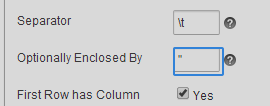
Quick Edit

Conclusion

A whole suite of changes and I didn't even have a good look at the new page designer. They all made sense and all we'll need to do is get used to a few new icons - but good progress has been made in helping us be productive.
