Monday, 10 September 2018

Enhancing the APEX Error Handling Function with Logger

Many, many moons ago, I created an error handling function for Oracle APEX, just like the original sample provided by Patrick Wolf for the 4.1 error handling feature. You'll probably find a strong correlation between the two events.

OK, now what?
We normally see this if an exception was propagated within a PL/SQL Dynamic Action.
In this case I thought it was time for a little upgrade.

I noticed the sample code, now part of the APEX_ERROR documentation, suggested including a reference ID, perhaps from some logging package.
Conveniently, we use such a package, a popular one among the PL/SQL community called Logger.


I glanced through the package specification, and for a moment I thought it was missing a function that returned the new log ID.

I found a procedure with an OUT parameter instead, so here I log some contextual information about the error.
logger_user.logger.ins_logger_logs(
    p_unit_name => 'error_handler' ,
    p_scope => 'apx_util.error_handler' ,
    p_logger_level => logger.g_error,
    p_extra => p_error.component.name
              ||'~'||p_error.component.type
              ||'~'||p_error.message,
    p_text => 'apx_util.error_handler()',
    p_call_stack => dbms_utility.format_call_stack,
    p_line_no => null,
    po_id => l_reference_id
);
Now the user has some context to report. I figured the wording could be softened a little, too ;p
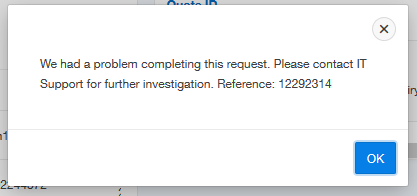
Standard error message, with reference

So if we were to execute the following SQL, we could see further details.
select time_stamp, module, client_identifier, extra
from logger_user.logger_logs
where id = 12292314;
The log message prior to this ID may also help to provide clues as to the problem.

SQL results, slightly redacted

I also wanted to add some convenience to the developer, so I added this same information to the error popup, but only when an active session is also present within the App Builder (or some special privilege present).

Immediate context for the developer

This is toggled by checking a built in substitution string (or my application item). I note this built-in was only documented from 18.1, but I believe it has been present for a while. It's certainly returns a value in 5.1.
l_result.message := 'We had a problem completing this request. '||
    'Please contact IT Support'||
    ' for further investigation. Reference: '||l_reference_id
    ||case when v('F_SEC_DEV') = 'Y' -- anyone with privilege
    -- or has builder open (from oos_util_apex.is_developer)
    or coalesce(apex_application.g_edit_cookie_session_id
               ,v('APP_BUILDER_SESSION')) is not null then
      ' Dev only: '||p_error.component.name
      ||' ~ '||p_error.component.type
      ||' ~ '||p_error.message
    end;
This brightened the day of some of my colleagues.

Wednesday, 5 September 2018

Client Side Dynamic Actions using jQuery Selectors

Consider a data entry page where it might be nice to capitalise the first letter of a person's name, for a number of fields.


I understand I may be anglicising a problem that contains minutia, but focus instead on the thought processes and options we have available using Dynamic Actions.

Let's say we want to create a dynamic action that responds to change on any of those name fields, then runs some JavaScript to apply sentence-case to the name value, before the user submits the page.

We can do this declaratively just using the mouse, APEX will construct a comma delimited list for you as you select page items from the list.

Declarative item selection

But that's not the only way we can nominate components on a web page. The example above might create a selector for those items that is a comma delimited list of IDs.

$('P18_FIRST_NAME,#P18_MIDDLE_NAME,#P18_LAST_NAME');

When we have a look at the underlying HTML defined for these items using Inspect Element, the selector would locate these fields based on the id="P18_FIRST_NAME"

Inspect Element to see underlying details of page components


Alternatively, we could use classes. This is how web developers of any ilk build their web pages. They make up a string that means something to them, then associate some behaviour with it.
You don't need to "define" a class anywhere, but it pays to ensure it's unique, and follows a standard.

In our case, if we could add a class to each item, then we would only need to list one class in the dynamic action.
In some circumstances, this style of coupling behaviour could be more advantageous.

To make "initcap" appear as a class, as shown in the item as highlighted above, add the string to the 'CSS Classes' in the Advanced section of the item properties.


APEX Page Builder makes this task quicker, thanks to behaviour inspired by Oracle Forms - well, some of us ex-Forms programmers will recognise it as such.

If you select multiple items, you can change some properties in bulk.


Over in the properties, we can modify CSS Classes attribute for all three items at once.

Multi-item select in Page Designer

Note the 'Value Placeholder' attribute - this is different for each field, so the delta symbol is shown with the attribute value blued-out. I love this concept.

So back on the dynamic action, we can change the 'Selection Type' to jQuery Selector, and reference the class with the relevant syntax - prefixed with a full-stop, as opposed to the hashtag for IDs.

.initcap

Dynamic action, only when item value all lower case

We also didn't want this behaviour to apply only when all the letters are still lower-case. If the user wants to enter "von Braun", I won't overwrite their particular usage.

So note the client-side condition, emphasis on the 'client'. Most conditions on APEX components are server-side, which generally means they are evaluated during page render - do we or do we not include this button/region/item? Dynamic actions have client side conditions to decide whether to apply the True actions, or the False actions.

$(this.triggeringElement).val().toLowerCase() == $(this.triggeringElement).val()

Here I've referred to the item being triggered using this.triggeringElement, mentioned in the inline help for this particular attribute. Wrapping that expression with $().val() gives me the item value, or I could have used apex.item().getValue. jQuery built in .toLowerCase() does what you would hopefully infer.

As with all things programming, there are many ways to cook an egg, and this goes for setting the value. Here I've define a Set Value action that uses a JavaScript Expression, as there is no need for a round trip to the database server.

True Action - apply change to item value

This expression uses a function I found on Stack Overflow that I was happy with

toProperCase($(this.triggeringElement).val())

I placed in an application level JavaScript file, included via User Interface attributes of the application.
// Turn mcdonald into McDonald
// only run/apply if current string lowercase
// $(this.triggeringElement).val().toLowerCase() == $(this.triggeringElement).val()
function toProperCase(s)
{
  return s.toLowerCase().replace( /\b((m)(a?c))?(\w)/g,
          function($1, $2, $3, $4, $5) { if($2){return $3.toUpperCase()+$4+$5.toUpperCase();} return $1.toUpperCase(); });
}
Most of the JavaScript usage I have in my applications these days tend to be one line, or is some form of expression, so commonly used there is only a small handful.

Don't let a little JavaScript scare you away from enabling useful interactivity for the end user. Dynamic actions do most of the work for you :p

Thursday, 23 August 2018

Pseudo Radiogroup in APEX Report

I'd be surprised if you've ever tried to put a radio group in a report, but if you've ever attempted it you might come across a post from Vincent Deelan.

When it comes to checkboxes and radio groups, the nature of HTML haunts us.

So it turns out it's possible to do the same task within a report, and we can build it so we don't even need to submit the page. It really just depends on how you want the page to interact. The following example simply logs the rating selected, rather than a rating being stored as an attribute of Emp.

This is no doubt even easier with Interactive Grids, but I'm not there yet, and I'm sure others aren't either.
And it's fun using Dynamic Actions to make applications more interactive, and revive draft blog posts from a good 18 months earlier. (I've got a few of these...)

I built a traffic light style report once before, but leveraging off the Universal Theme made this effort so much easier.

Consider the template options for creating a pill button group using standard button components.

Button Template Options

If you create three buttons, all with first, inner, last button sets respectively, you get something that looks like this:

Pill buttons
I refer to them as such because if you use the Inspect Element tool on these buttons, the template option classes are named as such
t-Button--pillStart
Check out the UT button builder for more examples.

So to utilise this in a report, I'll combine three manually constructed buttons, levering other existing classes.
select EMPNO,
       ENAME,
       JOB,
  '<span style="white-space: nowrap;">'
    ||'<a href="javascript:void(0);" data-emp="'||empno||'"'
    ||' class="high t-Button t-Button--success t-Button--simple t-Button--pillStart">H</a>'
    ||'<a href="javascript:void(0);" data-emp="'||empno||'"'
    ||' class="medium t-Button t-Button--warning t-Button--simple t-Button--pill">M</a>'
    ||'<a href="javascript:void(0);" data-emp="'||empno||'"'
    ||' class="low t-Button t-Button--danger t-Button--simple t-Button--pillEnd">L</a>'
    ||'</span>'  rate   
from scott.emp

If you remember to Escape Special Characters for the rate columnm you'll see something like this


Now you could slice and dice the dynamic actions in a number of ways, but here I created one for each type of button. So on click of the relevant class I associated with each button type, it will get the value from the data- attribute, put it in a hidden item, then insert a record.


The Set Value action would set some hidden item using the JavaScript expression
$(this.triggeringElement).data('emp')
The subsequent PL/SQL process would submit this item to session state, and insert the empno/rating selection into the log table. The third action refreshes the Rating region so we can see the new data.

We can make the buttons more pill-like but adding a border radius
span a.t-Button {border-radius: 10px;}


To dull the colours a touch
span a.t-Button{border-color: lightgrey; box-shadow: 0 0 0 1px lightgrey inset !important;}


It would only take a few more lines of jQuery to turn this into a status, leaving the active button highlighted. Plus a slight tweak to the SQL to match the relevant record.

Obviously I had a demo of this, but this draft was so old I've forgotten where I put it ;p

Wednesday, 1 August 2018

APEX 18.2 Statement of Direction

I've been thinking recently it's been a while since I remember seeing a revised Statement of Direction, and sure enough I see news of an update for 18.2.

It was back in 2015 that I last made my own conjecture about what each statement means (without the benefit of listening to as many conference sessions) and look at some of the outcomes now!

  • IG - well, I'm still a little late to that party, but missing out on early cuts & bruises ;p
  • Master detail detail - I was training people last week and it occurred to me this is another feature I don't really work with, but maybe should give a go.
  • New charting engine - well JET is going really well! Though I'm still experiencing teething issues with the data densification.

As for APEX 18.2, we now see:

  • Improved workspace provisioning wizard - not a big drawcard for myself, but I can see how some fresh attention in this space could be warranted.
  • New side-by-side master detail page type available in create page wizard - as I just noted, I need to experiment with recent master-detail development, to perhaps integrate with regular design patterns.
  • New dashboard page type available in create page wizard - Now I’m guessing this is just a wizard to help build an appropriate page – full of components already available to us, but used in an effective way. Either way, I'm interested.
  • Improved warnings with REST workshop to prevent loss of custom definitions - well, that sounds useful.
  • More comprehensive JavaScript API documentation - even more? I've barely had a chance at using the new set. I hope it comes with more examples. I think I saw a glimpse of Shakeeb's /ut application the other night with SQL examples inline for classic report variations. +1 from me.
  • Ability to update Font APEX stylesheets and font files independent of Oracle APEX releases - Maxime already showed us this was possible, and easy. I'm glad behaviour like this is enabled by the APEX team. 
  • Installing sample datasets now enables the creation of a complete sample application - well, that sounds intriguing.
  • EMP / DEPT sample dataset now available in different languages - sometimes I'm grateful my first language is English, but sometimes I really wish I was natively bilingual.
  • Updated productivity and sample apps - seems to go without saying now, but I haven't farmed them for ideas for a while.
They've always come through pretty well with these lists, plus a whole bunch of other extra stuff we find along the way. I also found this nugget from Oliver.

After recent experiences I thought I'd add a few examples of what I'd like to see, no doubt forgetting/neglecting some other needs & wants, includes:
  • IR - support for saved IR (& IG?) are still hidden away a few layers deep in a task menu. Saved IR are still inseparable from app_id. We could use some love here.
  • Excel2Collection - considering the efforts made in assisting Access & Forms users to migrate their information to APEX, perhaps it might be wise to integrate such a simple method of transferring Excel workbook content to a table in the database.
    The ORDS solution hung around for a while, and I find the data loading wizard somewhat clunky. 
  • PWA - Vincent recently published a comprehensive guide on turning APEX into a PWA. This technology is early days (certainly in my learning bubble), but I think APEX would benefit from internal support in regard to further penetrating the mobile market.
  • Native Super LOV - this one from Menno is great, but surely it's time this was baked in?
  • Dynamic Action support for inline modals - there are a few lines of JavaScript I repeat often that I'm sure could be replaced by declarative actions
Anything else? I've made wishlishs in the past (5.x, 4.2), but looking back they seem a little mundane.

Wednesday, 11 July 2018

Oracle Forms Migration

This post is one of a series on what I learned while not at Kscope18.

I realise that's a month ago now, but the mind still ponders, and I've had these lined up for a while. Just got busy with a deployment, as you do. Went nice and smooth though, APEX sure does make staggered deployments easier with build options. Underrated feature. /tangent

Anyhoo - every now and then someone on the forum asks about the Oracle Forms migration tool. I've noticed it a bit recently, I guess that's a good thing.


Oracle Forms Migration. I guess what I'm learning here is that sometimes I'm a little shocked they keep at it, but I guess you've got to play the odds. And I haven't heard what was said with this slide.

I'd like to start and alternate list:

1) Setup APEX. Of course. OracleRAD will make this a breeze.

2) Create a schema that will serve as your conduit to your existing data. Privileges become additive, adding another layer to protect your data, which may include information not for the relevant APEX application.

3) Analyse what needs to change, what's broken, what's required.

Important note - workflow in a browser will be different from Oracle Forms.

While the components, capabilities, and IDE are astonishingly similar, I would never bother converting Form->Page. You'll spend more time cleaning when you could be doing more productive building.

The web universe just works different to Forms. It offers different opportunities. For instance, it's easier to build walk-through wizards for data entry. This can be important in touch device world, offering interaction with buttons instead of virtual keyboard is a plus.

Our applications now tend to generally require less keystrokes for information to be added, it's more of an interaction of buttons.

4) Import your Forms code if you must, but only for the ability to annotate existing code while you build the fresh interface. You may get better mileage by analysing straight from Oracle Forms.

The spectrum of code you'll need to ditch/refactor/keep will vary depending on the quality of the legacy application.

Continue analysis of business rules. Are they fully known? stale? Does workflow need improvement? Maybe concessions were made during the Forms development.

5) Enhance - not always necessary, but always good to add polish. But this notion of RAD? Yep, you get pretty darn good apps without even trying to add polish. And polish with a few Dynamic Actions go a long way.

And with APEX plugins, polish comes in big, free tubs. And yes, you should embrace plugins.

6) Test. Of course. And with clicky people. People who click about for the sake of clicking stuff. They're the people that are going to find those left field holes.

7) Train. While you can never replace face-to-face explanations, hopefully your application will explain itself.

8) Rollout, and enjoy applications that aren't easily obstructed as new versions of APEX arrive.
Applications that run fast, derived directly from business data, data delivered to the right people, with a natural history of who visited what and how long it took them.

We've got a keeper.

Monday, 18 June 2018

Free Oracle Learning Tools

This post is one of a series on what I learned while not at Kscope18.

Would you like to learn something from the Oracle technology stack?
Here's a slide probably in a bunch of Oracle employee decks.


I think this collection represents the commitment Oracle is making to the developer community, in part thanks to the developer advocates team. Upon seeing these listed together, and considering the amount of work done to keep raising the bar, I've learned Oracle really are serious about engaging with the greater community.

  1. quicksql.oracle.com - one of the packaged apps given it's own URL. Construct your DDL/DML really fast, if you're happy to learn more markdown syntax.
  2. livesql.oracle.com - it's ridiculously easy to start playing with the Oracle product at this site. Recently I wanted to check some behaviour with a JSON query in the database version above what we had available, and I was able to confirm a database upgrade would solve the problem we had.
  3. devgym.oracle.com - I spend 5-10 minutes a week playing 3 quizzes, targeting PL/SQL, SQL, and database design. Sometimes I learn something new, something re-enforce something I'm familiar with, something I'd forgotten, or something interesting the database can do but I might never use.
  4. apex.oracle.com - surely we've all been here, playing with the most up-to-date release of the best feature of the a great database.
  5. asktom.oracle.com - I learned all my best habits from here, and highly recommend anyone ask a question. Especially anyone learning (hint - that's all of us). It's also a great place to learn how to ask a question.

These are all included in the APEX shortcuts page, along with another learning tool that could fill that 6th spot (besides 18c XE) - the forum. Here I do what I used to do at AskTom - read anything comes through; start listening to topics I need/want to learn about; and here I also get to contribute where/when I can add some of my knowledge & experience. Or if I have a bookmark to a solution someone previously documented.

At the forum you'll find a collection of volunteers willing to help you with your APEX/Oracle questions. Remember, "the #orclapex community is like no other".

ps - we could probably also add the Oracle Learning Library.

Thursday, 14 June 2018

Community Recognition at Kscope18

This post is one of a series on what I learned while not at Kscope18.

Some well deserved people have been recognised by the Oracle ACE program. One in particular I noticed was Daniel, creator of many practical APEX plugins.


Other mentions include, but not limited to, Adrian Png, Maxime Tremblay, Kai Donato, Moritz Klein, Becky Wagner, Eugene Fedorenko, Opal Alapat.

People like these really help keep our community strong, as Monty says,
"The #orclapex community is like no other." 

And Juergen Schuster, createor of apex.world, received special recognition from the APEX community.


It was a pleasure to meet this man, and I really need to catch up on his APEX podcast.

To everyone, a very Australian good onya!