If you're like me, the first time you ever heard of
Slack was when you checked out
apex.world launch last month.
Update April 2016 - apex.world Slack Community Guidelines are now available on GitHub
https://gist.github.com/tschf/149881e7dbc60311b5cd
Since then I've signed up, had a play, interacted with people and with the support of apex.world I thought about what it could do for our community. Slack's mission is “
make your working life simpler, more pleasant and more productive.” To me that sounds like something we should think about getting involved with.

What is Slack?
Slack is a relatively new site but has grown extremely fast, compiling the some of the best bits of twenty years of Internet interaction in the one offering. It's basically a highly integrated chat app built by the guy that brought us Flickr. The best article I've seen describes how it's
killing e-mail, and I can really see how. It's worth the read and will help you understand why we're a little excited.
Firstly let's consider the tools we currently use:
Email
Email is a funny thing. I still email the colleagues that sit nearby. Don't get me wrong, nothing goes past a good face-to-face conversation, but we also work with code, visualisation, and our headphones on. We want to be disturbed on our own terms, so e-mail can be a convenient tool. However, an email conversation is quickly polluted with signatures, loss of context and which ones do you keep?
Forums
The OTN community is a great place to ask questions, float ideas and see what other developers are struggling with. I find it optimised for clear questions and concise responses. Anything requiring more interaction can be painful and slow as forum lag creeps in.
Twitter
Need to float an idea? Need to consume information based on a particular tag like #orclapex? Twitter's a great tool in our community and you'll find plenty of the experts and gurus use it. Tim Hall induced an
interesting discussion this week on its value. Journalists and sociologists worldwide love it's instantaneous nature and insight into the human psyche; information is extremely current but transient.
One downside is that sometimes it feels rude joining an existing conversation, despite the fact you're essentially writing on a public wall. Others also like to talk about things other than Oracle and related technologies, who knew? For me it's science and pseudoscience, a side hobby. Some like this insight into the personal nature of people, but it's not for everyone.
Following conversations between others can be hard unless you're directly involved, and trying to convey technical information with 140 characters can be tough. Unless of course you transfer your discussion to somewhere like Slack, where other perspectives are naturally welcome.
ICQ
Remember this? It was fantastic for instant chat, we used to use it at university to communicate with students in other study rooms. Apparently it's till around, and I think Slack is a more advanced, more mature version of a chat room - built for engineers.
Slack
Imagine the benefits that instant messaging could give your team, one with a useful UI, one that's searchable, where you can set up a few different channels, include various forms of media, and one that integrates with a whole bunch of other frameworks. That's Slack.
What does apex.world do?
For those that aren't interested in registering with forms of social media, apex.world does a great job of aggregating information.
The first column lists all the conversations coming out of Slack, with a drop down list for the different channels. By registering with apex.world you can get invited to the
orclapex.slack.com domain.
The column on the right aggregates all messages coming from Twitter with any of the tags shown in the region heading, which are typically the cream of the crop for data mining. This differs from lists that
people can make in Twitter that show any tweets by particular people, which sometimes aren't about Oracle or technology.
The middle column lists any link the apex.world team deem newsworthy. The first few in the screenshot relate to jobs, but the types of links are quite heterogeneous. The next in the feed was highlighting a
particular tweet from Joel Kallman essentially confirming Oracle JET as the target charting engine in APEX 5.1.
Visiting apex.world means you don't need to be a member of Twitter nor Slack, nor do you even have to register at apex.world, but I'd like to convince you otherwise. I've previously posted about the advantages of
Twitter as a work tool, and I'd like to familiarise readers with why Slack could help APEX community members.
Finally, the apex.world site is bigger than just this landing page and registering brings other benefits such as the job market.
Using Slack
 |
| Slack sidebar |
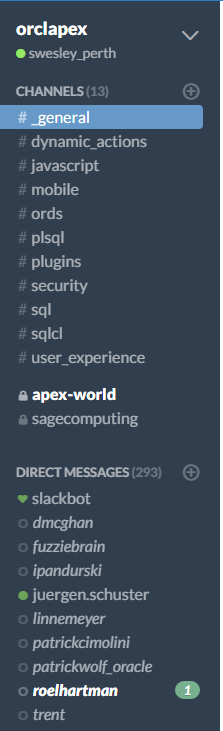
I'm still a relatively new user to Slack, but Juergen tells me that makes me the prime candidate for spruiking my findings. It's certainly a new tool for the APEX community, and I'm sure there are uses we're yet to discover. Consider this a time of cultivation of a product that's already proved its worth - apex.world would not be possible without Slack due to the vast geographic separation of the development team.
Domain Header
The big "orclapex" in the top section provides a drop down with site level links of interest, including Preferences.
For instance, I've chosen a skin I like, separated private channels in the list and set emoji to text only. I also enabled desktop notifications for certain events.
Channels
The these predefined channels were devised by the apex.world team as to break up the orclapex domain into categories that hold their own weight when it comes to discussions.
If you have a question or thought regarding dynamic actions, there's a spot for you. If you need feedback on using plugins, ask a question over there. When you sign up you can opt in to channels that interest you, I've done subscribed to them all.
The channel displays bold when new content is present, as per the private apex-world channel in the screenshot. The UI does a great job at showing new information to suit your preference.
No doubt others will arise over time, perhaps more transitory channels for use in ODTUG webinars?
Private Channels
It's also possible to define private channels for your own projects, cities or languages... or who knows what in future. There are two in this screenshot, signified with the closed padlock.
We welcome non-native speaking communities to define private channels for their native tongue. First ask in the #_general channel if one has already been created in your language and you will be sent an invite since anyone who's a member can invite anyone else in slack domain.. If one doesn't already exist, we suggest create a language channel using the international format
Or city based, eg:
- apex_perth
- apex_nyc
- apex_birmingham
We hope this will reduce channel clashes and help consistency.
Direct Messages
Direct messaging is available, just like most other networking sites, but please consider standard etiquettes. Not everyone likes private messaging.
Back to a utilitarian perspective, you can define a group of people for a private conversation. New message appear bolded like the channels, with the addition of a message count.
Membership is growing quickly, so it's possible to put your friends, colleagues and favourite channels in a starred section, back up the top of the sidebar.
As a Gmail user, I find this perspective rather familiar.
Slackbot
The Slackbot helps you start out and has potential for future utility just like Siri, as you type commands into the message box prefixed with the / slash.
 |
| Command shortcuts |
There are actions it can do now such as set reminders, but keen an eye out for this little AI. You can also use it as a place to test out messaging features.
Communicating
I've found the message bar rather impressive. For a start it handles me pasting an image from the clipboard, enabling me to add some meta information before posting. In addition to this common need, it's possible to upload documents, pictures, videos and does it with a smooth UI.
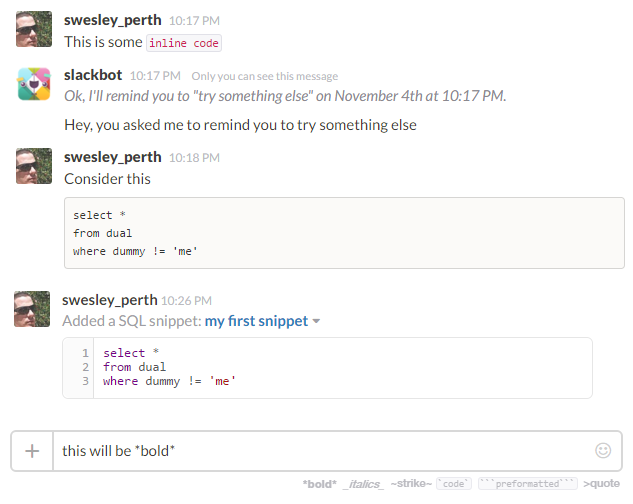
This screen grab shows some examples that all programmers should be interested in. Inline code, the result of talking to the AI, multi line code and a snippet example I used after being gently prompted as I started to write code. There is a more direct option under the plus button.
 |
| Markup examples |
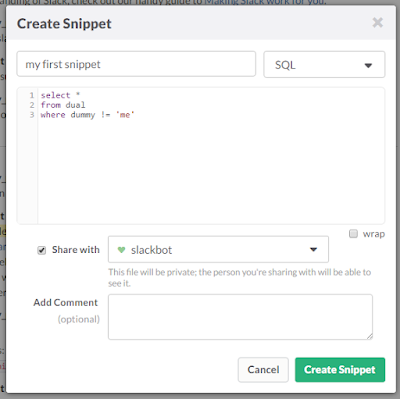
The markup options are suggested on the bottom right. If you want to include something larger than a few lines of code, check out the snippet popup. Is this tool for built programmers or what?
 |
| Add snippet |
You can use the @ symbol to mention people within a message so they receive addition notification.
This can also be useful in a larger discussion if you need to keep information in the group but focus your contribution to someone in particular, just like Twitter but with more elbow room.
And hereby lies an example of how Slack can be effective, highlighting a nugget amongst the chaff in the #javascript channel.
Search
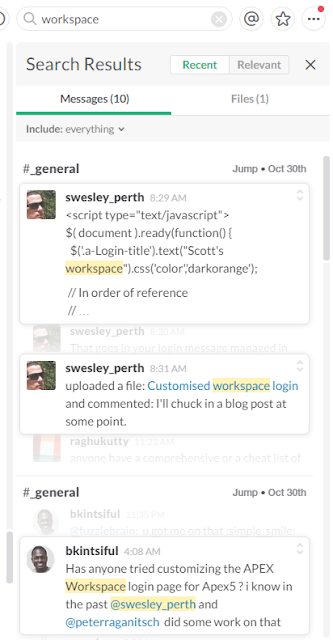
The search facility is a clever looking bit of UX, and for a community our size it should filter through a decent look through the past. Ten thousand messages to be exact, enough to be current.
 |
| Slack search |
Back to the UX, as you can see from the screenshot the search for "workspace" was effective. Clicking on any of these cards expands the neighbouring conversation to help with context.
For a more generic guide on what you can do in Slack and how, try
http://thenextweb.com/insider/2015/08/11/the-ultimate-guide-to-doing-anything-in-slack/
Behaviour
The tools I've mentioned serve their niche well. For instance the OTN forums are great for technical questions, but I'm not sure Slack is the best medium for this. Slack is more of a technical discussion board than a technical answer board.
Something might arise in Slack, but as soon as it starts looking like a forum post with connection details being passed, it probably belongs in the forum. Though people on the forum might get places faster in a private discussion on Slack, timezones permitting. In this time of exploration we'll probably find more examples of the Forums and Slack complimenting each other.
Twitter can also be good to throw something to the crowd in a sentence or two, hoping to elicit a response directing to more detailed information. If the conversation gets deep, transfer it to Slack. This might encourage others to contribute to a conversation that can get lost in the quicksand that is Twitter.
I find Slack a place where a conversation can be had about current events, or asking "has anyone done this potentially esoteric thing". Or something that used to be an email discussion where some listened, others contributed, and we all got frustrated at such an unconsolidated feed.
Keep an eye out for a concise set of guidelines from the apex.world team shortly, so we all try eke the best out of a useful tool.
Looking forward
Slack is a modern tool with a lot of potential. The #orclapex community is still exploring it but I think it's effectiveness is already shining through. People have asked various questions about current events and received feedback from around the world. It's similar to Twitter, but more focussed and digestible.
As I wrote this post I asked if anyone else had experienced what I thought was a strange behaviour I encountered today. Within minutes Patrick Wolf suggested I turn Escape Special Characters off my column, something I'm sure I thought I tried but sure enough, I was on my way.
As OOW15 was going on, people who weren't at the event wanted to get involved in the converation, seeking further information announcements like as Oracle JET. Sure, people were also doing the same thing on Twitter and the OTN forum, but the tone of the discussion on Slack was more accessible. I found it encouraged more participation. Less like we're on a giant spinning planet keeping us all geographically distant, well, me anyway.
There are downsides, Juergen
read about a team that outgrew Slack, where the free plan allows search/browse of the last 10k messages. That sounds like a lot until you have thousands of users. The tool will still be a useful communication device, but one will hope the future 'Enterprise' pricing plan will help larger user sets since a per person charge for even a modest group would probably price communities like ODTUG out. The orclapex domain is currently at 321 confirmed members, so with modest participation rates I think we'll be ok for now. You never know, by that stage we might have a searchable archive on apex.world.
I'm sure the greater community will work out how to use which tool most effectively and for what content. Either way, I recommend keeping in touch! Let's make this big world a little smaller.
#letswreckthistogether