It's been a while since I posted some developer content, and I've been playing with APEX 4.2 a fair bit recently - preparing for my conference presentation.
I thought I'd share how I implemented a mobile (smartphone/gadget) accordion sourced from SQL.
I say the because you can do it out of the box using region templates, but only compressing multiple
regions together, not rows from a query
 |
| APEX 4.2 Mobile Region templates |
There seems to be many ways to
skin the cat in APEX 4.2, and this is one way to do it - I'm happy to learn easier ways - I'm sure I will do that for a few things along the mobile journey!
 |
| Samsung 3 Screenshot |
Consider the following SQL as my list, where column
am_info_vw.header shows the accordion heading, and
am_info_vw.my_html is the content.
select
  null lvl
 ,header label
 ,my_html target
 ,decode(rn,1,'YES') is_current
 ,header image
 ,my_html image_attrib
 ,null img_alt
FROM am_info_vw
order by rn
The List Template image shows me commandeering the image attributes, but the same result can be made with the #TEXT# & #LINK# substitution strings.
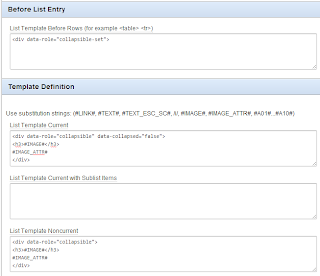 |
| List Template |
List Template Current:
<div data-collapsed="false" data-role="collapsible" data-collapsed="false">
<h3>
<code>#TEXT#</code></h3>
<code>#LINK#</code></div>
List template non-current (just excludes the data-collapsed):
<div data-collapsed="false" data-role="collapsible">
<h3>
<code>#TEXT#</code></h3>
<code>#LINK#</code></div>
Before List Entry:
<div data-role="collapsible-set">
After List Entry closes the
</div>
Then I just had to define the region on my mobile page utilising that template for the list with a plain region template, job done.
I'm still learning various options in the 4.2 environment, but this may seem like an easier method to create dynamic content lists instead of using the Advanced Attributes option in the List View built-in plug-in.
To help me out with the required syntax, I used the
jQuery Mobile Docs.