Showing posts with label #entrylevel. Show all posts

Sunday, 15 March 2020

Inspect Element Deep Dive, with Oracle APEX

In my previous post about tweaking APEX classic reports, most of the settings were "low-code" configurations. All except the final line of JavaScript that moved the radio group from its default location, to the region's title bar where we'd normally find buttons.

But how did I conjure that statement?

When I wrote my book on jQuery in APEX, my general premise was each web page can be queried like a database can, you've just got to learn how to apply the filters to find the relevant component.

Browser Tools


In most browsers, if you right-click on any component on the page, then choose 'Inspect Element', you'll see a window appear showing you what the web page looks like prior to markup.

I can also use F12 in Chrome on my laptop to bring up this console window, but don't presume that's the same anywhere - I borrowed a laptop for a webinar once, and it put the laptop in aeroplane mode. I digress... you can dock this console window to the bottom, side, or have it floating elsewhere.

Where is my item?

If I inspect the radio group, it will take me to the specific radio option, in this case 'Accounting'.

As I move the mouse up the tree, different portions of the page will highlight, signifying exactly what part of the page the HTML represents. Sometimes you'll also see orange & green, signifying margin & padding respectively.

Find the relevant component on the page with help from highlighting

I kept going until I found the P29_DEPT_Z_CONTAINER, which holds all of the contents of my radio group item P29_DEPT_Z. The id property allows us to 'query' this page using the filter (selector) #P29_DEPT_Z_CONTAINER.

I can wrap this selector with the $() function to return that portion of the page, a portion I would like to move somewhere else.

You can also see what happens when you enter this in the console window - it returns a result.
$('#P29_DEPT_Z_CONTAINER')

What function do I use?


I use this jQuery cheatsheet to help identify the relevant command I need. Sometimes there's alternates depending on what expression is on either side of the equation.

In this case, I want to take my radio group, and append it to somewhere else on the page.
$('the object I want to move').appendTo('where it is going');

Where is it going?


The next step is to identify the part of the page where my snippet of HTML will be going.

I can use the same inspect element technique to locate a region already dedicated to placing buttons.

Find the destination using the same technique

Here I've located my zhuzh region by the Static ID I've applied (purple), and there is a div the represents the location of the buttons. I can identify this part using one of the classes (red)

Classes are prefixed with a dot when used within selectors
.t-Region-headerItems--buttons

You need to take care when determining which selector to use. IDs should be unique (but aren't necessarily), and classes certainly aren't unique.

A pairing of ID and class is often an effective combination, but you need choose the right class. One you've added your own is often safe, and you can inject classes into the page using various APEX attributes. They can be anything.

This t-Region set of classes is defined within the Universal Theme. One early problem with APEX was these classes would change from theme to theme, as we didn't have a universal theme, so migrating custom code could be awkward.

The UT has changed some classes over time, but documented ones should remain constant.

Verifying the selector


Using the find function in the Elements tab allows you to test your selector, test how many results are returned on the page. If I just use the class, I actually get two results - one for each standard region I have on the page.

Count components on the page by searching in element tab

Combining these selectors will ensure I only get the button class for the relevant region. This is what forms my destination selector in the appendTo().

Testing the move


We can test the final command in the Console tab of the browser tools.

$('#P29_DEPT_Z_CONTAINER').appendTo('#zhuzh .t-Region-headerItems--buttons')

If I test this without using the #id selector, then the radio HTML will be appended to both regions.

Test your command within the runtime page

Once you're happy with the result, you can add it to the relevant portion of your page. In this case, I put it in the page attributes 'Execute on Page Load', though often it's within a dynamic action.

Playing with CSS


While we're here, it would be remiss of me to mention how you can play with the CSS attributes in the browser tools.

Play with styling on the rendered page

In this example I found the background colour property of the radio group label, and turned it green.

This was done without re-rendering the page, but it's only relevant until I do re-render the page, just like when we applied the console command to move the radio group.

But it's a great way to test/tweak CSS commands to see the result before applying it as CSS content rendered with the rest of your page.

The syntax would be similar, we would take a selector, but in the same syntax as what's found in the Styles sub-tab. You can copy/paste from the tab if you're not sure.

.t-Region-headerItems--title {color : red}

This CSS in the page would apply the styling during render of all page markup, but we could also do this on demand with jQuery, with just a slight adjustment to the syntax - and this is but one variation.
$('.t-Region-headerItems--title').css('color', 'red');

Conclusion


These concepts can arm you with some nifty behaviours, above and beyond what comes with APEX.

Or to think of it a different way, if can really empower your use of dynamic actions, as the same instruments can be wielded as a jQuery selector, dynamic action condition, part of set value action, to name a few.

Doing this with an Interactive Report also provided extra challenges.

See a video on how to action this blog here, and the app here.

Happy APEXing!

Tweaking Classic Reports

I like classic reports in Oracle APEX.

They're so versatile, and while it may not look it in this example, adjusting particular declarative settings can make a real difference in a small region displaying pivotal data.

And this still looks like a report. You should see what else they can do.

Left region is default settings, right region has a few options set

Base Behaviour

The classic report is straight out of the wizard, this example performs a cross join to inflate the data set.
select e.* from emp e cross join emp e2
where :P29_DEPT is null or e.deptno = :P29_DEPT


A where clause has been added to filter by Dept, if supplied.

Page Items to Submit

Note one of the most important properties in APEX - Page Items to Submit, in this case nominating the P29_DEPT item.

There is a Dynamic Action defined on Even Change for the item, which simply refreshes the nominated region.

Simple Dynamic Action

If we don't set Page Items to Submit on the region, then the database won't know about the change made on the browser. Any item specified in this list upon refresh will have the current value set in the browser sent to APEX session state (a key/value table in the database), so when the query binds the value, the database knows what the browser knows.

So when I select a department, the employee list refreshes to show the relevant department.

Make Left look like Right

This may seem like a long list, but it doesn't take long at all once you know where to click. I estimate 23 clicks, as of 19.2.
  1. Modify Region properties
    1. Change Template Options for region
      1. Tick Remove Body Padding
      2. Tick Show Region Icon
    2. Add Icon: fa-list
    3. Add Static ID: zhuzh
  2. Modify Report properties
    1. Change Template Options for report
      1. Tick Stretch Report
      2. Report Border Horizontal Only
    2. Change Pagination Type to Search Engine.
    3. Sometimes you may which to turn Heading Type from Custom to Off, or at least disable the sort (by adding order by to SQL, or disabling sort on columns)
  3. Modify Item properties
    1. Change Type to Radio Group
    2. Change Number of Columns to 4 (something relevant to your list. Usually useful for items with small number of options)
    3. Change template option Item Group Display to Display as Pill Button
  4. Modify Page Property
    1. Set Execute when Page Loads
      $('#P29_DEPT_Z_CONTAINER').appendTo('#zhuzh .t-Region-headerItems--buttons')
      This moves everything holding the radio group together, to a spot made for buttons in the region.
      Not something I do often, but can be an economic use of space.

Notes


We've found the search engine pagination style great for touch devices, but I tend to prefer the Display Position on the Left, and at the Top, or at least Top & Bottom.

Report Template Options offer a facility to hide pagination when all rows displayed, but I've never seen it consistently work as I expect, so I continue to use my own JS library call for that.

The static ID can be whatever you like, so long as it doesn't clash with other IDs on the page, such as item names.

See my next post for more detail on how I derived that line of JavaScript, and what you can do with the browser tools.

See a video on how to action this blog here.

Monday, 4 November 2019

Do you want to learn about database technology?

Do you live close enough to Melbourne, Brisbane, Sydney, Seoul, or Tokyo to attend a software development roadshow for a day in November?

Are you interested in how easy it is to build data driven web based applications?
Perhaps you're a student of the programming world?

Your local user group is hosting some visitors from the US that I think are worth listening & engaging with, in person. And if you're not a member of the user group, it's only $50 for the day.

https://blogs.oracle.com/apex/oracle-apex-apac-tour-2019

50 bucks.

For a day of learning, engagement, and networking with industry peers.

I can't emphasise that networking element enough, particularly for those still formulating their career goals & focus.

It's been a while since I was a graduate, but I relished the information I gathered at the local user group events. I was recently privvy to witnessing a member of the next generation of technology professional help shape her career at our conference.

It's worth investing a day in yourself, to help inspire your work tomorrow, to help nurture your love for your job. Whatever the stage of your career.

Warning, tangent ahead.
While I now find myself a regular speaker at such events, I also still value attending them, even with the advent of regular, engaging, recorded online technology seminars with experts and those that build the product.

That photo? That's Oracle product manager David Peake helping out. That's what these communities do - get you within one degree of separation of the product itself.

I can't keep up with all the new gadgets being made available in my development tool of choice.
I certainly need more practice with REST technology, and a hands-on-lab with the development team would really help.
We're also about to level up with our version, so another revision of all the new kit will be super handy.

And Shakeeb is a really slick presenter. It's not just the technology I learn about when watching the sessions by Shakeeb, or Connor & Steven, or many other seasoned (and some new) presenters.
And I'd like to meet Christina, add to the list of the APEX team I've met in person.

Seeing them in person is something else. Nothing beats having a face-to-face conversation with someone about ... anything really. And to then establish that rapport, that human-to-human contact with other people. It can remind us to be humble. A reminder that we all make mistakes; we all continue to learn; and most importantly - none of us know everything.

We see regular personalities on the speaking circuit, or those bloggers out there that pump out their experiences online. These are only a small percentage of all the developers out there, working hard, empowered by education, utilising online resources, leveraging off forum conversations. Sometimes it feels like they seem to know so many things about the product, but really, most of them are just making notes, and thankfully publishing them in a manner for us all to benefit. Don't let the imposter syndrome get you down.

And let's not forget the friendships that are forged at such events. Yes, you're allowed to have friendships at work, it helps keeps smiles on our faces when times are tough.

So. 50 bucks, unless you're already a member - then it's free!

Learn about how to get your FREE Oracle instance.
Learn how to use a low code development tool to build apps.
Learn how to source data from web services.
Learn what's in the latest version of the product.
Have an engaging session where you have the platform to ask anything.
And do it - if you have the chance to ask a burning question, odds are there is at least another person nearby with the same question.

Thank you, Oracle for your growing engagement with the community, and thank you to our local user groups for helping facilitate these visits, and most importantly, thank you to the community - actively producing content, and those who drive up the SEO by quietly read all the content.

Monday, 7 October 2019

So you want to learn Oracle APEX?

Are you involved with Oracle? Perhaps your a DBA, or a PL/SQL data master, possibly know a bit about Oracle Forms, and you want to learn what all the fuss is about regarding Oracle Application Express (APEX)?

My best elevator description? It's a low code development tool that lives in the browser. Yep, the IDE is a web page that allows you to add SQL, PL/SQL, modify a few attributes - and you've got a data driven web based application that runs on any device. Easy for any Oracle technologist to learn.

This is not a new tool, it's been around since 2004, conceptually even before then.
We've built applications that have lasted for years with minimal inteference. They've outlasted other popular frameworks, and they're still within touch of the present. Still doing the basics of the web, in a clever, interactive way.

AskTom has been using this technology before it was called HTML DB.

It's also being mentioned out there, in the world beyond our bubble.

And it's hitting the news for the right reasons - helping natural disasters.

And helping people take action regarding climate change.

This all started from Kscope19, and it appears momentum continues to grow.

So do you want to board this hardy vessel?
The community is strong & passionate.

Use this as your starting resource
http://apex.oracle.com/shortcuts

Sign up for a (no obligation) workspace on apex.oracle.com.

Your web page is your IDE now. Lucky, the modern browser is a nifty place to be.

That's APEX. You paste SQL queries / PL/SQL API calls in a box, change some attributes, and there you go. Simples. You have data driven web applications, ready to use on any device.

As for skillset, I have a few JavaScript one-liners I use regularly, sometimes I embed some simple HTML, and I have a mechanical understanding of CSS - which is just queries against your page content.
You know how a web page works? You know Oracle stuff (SQL, stored procedures)? You'll be fine.

If you have Oracle Forms experience, maybe check this out.

Empty the cup.

Try the documented tutorial
Install some packaged applications, check out how certain features tick.

Looking for your source code? It is just meta-data in some tables, check out
select * from apex_dictionary;
and
select * from apex_applications;
See how far the rabbit hole goes.
SQL developer has some dedicated tools for the job.

Try the Maze Runner presentation by Jorge & Jackie, to find your feet.
Want to know what components are available? go to apex.oracle.com/ut
Charts are particularly awesome: apex.oracle.com/charts
Got a question? Try the forums.
Like a conversation? Try Slack
Happy to chip in for some help? askMax.
Want a place to visit, learn & keep in touch for 5 minutes every day? Try apex.world
They have a page titled "How to start as a developer".
Also check out the plug-ins page, to fill any gaps in the builder.
Steady blog stream available here.
Do you like to listen? There are currently two active podcasts.
If you like books, I particularly recommend the collaborative efforts.
If you like videos, I have a series, and plan another. Caleb Curry also has our back.

Need to load spreadsheet data? This. And this.
Want to talk to web services? Find Carsten.
Do you really need to produce a PDF? AOP (APEX Office Print) is your best option.
Moet dingen vertalen? Translate APEX
Want to get a little funky with your page interactions? Check out Maxime's award winning demo app.
I recommend you learn not what you can do for Dynamic Actions, but what dynamic actions can do for you.

Want a second opinion on this list? Try this Github, because it adapts.

Want to get serious about delivering your app? Get a piece of an 'always free' tier, and check out Dimitri's guide. Or you could build you own stack with the free Oracle XE.

Note, the preferred pronounciation is a-pex, not app-ex. I blame my accent for any mispronounciations ;p This guy knows.

It's also "APEX", not "Apex". Possibly as not to be confused with SaleForce 'Apex', which if I recall is something pretending to be Java. "ApEx" is as painful as camelCase.

You generally need to prefix any searches with "oracle apex"

Or just ask a question on Twitter with the hashtag #orclapex. Someone is bound to point you in the right direction.

Note that even those without a Twitter account can browser activity in this tag. I recommend getting involved, it's an active zone for the Oracle team.
You might see it as #orclAPEX, which not only helps get it right, but helps #a11y

Let me know if you think something else belongs here.

#letswreckthistogether

Monday, 17 September 2018

Hide region if no data found

I have a diagnostic page where I hide classic report regions that aren't relevant - ie, have no data returned.

Here I create a dynamic action that executes After Refresh of the relevant region.

Dynamic Action definition

The client-side condition evaluates the presence of the .nodatafound class within a classic report, which is present only when no records are returned.

Inspect element of region with no records

The dynamic action then shows/hides the region, depending on the result of the JavaScript expression:
$(this.triggeringElement).find('.nodatafound').length == 1

The triggering element is the region, so find the class within that region, count the result set, and compare to value 1.


Instead of the region itself, this could relate to other components only relevant when records are returned.

As Maxime pointed out in the comments, here I was focussing on classic report regions. The relevant classes you may be looking for include:

  • Classic Report (versatile): nodatafound
  • Interactive Report (IR): a-IRR-noDataMsg
  • Interactive Grid (IG): a-GV-noDataMsg

This can mean there is no need for a server-side condition to test for existence.

With this dynamic action, the region could re-appear upon refresh with results, making the page more interactive without requiring full page submission.

Friday, 14 September 2018

Add record count to collapsed region

I have a diagnostics page where I wanted to display how many records are in a collapsible region's title.

The following is a simple solution, but will only work properly if all records are displayed, and no pagination is used.
Otherwise, check this past post for alternative methods to get the number of rows in a region.

Pick a column in the region and add a class. I chose "cnt".

Column attribute

To be selective, it's always handy to add a static ID to the region.

This is not an 'advanced' feature

Now we're ready to create an After Refresh Dynamic Action on the region, executing the following JavaScript, also firing on initialisation

$('#p99_share .t-Region-title').text('Sharing ('+$('#p99_share .cnt').length+')');

It will relabel region title with the amount of .cnt classes it could find in the region.

The final result looks like this:

Collapsible region with modified title

An alternative that skips the need for a static region ID would be

$(this.trigginerElement).find('.t-Region-title')
   .text('Sharing ('+$(this.trigginerElement).find('.cnt').length+')');

After Refresh Dynamic Action
Edit - Trent offered a more declarative example.

Relatively simple, but effective.


Wednesday, 5 September 2018

Client Side Dynamic Actions using jQuery Selectors

Consider a data entry page where it might be nice to capitalise the first letter of a person's name, for a number of fields.


I understand I may be anglicising a problem that contains minutia, but focus instead on the thought processes and options we have available using Dynamic Actions.

Let's say we want to create a dynamic action that responds to change on any of those name fields, then runs some JavaScript to apply sentence-case to the name value, before the user submits the page.

We can do this declaratively just using the mouse, APEX will construct a comma delimited list for you as you select page items from the list.

Declarative item selection

But that's not the only way we can nominate components on a web page. The example above might create a selector for those items that is a comma delimited list of IDs.

$('P18_FIRST_NAME,#P18_MIDDLE_NAME,#P18_LAST_NAME');

When we have a look at the underlying HTML defined for these items using Inspect Element, the selector would locate these fields based on the id="P18_FIRST_NAME"

Inspect Element to see underlying details of page components


Alternatively, we could use classes. This is how web developers of any ilk build their web pages. They make up a string that means something to them, then associate some behaviour with it.
You don't need to "define" a class anywhere, but it pays to ensure it's unique, and follows a standard.

In our case, if we could add a class to each item, then we would only need to list one class in the dynamic action.
In some circumstances, this style of coupling behaviour could be more advantageous.

To make "initcap" appear as a class, as shown in the item as highlighted above, add the string to the 'CSS Classes' in the Advanced section of the item properties.


APEX Page Builder makes this task quicker, thanks to behaviour inspired by Oracle Forms - well, some of us ex-Forms programmers will recognise it as such.

If you select multiple items, you can change some properties in bulk.


Over in the properties, we can modify CSS Classes attribute for all three items at once.

Multi-item select in Page Designer

Note the 'Value Placeholder' attribute - this is different for each field, so the delta symbol is shown with the attribute value blued-out. I love this concept.

So back on the dynamic action, we can change the 'Selection Type' to jQuery Selector, and reference the class with the relevant syntax - prefixed with a full-stop, as opposed to the hashtag for IDs.

.initcap

Dynamic action, only when item value all lower case

We also didn't want this behaviour to apply only when all the letters are still lower-case. If the user wants to enter "von Braun", I won't overwrite their particular usage.

So note the client-side condition, emphasis on the 'client'. Most conditions on APEX components are server-side, which generally means they are evaluated during page render - do we or do we not include this button/region/item? Dynamic actions have client side conditions to decide whether to apply the True actions, or the False actions.

$(this.triggeringElement).val().toLowerCase() == $(this.triggeringElement).val()

Here I've referred to the item being triggered using this.triggeringElement, mentioned in the inline help for this particular attribute. Wrapping that expression with $().val() gives me the item value, or I could have used apex.item().getValue. jQuery built in .toLowerCase() does what you would hopefully infer.

As with all things programming, there are many ways to cook an egg, and this goes for setting the value. Here I've define a Set Value action that uses a JavaScript Expression, as there is no need for a round trip to the database server.

True Action - apply change to item value

This expression uses a function I found on Stack Overflow that I was happy with

toProperCase($(this.triggeringElement).val())

I placed in an application level JavaScript file, included via User Interface attributes of the application.
// Turn mcdonald into McDonald
// only run/apply if current string lowercase
// $(this.triggeringElement).val().toLowerCase() == $(this.triggeringElement).val()
function toProperCase(s)
{
  return s.toLowerCase().replace( /\b((m)(a?c))?(\w)/g,
          function($1, $2, $3, $4, $5) { if($2){return $3.toUpperCase()+$4+$5.toUpperCase();} return $1.toUpperCase(); });
}
Most of the JavaScript usage I have in my applications these days tend to be one line, or is some form of expression, so commonly used there is only a small handful.

Don't let a little JavaScript scare you away from enabling useful interactivity for the end user. Dynamic actions do most of the work for you :p

Wednesday, 14 June 2017

Presentation: Dynamic Actions, Javascript, & CSS for APEX Beginners

My first webinar didn't do so well, perhaps my new home will have suitable internet capability, in this "innovate nation" of ours...

My second one on my Boggex game went ok, though the room the locals were in was like an sauna.

My third attempt had it's own set of issues.
1) Ubuntu as an OS doesn't seem to enable broadcasting via GoTo Meeting.
2) The wireless policy in the Oracle building is effective, but not great for hastily setting up a second laptop
3) The navigation keys on Lino's keyboard was just different enough to be disruptive
4) While I use on Chrome's save password feature, I'm pretty confident with most of my APEX passwords. It's the username I was stuffing up on the foreign PC.
5) The think tank at HP thought it would be a good idea to map Aeroplane Mode to F12, so when I proceeded to display the Chrome browser console...

So balance was restored after the first 10 or 15 minutes, which rattled my first attempt at presenting using just an APEX app - no powerpoint/prezi.

Though I think the concept was fine. It's just like training people, jumping between Page Designer and runtime.

I'd give it another go, and it's less presentation prep. I learned a bit from the first session, and explored some layout options while I was at it.

I still baulk a little at the difference between talking with a live crowd, and a community of ears at the other end of my microphone. I wonder if (finally) creating a few more videos will fix that? Once my ultrabook is back from computer hospital, perhaps. In the new house?

As for the topic, I explored dynamic actions, JavaScript and CSS for those trying to understand the fundamentals. It's a favourite topic of mine and I think there are a few basic patterns that get me a long way in creating interactive applications.

No doubt I'll refine these example further, and how to communicate them more concisely. Stay tuned.

I've made the app available here. Please feel free to provide any feedback, either here or through the app.
https://apex.oracle.com/pls/apex/f?p=27882
My favourite page is P50 specifically on Dynamic Actions, probably the most versatile utility within APEX.
If you scroll down you'll see the relevant code I used to sustain an interactive page that doesn't need to submit.
Also look out for things like conditional buttons, conditional colours (foreground and background), APEX behaviour considerations, among others.

If you're in Australia and you'd like training on this topic, I could demonstrate cool stuff for hours ;p
I also aim to get some organisation around github sorted when I get my laptop back, but I've at least put the export here so you can check it out directly.
https://github.com/swesley/apex-beginner-css-jquery

I hope you learn something new.

Scott

Thursday, 25 August 2016

How to debug stuff in Oracle APEX

Recently a fine young gentleman, who shall remain nameless (let's call him Jerry), asked for some assistance he was getting with an error in Oracle APEX.

He had done all the right things in regard to debugging the problem, but didn't know enough about APEX to know which settings to investigate.

I think developers new to APEX need the occasional post like this to give them an idea on how to start looking into a problem, so I hope you found this knowledge helpful in squishing bugs in future.

The problem.

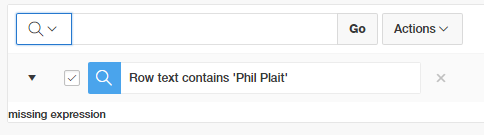
An associate of Jerry's converted a classic report to an interative report. However, when using the search bar to add a filter, the error "missing expression" was shown instead.


We could be fairly certain it's the filter we added that caused the problem, but that's built by the APEX engine. What can we do but perhaps run the page in debug mode to look for clues.

developer toolbar


Jerry enabled debug mode in the developer bar, which refreshed the page, collecting information about the rendering processes within the page. Clicking on open debug, then drilling into the the recent debug entry, using ctrl-F to find the error and you'll see a result like this.

Click/tap to embiggen

The brackets are there, but there's nothing in the middle, hence "missing expression". Jerry told me about this and wondered how this could come to be?

The Hint

Jerry said they recently expanded the capacity to filter stuff on that report, for my benefit, he says... anyway, that's a lead we can follow through on.

It turns out each column in an Interactive Report is configurable at a fairly granular level, and it turns out all columns had the ability to filter disabled.

Isn't it so great we can manipulate 8 columns at once like this?


If a few columns were set as searchable in this fashion, the debug would report a statement that looked like this.
select EMPNO,
       ENAME,
       JOB,
       MGR,
       HIREDATE,
       SAL,
       COMM,
       DEPTNO
  from EMP
)  r
where ((instr(upper("ENAME"),upper(:APXWS_SEARCH_STRING_1)) > 0
    or instr(upper("SAL"),upper(:APXWS_SEARCH_STRING_1)) > 0
))
) r where rownum <= to_number(:APXWS_MAX_ROW_CNT)

Note your own PL/SQL can also contribute to this debug log using the apex_debug package.

But, how?

Anyway, how could Jerry know to look there? Unfortunately the debug machine can't do all our work and tell us what to check. I guess knowing exactly where to look is when APEX developers get paid the foldy notes, in knowing what sort of settings to check out first.

Through experience I guess I had a hunch on where to look and how to get there. Adding to that, any errors you may receive with Interactive Report filters, try repeat the filter for just one column instead of 'row text contains'. I find issues are often isolated to one particular column.

I normally start with the related region if I'm not sure where to start, though these settings are mostly oriented to the region framework, regardless of the widget inside the region - report, chart, plugin etc.

People new to the Page Designer often forget the 'Attribute' node under the columns. This is where you find settings specific to the region type you've chosen.

IR search bar controls are fairly granular, and I remembered that IR columns also had some options, and seeing 'Filter' gave it away for me.

Will we always have a job?

Back to the concept that computers can't do it all. I think us software developers have got it good, because we're the ones who need to design the AI to solve problems without humans. We'll be one of the last jobs to go, right?

Wednesday, 25 May 2016

Small tip: Align button in UT

Ever had this problem where your button is offset to page items?

Item / Button misalignment

While the Universal Theme is awesome, it hasn't quite got everything right. I look forward to trying the updated version of the theme in our existing applications.

APEX forum legend fac586 (a.k.a. Paul MacMillan) provided a simple solution here.


Add t-Form-inputContainer to the Column CSS Classes property for the button.

Little tips like this can be acquired just by occasionally checking out the recent responses in the forums, perhaps opening anything of interest that might pertain to your work.

I think this tip should be suffixed with this funny
https://pics.onsizzle.com/rob-ybu-know-css-come-quick-to-disarm-the-bomb-2466256.png

Modified from the xkcd original
https://xkcd.com/1168/

Tuesday, 10 May 2016

Difference between SQL Injection and Cross Site Scripting

I came across a tweet from a non-Oracle person I follow that should amuse many web developers:
One of the replies referred to "little bobby tables", eluding to a classic xkcd comic about SQL injection.

Of course I had to make the correction that this was in fact Cross Site Scripting (XSS), not SQL injection. This post summarises syntactical considerations within APEX, but in the spirit of #entrylevel content I'd like to summarise the conceptual difference. It's a little like flogging a dead horse, but security is everyone's concern so it won't hurt to mention it again!

Both concepts are about information being entered by a user within an application to do something nefarious, but they differ in where this malicious activity ends up happening.

SQL Injection is about information being entered in the browser, such as within a search field, which would impact the query being executed on the database. This could modify the statement to produces results you wouldn't normally have access to see, or even drop a table.

Don't try this on the road (Gizmodo)

Using bind variables instead of building dynamic queries usually mitigates SQL injection, but it doesn't stop bored programmers from finding susceptible examples in the wild.

Cross Site Scripting is also about information being entered in the browser, but instead of the malicious code impacting the database, it affects a user's machine when the information is redisplayed. Someone could enter JavaScript in a text area that when redisplayed as data, the code could actually execute.

It's never hard to find an example of XSS in the news, and it requires a little more proactive coding to minimise flaws.

Oracle APEX does a good job of 'escaping' information displayed in reports by default, so any code gets rendered as it looks, instead of being treated as if it's code. You may have already used the "Escape Special Characters" toggle to allow the use of the apex_item API within a report, but this should normally be used in conjunction with the apex_escape package. Another alternative is to use the HTML Expression attribute to construct your final code for output.

In the end this pizza store wins, since the person's "name" was rendered as entered instead of displaying an alert.

But they lose points for spelling "piza"