Showing posts with label Security. Show all posts

Thursday, 28 February 2019

APEX configuration problem - empty stack trace

This post is just here to save someone a few hours debugging one day.

We were trying to launch a new Tomcat instance, but we were facing a strange error.

There was no stack trace, and the debug trace started with
[TE] url-mapping start:
[TE] get /ords/f?p=ABC start:


Turns out we had listed some hostnames in the workspace isolation feature, in preparation for deep linking.


Our new server was not listed.

Tuesday, 22 January 2019

Customising APEX Session Expiry

It's nearly 8am, you're holding your favourite morning beverage, and you open yesterdays APEX tab, only to find this:


This is the current default expiry page. I'd like to tart it up.

I've used the following technique for so long, I've forgotten what it used to look like to drive me to this solution. Ultimately, you end up with a similar result, but you really can customise it to behave however you like.

Under Shared Components -> Security -> Session Management, you'll find the Session Timeout URL attribute. Here we can specify what page should be opened when the application times out.

If I use the following, it will open the login page just as it normally would have, but also include a REQUEST parameter, with the value "TIMEOUT"

f?p=LEMENU:LOGIN::TIMEOUT

We can define this value to be whatever we like, but the intention is that on the login page, we can conditionally render a region based on the declarative condition:

Request = Value
TIMEOUT


Where TIMEMOUT is the literal string we provided.

Here I've used it to conditionally display a region that uses the Alert template.

Useful feedback for the user

The only trouble is, when your original session times out, Oracle initiates a new Session ID - which will also time out. Then, when you press the login button, you'll just see this.

Your login page has timed out!

So we could extend the region I added by providing a link to re-open the login page, forcing a new session.
Your session has timed out.
<br><br>
Click <a href="f?p=&APP_ID.">here</a> to log in.

And add a condition to the original Login region to exclude when the timeout message is being displayed, forcing the user to click the link to re-open the page, thereby initiating a new session. I use this SQL expression to test the opposite, since the request value may be null.

lnnvl(:REQUEST = 'TIMEOUT')

Clean timeout message

You could pimp up the link by adding UT classes, with help from the UT button builder
class="t-Button", since buttons are easier to tap.

Or just add a declarative button to the region.

Or you could just set your Timeout URL to redirect to a completely different page, where the Authentication page attribute is 'Page is Public'.

Nothing too exciting, but I do like the options a REQUEST parameter can offer - transmitting information with no need for a defined parameter name.

This is one of a few ideas shown in this presentation, from slide 22.

Thursday, 17 January 2019

Authentication - Switch in Session

It's only taken a year, but I've finally checked out the ability to switch authentication schemes at runtime with 18.x. It's mentioned in this 18.1 new features slide deck, and the new features list in the documentation.

Such a frequent request in the forums is to either share authentication between sessions, or dynamically change the authentication scheme - which hasn't been possible until APEX 18.1.

I've set up a sample application, where the home page is public, and contains a concise summary of this post.
https://apex.oracle.com/pls/apex/f?p=100567:1
Clicking 'Secured Page' in the menu will open page 2, forcing default open-door authentication, if not already authenticated.

The default authentication scheme is open-door credentials, but there is another defined for APEX accounts. I've given them a simpler name for simpler parameterisation.

Authentication Schemes available to app

The non-current scheme must have the following property set to Enabled.

Authentication Scheme - Switch in Session

However, is this opening up a security issue, offering the end-user an ability to change authentication method on the fly?

Now the following two links allow toggling between authentication schemes at runtime
https://apex.oracle.com/pls/apex/f?p=100567:2:0:APEX_AUTHENTICATION=apex
https://apex.oracle.com/pls/apex/f?p=100567:2:0:APEX_AUTHENTICATION=open

If this REQUEST parameter is present, it always appears to force fresh authentication.
However, :REQUEST returns null when attempting to use as a condition on the page.

This is an alternative to the application session sharing technique, and may be useful when integrating social sign-in.

Another use case could be for the related development environment. If you're using OAuth2 authentication, it probably won't be practical signing in as other users, so enabling switching back to an older authentication scheme could be useful.

Thanks to Morten for the heads-up.

Oracle APEX Social Sign-in Authentication Scheme

Recently I was involved in setting up a Social Sign-in Authentication Scheme, so despite the doom & gloom of this post, we are breaking some interesting rock.

I say 'involved', since I had the support of one of the nerdiest nerds in Perth, for all the server tinkering. I just had to paste in some URLs and other config settings within APEX.

He expected every error, and it always seemed just due process to the finish line. We had it all sorted within a couple of hours, and I was really doing other things while they configured SSL & wallets.

I can't really divulge all the details, since, you know, security, but I can certainly help describe the steps, to maybe help future tinkerers.

This post from Ciprian Iancu was a major reference for the team, though it wasn't entirely accurate for us. Details below.

<handwave> this is handwaving I'll use when I either don't fully understand what was done / is a security issue / just noted as a prompt. I'm the data/UX guy ;p
We also moved so quickly, I didn't have a chance to copy all the errors.

1 - SSL 


Our new Tomcat server needed to be running with SSL before Azure would accept a handshake.

<handwave> There is something they do that allows me to use https

2 - Wallet


<handwave>A wallet was configured on the database server. There is talk about ensuring the one wallet contains numerous certificates, since we now need it for a number of exchanges.

I entered the wallet's file location in the Internal workspace under Manage Instance -> Instance Settings -> Wallet.
file:/home/oracle/wallet

Without it, we get a warning regarding certificate failure.
At one point the permissions on the wallet file were wrong, which I saw by opening the login page in debug mode, then checking the debug log.

https://myhost:port/vbs/f?p=100::::YES::

You should see an entry starting with apex_authentication.callback
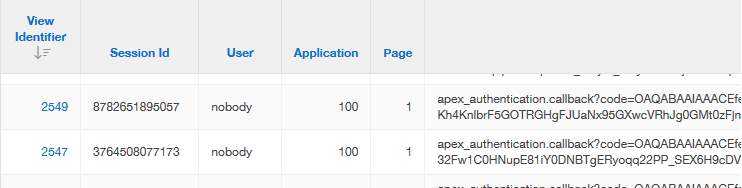
Debug example

3 - ACL


ACLs allow the database to communicate to certain hosts in the outside world. Ciprian's blog was helpful, but the ACLs weren't quite right. The ACL API has changed in 18c, the graph host was incorrect, and we only needed http, not connect.

DBMS_NETWORK_ACL_ADMIN.APPEND_HOST_ACE(
    host => 'graph.microsoft.net',
    lower_port => 443,
    ace  =>  xs$ace_type(privilege_list => xs$name_list('http'),
                        principal_name => l_user,
                        principal_type => xs_acl.ptype_db));

  DBMS_NETWORK_ACL_ADMIN.APPEND_HOST_ACE(
    host => 'login.microsoftonline.com',
    lower_port => 443,
    ace  =>  xs$ace_type(privilege_list => xs$name_list('http'),
                        principal_name => l_user,
                        principal_type => xs_acl.ptype_db));

4 - Web Credentials


It took a little while to know this is where we needed to define something prior to creating the authentication scheme, as noted in this bug description. Without it, we are unable to define the authentication scheme.
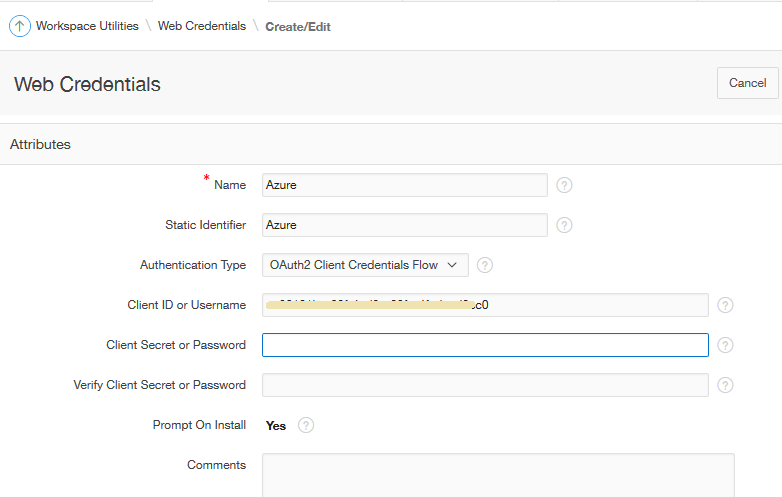
Web Credentials


<handwave> Mr Sysadmin set up a Client Secret somehow in server land.

I then pasted the long string under Application Builder -> Workspace Utilities -> Web Credentials.

5 - Create Authentication Scheme


I always find some strange satisfaction in setting up an authentication scheme, and to do one that integrates with Azure using contemporary methods was particularly gratifying.
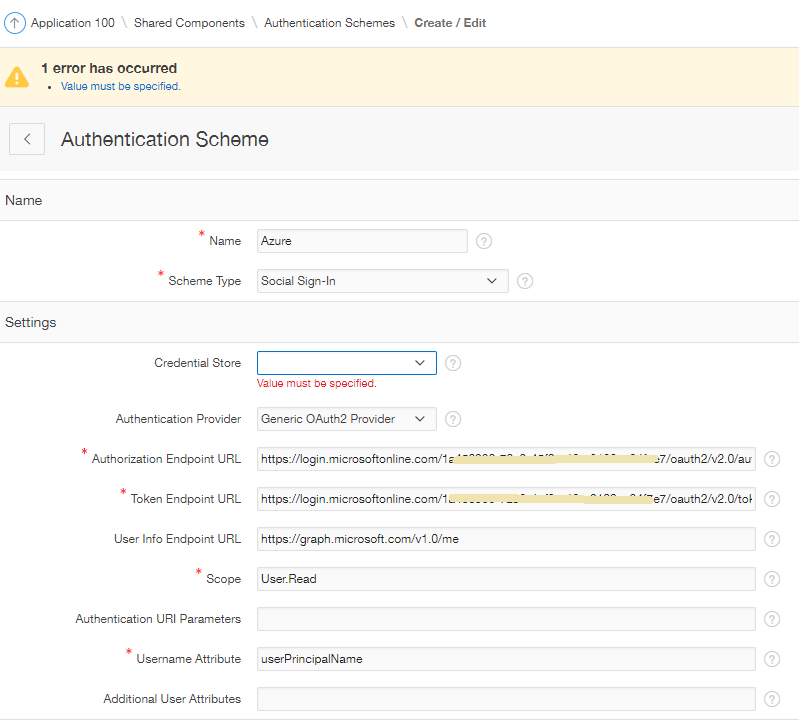
First round of settings

The User Info Endpoint URL allows us to harvest more information from Azure. By default, a small set of attributes are returned in a JSON packet, but we can extend the attributes supply by extending the URL

https://graph.microsoft.com/v1.0/me/?$select=userPrincipalName,onPremisesSamAccountName,mail,officeLocation,department,displayName,givenName,jobTitle,mobilePhone,surname,id

Post-Authentication Attributes


I found an OTN post from Christian Neumueller describing exactly how to apply the apex_json package to get attributes listed in the settings - I just made some adjustments to make it look a little prettier, and add the fields we wanted to look at.

I'd really love to see examples like this in the inline help for attributes more often.
Here is what I used in the post-authentication procedural code:

:G_USER_INFO := 'Authenticated via Azure. '||chr(10)||
  '<br>Details from Graph:<br>'||
  '<table class="t-Report-report">'||
  '<tr><td class="t-Report-cell">id:</td><td class="t-Report-cell">  '||apex_json.get_varchar2('id')||'</td></tr>'||
  '<tr><td class="t-Report-cell">userPrincipalName:</td><td class="t-Report-cell">  '||apex_json.get_varchar2('userPrincipalName')||'</td></tr>'||
  '<tr><td class="t-Report-cell">onPremisesSamAccountName:</td><td class="t-Report-cell">  '||apex_json.get_varchar2('onPremisesSamAccountName')||'</td></tr>'||
  '<tr><td class="t-Report-cell">mail:</td><td class="t-Report-cell"> '||apex_json.get_varchar2('mail')||'</td></tr>'||
  '<tr><td class="t-Report-cell">displayName:</td><td class="t-Report-cell">  '||apex_json.get_varchar2('displayName')||'</td></tr>'||
  '<tr><td class="t-Report-cell">givenName: </td><td class="t-Report-cell"> '||apex_json.get_varchar2('givenName')||'</td></tr>'    ||              
  '<tr><td class="t-Report-cell">surname: </td><td class="t-Report-cell"> '||apex_json.get_varchar2('surname')||'</td></tr>'||
  '<tr><td class="t-Report-cell">officeLocation: </td><td class="t-Report-cell"> '||apex_json.get_varchar2('officeLocation')||'</td></tr>'||
  '<tr><td class="t-Report-cell">department:</td><td class="t-Report-cell">  '||apex_json.get_varchar2('department')||'</td></tr>'||
  '<tr><td class="t-Report-cell">jobTitle:</td><td class="t-Report-cell">  '||apex_json.get_varchar2('jobTitle')||'</td></tr>'||
  '<tr><td class="t-Report-cell">mobilePhone: </td><td class="t-Report-cell"> '||apex_json.get_varchar2('mobilePhone')||'</td></tr>'||
  '<tr><td class="t-Report-cell">Access Token: </td><td class="t-Report-cell"> '||apex_json.get_varchar2('access_token')||'</td>'||
  '</table>';

I had a simple region on the home page to display the data.
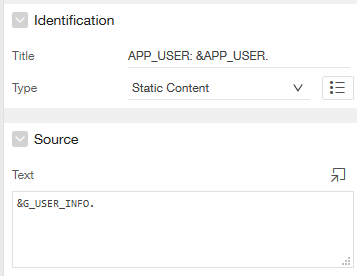
Region on Home Page, showing G_USER_INFO

Then when we launch the application, we're redirected to login.microsoftonline.com; enter our Azure credentials, accompanied with the client's splash; then see our APEX page.
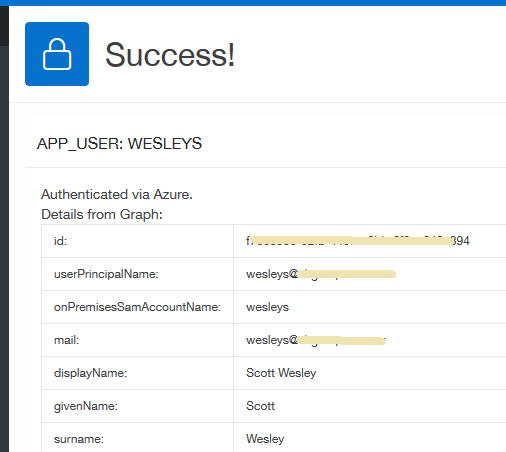
G_USER_INFO displayed at runtime

We were prompted to stay signed in, but I keep pressing No until we have a chance to experiment further.

APP_USER


APEX uses the Username Attribute to source the APP_USER variable. In our case the userPrincipalName returned an email address, but we wanted to match this up to our existing login IDs which use the WESLEYS style format.

We first tried using the onPremisesSamAccountName attribute, but that returned "wesleys"

Christian Neumueller once again provided an easy solution to ensuring our APP_USER returned the same uppercase value, by adding this to the post authentication process:

apex_custom_auth.set_user(p_user => upper(v('APP_USER')));

And in 19.1, there's already a declarative "Convert Username to Uppercase" attribute.

Logout URL


This was originally pointing to the application home page, which just re-authenticated me - which was quite handy as I refined the handling and temporary display of attributes from JSON.

We still need to experiment with authentication behaviours when it comes to remembering who you are, and logging out. For now, I know we can go to portal.office.com to log out of Azure.

No doubt there are other experiences & behaviours to refine as we move forward, but this is a nice step away from database accounts!

7 - Link Applications


This experiment was done on a fresh application, but I was able to use the principles behind sharing application authentication, to then create a button that linked to our main application - already authenticated.

I hear there is now a way to programmatically change the current authentication scheme, via a parameter. I'd like to experiment with that to see how it might change my answer when people ask if we can authenticate into the one application using two authentication schemes.

Conclusion


We had this hooked up within 2-3 hours. That can't be a normal experience, but it's still been a really good exercise in understanding how this technology works. Kind of.

It's also pretty cool that we have such declarative options for setting this up in our APEX applications.

If you want more examples to help get your configuration working, maybe filling in the blanks I left, see other posts by
- Dimitri - Social Sign-in with Google and Facebook
- Ciprian - Social Sign-in with Microsoft Azure
Adrian - Social Sign-in without a wallet
- Adrian - Certificates
- Morten - Authentication with Microsoft
- Mahmoud - Forum solution with Google

Wednesday, 16 January 2019

APEX 18.x Application Session Sharing

For quite some time I've been crafting multiple applications that, to the end user, appear as one.

This is possible with some Session Sharing attributes in relevant the Authentication Scheme, a feature agnostic to the Scheme Type.

This ultimately means you can set up two different applications that use two different methods of authentication, thereby letting in two different sets of users in the 'same' application - you just need to make some UX decisions.

APEX 18.x introduced a 'Type' option, and renamed the section from a less descriptive 'Session Cookie Attributes'.

Session Sharing Attributes

I thought this was offering something a little bit extra, but it appears to just make the process a little simpler for the likely majority.

We can still segment our applications, where users of applications with the same cookie name / colour may have links that jump seemlessly between applications, such as Earth and Mars.

Application sharing examples

This is possible only if you use the declarative 'link to different application' target, or include the session ID when you build the URL

f?p=EARTH:HOME:&SESSION.::

If the user tried to jump to Jupiter, then they will be prompted for login details. Ceres and Vesta stand alone with the default option, sharing authentication with no other apps, not even between themselves (unlike a certain spacecraft).

Upon returning to the authentication scheme for Earth, I noticed the Type actually changed back to Custom, and I saw an (undocumented) substitution string WORKSPACE_COOKIE used.

This saves us from having to nominate the cookie name, and store the literal ourselves, perhaps as a custom application substitution string. It just presumes that all apps in our workspace we nominate as such are to share authentication.

I thought I read some attempts on the forums to change the 'current' authentication scheme on the fly, but I don't see any mention in the documentation - Correction.

Thursday, 21 December 2017

ORDS Cross Origin Complaint

A few years ago while upgrading to APEX 5.0, we had a few issues when upgrading ORDS.

My loose understanding is that from about ORDS 3.0.3, it started enforcing some security policy regarding cross-origin requests. The big browsers handle this differently, for instance Chrome returns 403 Forbidden and won't let you log in.

Cunning Chrome Cross Origin Complaint
Amusingly, Edge let me in, even after advising me otherwise. No doubt there is minutiae I do not yet understand.

HTTP403: FORBIDDEN - The server understood the request, but is refusing to fulfill it. (XHR)POST - https://redacted.com.au/vbs/wwv_flow.ajax

It seems depending on what you're trying to accomplish, and your middle tier framework, your problem/solution may be different.

I found these threads brimming with leads
https://community.oracle.com/thread/4042054
https://community.oracle.com/thread/3971878
And while writing this post I found one that essentially described our solution
https://community.oracle.com/message/1409513

Now most discussions involving proxies are word soup to me, especially when they're described as reverse proxies.
But I think this experienced helped me wrap my head around it. A little.

For us, outside requests got remapped to an internal domain. This effectively meant the domain looked different, and somewhere along the line some bit of software drew the line and said this was a security threat.

However, there is a setting that allows the Proxy Host name to be preserved.
It's aptly named ProxyPreserveHost, or preserveHostHeader, depending on your middle tier kit.
And it's described well here
https://www.ctrl.blog/entry/how-to-httpd-reverseproxy-hostheader
No complaints since.

So for anyone migrating to ORDS 3.0.3+, perhaps don't lay blame on ORDS for your problems.
There may be some proxy voodoo your network engineer can fix in a jiffy, with that golden screwdriver. Thanks, Harry.

ORDS web services returning BLOBs

When it comes to deliving blobs from the database, I'm sure many of us have used, or came across a procedure that look like the one described here.

This sample includes some commentary on how the surrounding infrastructure should look, but it's a little out of date.
create or replace procedure get_image(p_id  IN  images.id%TYPE) IS
  l_mime        images.image_type%TYPE;
  l_length      NUMBER;
  l_lob         BLOB;
-- This procedure needs
  -- Grant to apex_public_user
  -- Public synonym, so not reliant on #OWNER#
  -- Function wwv_flow_epg_include_mod_local needs to include this procedure name
  -- Test rendering using call such as
  -- http://domain.com.au/pls/apex/GET_IMAGE?p_id=2
  -- If not found, check case, synonym
  -- If no permission, check execute priv, presence in wwv_flow_epg_include_mod_local
BEGIN
  IF p_id IS NOT NULL THEN
    SELECT image_type, the_blob, DBMS_LOB.GETLENGTH(the_blob)
    INTO   l_mime, l_lob, l_length
    FROM   images
    WHERE  id = p_id;

    OWA_UTIL.MIME_HEADER(COALESCE(l_mime, 'application/octet'), FALSE);
    HTP.P ('Content-length: '||l_length);
    OWA_UTIL.HTTP_HEADER_CLOSE;
    WPG_DOCLOAD.DOWNLOAD_FILE(l_lob);
  END IF;
END get_image;
There are alternative methods available, so you can make ORDS more inherently secure, as descibed by Kris Rice. In fact, this was the reason I needed to do something. Regression testing with a newer version of ORDS uncovered a difference with requestValidationFunction parameter.

For instance, you could use an application process, thanks to Joel Kallman for yet another solution ;p.

We've previously delivered other images using web services, thanking Kris again for the inspiration. The web service is a basic query on the images table, and it also means referencing the image within the HTML is easy
<img src="/ords/rest/image/fetch/3141592" />

Often this would translate to an expression like this within your report
<img src="/ords/rest/image/fetch/#IMAGE_ID#" />

Or perhaps
<img src="#YOUR_IMAGE_PATH##IMAGE_ID#" />

I recently upgraded SQL Developer to a relatively shiny 17.3, so I could use the fancy REST navigator in the connections window.

I've also been meaning to note down the process, and typical values, since I still only understand web services at a relatively basic level.
(secret: the real reason we write blogs is so we can google ourselves later.)

I new based on existing web services that the following values were required, so I just had to match these to the steps in the create wizard.

Module: image
URI Prefix: /image/
URI Pattern: fetch/{id}

The module being a group of templates, which are perhaps difference sources of images -> image table, user table, product table. Then a handler is created to get or post data.

The first step is a good start. I've always had trouble working out what value goes where in the URL equation, so it's great to see the translation in the first step.

Step 1 - Define Module

Step 2 finalises the URL by defining how the identifier for the database record will be provided.

Step 2 - Define Template

And we're at the summary already, noting we can create web services without initially publishing them for use (from step 1).

Step 3 - Summary

We can flip over to the SQL tab to show all that SQL Developer is doing behind the scenes - calling supplied APIs.

Step 3b - Review SQL

Now the web service should be visible in the SQL Developer Connections navigator.

SQL Developer UI

Righ click on the template to create a handler, in this case to GET the image.

Step 4 - Add Handler

All the source types return some form of text, except Media Resource, which delivers a binary representation of our blob.

Handler Type

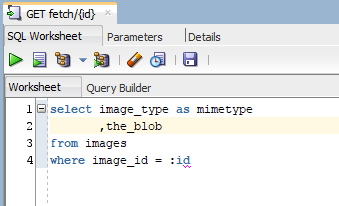
And the handler is just a SQL statement fetching the blob from the table, filtering with a bind variable mapped to the {id} named in the URI pattern.

Handler SQL

The query in the image:
select image_type as mimetype
,the_blob
from images
where id = :id
All pretty simple so far, but we had another similar procedure that delivered binary content using bfilename(). ie - files in the file system, resolved via an Oracle Directory.
I figured I could still write a query that delivered this using a table function:
select mime_type, document
from table(get_job_doc(:code));
Where get_job_doc returns an object type. The function doesn't need to be pipelined, because it only returns the one row. I describe the relevant pseudo-code in this forum post.
It works, but I had trouble adding content-disposition in the header, so .msg files don't download well. I bet there is some tidy ORDS feature/solution I'm yet to discover.

In the end, one procedure was replaced with a web service, another with an application process. Both more secure options that don't require custom PL/SQL to be available via the URL. A whitelist is safer when there's no need for one.

In the era of cloud, web services are king.
Now we just need to wait for ORDS & APEX to talk the same data set when it comes to manipulating these services.

Tuesday, 24 January 2017

Escape Special Characters APEX Demo

A few weeks ago I wrote more detail than expected regarding escaping of special characters.

I thought I'd add a simple demonstration, for reference.

Consider the following query, with variations of escaped column output.
with data as 
  (select q'[G'day,]'||chr(10)
           ||'Scott<strong>loves</strong>'
           ||'<br>APEX<script></script>' as string 
   from dual)
select 
 -- UI default
 string dflt
  -- where no tags expected
 ,apex_escape.html(string) protected
  -- good for most things
 ,apex_escape.html_whitelist(string) whitelisted 
  -- replace line feeds with HTML line break. Could use chr(13)
 ,replace(apex_escape.html_whitelist(string),chr(10),'<br>') protected_custom
 -- UI naughty
 ,string naughty
from data
The major difference being unescaped output looks like
"G'day,
Scott <strong>loves</strong><br>APEX<script></script>"


While escaped output looks like
"G&#x27;day,
Scott &lt;strong&gt;loves&lt;&#x2F;strong&gt;&lt;br&gt;APEX&lt;script&gt;&lt;&#x2F;script&gt;"


It determines how the browser will interpret these tags and display them to the end user.

Note that the first field called "DFLT" is using the default setting, therefore escaping special characters.
All other four columns do no explicitly escape these characters, deferring protection to the SQL.

Colum Attributes across four columns

The output looks like the following. The first line may look similar to any time you attempt to use APEX_ITEM in a classic report without turning this flag off.

Sample output, using template: Value Attribute Pairs - Column

So depending on what you're trying to display, you might need a particular combination of code / settings.
  1. Default - default APEX behaviour, no column settings adjusted.
  2. Protected - uses apex_escape package to do the same job as declarative attribute
  3. Whitelisted - Certain markup tags are allowed, but all others are still escaped
  4. Protected custom - often I want to replace line feeds/carriage returns in data with HTML line breaks. This combination facilitates the best of both worlds
  5. Naughty - avoid unticking Escape Special Characters attribute without protecting data within SQL. This is enabled Cross Site Scripting (XSS)

The naughtiness can be demonstrated by adding alert("Hello universe") between the <script> tags. The unescaped column will mean the browser will render an alert when the page renders.

This is bad because instead of an alert, it could be some malicious JavaScript.

Further security tips can be found at Recx.
APEX-SERT is also 5.0 ready.

Thursday, 19 January 2017

Re-evaluating APEX Authorization Schemes

Authorization schemes in Oracle APEX are used to control access to page, buttons, and all sorts of other components.

In my experience, these are best defined at a privilege level, where the same privilege could be allocated to multiple business roles, but that's for another post.

In this post, I want to mention a cool API function called apex_authorization.reset_cache, which helps control the behaviour of these authorization schemes.

Preface

While googling something else I stumbled across an interesting function called apex_util.reset_authorizations, only to find it was deprecated in 5.1, replaced with the same (but renamed) function in another package.

APEX_UTIL was getting big, and even though the team was trying to manage it, 5.1 was the first time I noticed it reduce the number of procedures. Too many procedures mean some gold nuggets get lost, perhaps until they're moved to a more specific package.

I'd say we're all guilty of putting a procedure in the inappropriate package or letting a "utils" package grow too big. Me probably more than many, but there's been a lot of clean-up in 5.1. If there's any documentation you read about 5.1, let it be the release notes.

I also found the function mentioned in an old email I marked for blogging about because of an OTN forum post I was listening to. Not because of the original topic, but another deprecated/renamed procedure mentioned within.

Authorization Evaluation Point

The default evaluation point for authorization schemes is once per session. This means the first time APEX comes across a component protected by an authorization scheme, it will evaluate it and remember the result.

Authorization Scheme Evaluation Point

This default option is best for performance, but if you want to afford your users the ability to pick up changes in authorization without needing to log out then back in, then you can use one of the other options.

Re-setting authorization schemes at runtime

A cool API exists called apex_authorization.reset_cache. The documentation states
"it resets the authorization caches for the session and forces a re-evaluation when an authorization is checked next".

This means you can provide a button to the user that would clear the slate for all authorization scheme outcomes in that session and force APEX to re-evaluate any authorisation schemes it encounters.

This will be handy for me because it offers a chance to do this on demand at runtime, instead of once or 'all the time'. It also does the job across multiple applications that share authentication.

This is one of quite a few library functions now available in 5.1, in fact, this particular one has been around in some form since 4.2, but buried in apex_util.reset_authorizations.

Under the hood

If you want to see the interactions in the underlying APEX table, this query will help.
select s.*, a.application_id, a.authorization_scheme_name
from apex_050000.wwv_flow_session_authz$ s
join apex_application_authorization a
  on a.authorization_scheme_id = s.authorization_id
where session_id = 16678957299354
See, it's not magic. Just clever.

References

apex_authorization.reset_cache
Providing Security through Authorization
APEX 5.1 Release Notes

Wednesday, 4 January 2017

APEX attributes for Escaping Special Characters

A relatively common on the forums is regarding the escaping of special characters in reports, but it seems the developer isn't always sure what is actually happening and how to how to search for it.

It seems I've had this on my "to blog" list since April 2015, but now that 5.1 has been released, it seems more people are coming out to leave 4.x can't work out where the Standard Report Column option is.

APEX 4.x Display As attribute

This was required when HTML was present in the query, either to add tabular items manually using apex_item, or to style data (though you should use HTML Expression instead)

Example of special characters being escaped

For instance, if you've written a query like so

SELECT APEX_ITEM.CHECKBOX2(1, empno, 'CHECKED') chk, ename
FROM   emp
ORDER BY 1


And are only seeing the HTML code in your column output

<input type="checkbox" name="f01" value="7369" CHECKED />

Then you need to Escape Special Characters, now found in the Security section of the column properties as a Yes/No option.

APEX 5.0 Escape Special Characters attribute

This is defaulted to Yes to help protect from cross-site scripting (XSS), a common security concern in the web world where data entered by users is stored in the database, then when rendered it can be interpreted as HTML code.

Set to No to allow your data to be rendered as you may expect. 
Note that in the 5.0 component view this is still referenced as Display As - Standard Report Column.

The change in terminology is documented in the 5.0 release notes

Report column property naming differences
Please note that if setting this attribute to no, you should still make efforts to protect your applications by escaping data where possible. For example, if I wanted to replace all carriage returns with the HTML line break, you can still escape your data then add HTML content.

replace(apex_escape.html(card_title), chr(10), '<br>')

You could probably do a variation of this using apex_escape.html_whitelist

If you're combining two fields, separated by the line break:

apex_escape.html(phone)||'<br>'||apex_escape.html(email)

then you might as well use HTML Expression and keep your data/UI layers separate.

HTML Expression attribute

Check out the open source project APEX-SERT to help find potential security concerns with your Oracle APEX applications.

See escaping examples in APEX reports here
http://www.grassroots-oracle.com/2017/01/escape-special-characters-apex-demo.html

Tuesday, 10 May 2016

Difference between SQL Injection and Cross Site Scripting

I came across a tweet from a non-Oracle person I follow that should amuse many web developers:
One of the replies referred to "little bobby tables", eluding to a classic xkcd comic about SQL injection.

Of course I had to make the correction that this was in fact Cross Site Scripting (XSS), not SQL injection. This post summarises syntactical considerations within APEX, but in the spirit of #entrylevel content I'd like to summarise the conceptual difference. It's a little like flogging a dead horse, but security is everyone's concern so it won't hurt to mention it again!

Both concepts are about information being entered by a user within an application to do something nefarious, but they differ in where this malicious activity ends up happening.

SQL Injection is about information being entered in the browser, such as within a search field, which would impact the query being executed on the database. This could modify the statement to produces results you wouldn't normally have access to see, or even drop a table.

Don't try this on the road (Gizmodo)

Using bind variables instead of building dynamic queries usually mitigates SQL injection, but it doesn't stop bored programmers from finding susceptible examples in the wild.

Cross Site Scripting is also about information being entered in the browser, but instead of the malicious code impacting the database, it affects a user's machine when the information is redisplayed. Someone could enter JavaScript in a text area that when redisplayed as data, the code could actually execute.

It's never hard to find an example of XSS in the news, and it requires a little more proactive coding to minimise flaws.

Oracle APEX does a good job of 'escaping' information displayed in reports by default, so any code gets rendered as it looks, instead of being treated as if it's code. You may have already used the "Escape Special Characters" toggle to allow the use of the apex_item API within a report, but this should normally be used in conjunction with the apex_escape package. Another alternative is to use the HTML Expression attribute to construct your final code for output.

In the end this pizza store wins, since the person's "name" was rendered as entered instead of displaying an alert.

But they lose points for spelling "piza"

Thursday, 3 December 2015

Customising APEX workspace login

A few years ago Peter Raganitsch showed us how to customise the workspace login page in APEX 4.x.

I think it's even easier from APEX 5.0 (through to at least 18.2), though it looks pretty slick already.

Here is the solution I shared on Slack a few weeks ago, also on Github.
<script type="text/javascript">
$( document ).ready(function() {
  $('.a-Login-title').text("Scott's workspace").css('color','darkgreen');

 // In order of reference
 // Oracle header
 // Down arrow
 // Second page fluff
 $('.a-Login-message, .a-Header--login, .a-Login-slideNav, .a-Login-slide--secondary').css('display','none');
 // Orange message bar
 $('.a-Login-message').text('Reminder: use your windows credentials');

 // Hide reset password
 $('.a-Login-links').text('')

 // Change logo, list in /i/apex_ui/css/Core.css
 $('.a-Login-logo').addClass('gi-icon-admin-dashboards').removeClass('gi-icon-apex-logo-icon');

});
</script>

Paste this in the same location in the INTERNAL workspace, under Manage Instance -> Login message.

And voila!
Customised Workspace Login
Perhaps use this to indicate environment details.

A setting was introduced in 18.x to hide some of this content, but I'm not sure it works properly.
INTERNAL workspace instance setting
I believe some others have been tackling easy options to replace the icon.

Tuesday, 15 September 2015

APEX 5 Change Workspace Authentication

APEX has provided the ability to authenticate your application users against an LDAP server for quite some time.

APEX 5 now provides us the ability to change how we log into the development builder itself, and it's surprisingly easy.

Recently I modified our APEX 5 sandpit to authenticate against LDAP, so we can use our Windows passwords logging into the APEX Development Builder - one less password to manage.

Database ACL

I didn't need to apply an ACL to get this working in 11g APEX 4.2.1, but I did in 12c & 11g APEX 5 instances.

DECLARE
  l_acl       VARCHAR2(100) := 'ldapacl.xml';
  l_desc      VARCHAR2(100) := 'LDAP Authentication for SAGE';
  l_principal VARCHAR2(30)  := 'APEX_050000'; -- upper case
  l_host      VARCHAR2(100) := 'your-ldap-domain.com.au';
BEGIN
  -- Create the new ACL.
  -- Also, provide one starter privilege, granting the schema the privilege to connect.
  dbms_network_acl_admin.create_acl(l_acl, l_desc, l_principal, TRUE, 'connect');

  -- Now grant privilege to resolve DNS names.
  dbms_network_acl_admin.add_privilege(l_acl, l_principal, TRUE, 'resolve');

  -- Specify which hosts this ACL applies to.
  dbms_network_acl_admin.assign_acl(l_acl, l_host);

  COMMIT;
END;
/

You can check what you have already with
select * from dba_network_acl_privileges where acl like '%ldap%'

Instance Security

First log into the INTERNAL workspace and head to Instance Security settings. Under the authentication section you'll see a list of available schemes, all you need to do is change the 'current' scheme.
Instance Security Settings

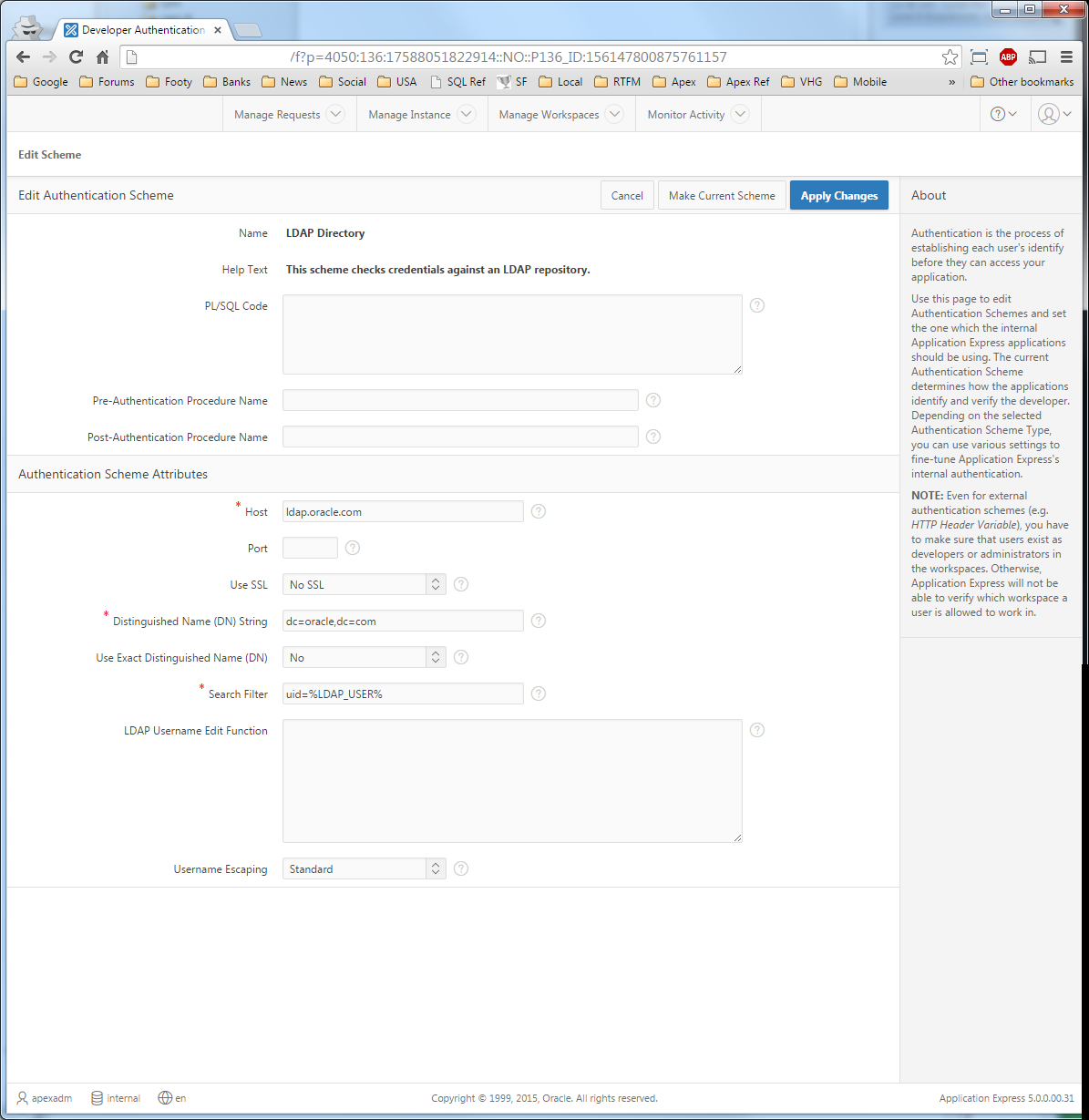
Scheme Settings

The declarative settings are just like those for your application. Getting the LDAP string correct for your environment can be tricky.

At our site I had one that worked for some of us, but not others. Then I found since we're using a Microsoft LDAP we can use the simple format of domain\%LDAP_USER%
LDAP authentication attributes

Note the message on the right hand side.
NOTE: Even for external authentication schemes (e.g.HTTP Header Variable), you have to make sure that users exist as developers or administrators in the workspaces. Otherwise, Application Express will not be able to verify which workspace a user is allowed to work in.
Now the login process authenticates against LDAP, but it still uses APEX user settings to determine authorisation.
ie - what type of user are they? administrator, developer etc.

Internal Workspace Users

Since level of access is still deferred to APEX accounts, don't forget to define workspace users specifically for the INTERNAL workspace that match the LDAP username.
INTERNAL Workspace user list
It's unlikely you will have an ADMIN account in your LDAP server, which is a good thing.

Rolling Back

If you leave your INTERNAL session logged in you can use another browser (or private session) to test authentication and revert the current scheme if necessary.

Alternatively, as described by the warning when applying the scheme change, you restore the authentication from SQL Developer using an API.


You'll need administration privileges:
exec apex_instance_admin.set_parameter('APEX_BUILDER_AUTHENTICATION','APEX')

Workspace Logon Page

Don't forget to remind your developers what's going on, perhaps via a login message.

APEX 5 login message

The login message here is a running joke with our transient DBAs.

I've drafted a post where you can include JavaScript in the login message to make modifications to the login page, just like in prior versions.

Monday, 25 May 2015

APEX iFrame Security setting

At some point during APEX development you may find yourself putting an Oracle APEX page within an iFrame.
<iframe src="//myserver.com.au/ords/f?p=SAGE:1023:&SESSION."></iframe>

Just recently I did just that and came across an error I expected to see, but a little curious as to how it presented itself.

Refused to display '//myserver.com.au/ords/f?p=SAGE:1023:30559832045078' in a frame because it set 'X-Frame-Options' to 'DENY'.

Googling the last half of the message returns some interesting discussions on how this works from a web technology perspective
http://stackoverflow.com/questions/27358966/how-to-set-x-frame-options-on-iframe

The idea is that it can protect from clickjacking behaviours. APEX manipulates browser settings through an application security attribute "Embed in Frames". Allowing from same origin is deferring trust to the hosting server.


You might need to adjust this for scenarios such as

  • modal dialog plugins
  • embedding an apex page as a region within another page 
  • attempting multiple IR per page prior to APEX 5
  • APEX page embedded within a Portal

Dan McGhan explains the properties in more depth:
http://www.danielmcghan.us/2011/08/new-browser-security-attributes-in-apex.html

Current APEX 5 documentation:
http://docs.oracle.com/cd/E59726_01/doc.50/e39147/bldr_attr.htm#HTMDB29922
though I'm pretty sure the setting was introduced in 4.1.

Scott

Wednesday, 29 April 2015

Customising APEX 5 Open Door Credentials

The polish that comes with APEX 5 also extends to the generic login screen used for the Open Door Credentials authentication scheme.

This scheme is great for testing. It allows you to log into the application by supplying just a username, as if you logged in normally - saving on user management in test servers.

The login screen used isn't page 101, but a generic page generated via wwv_flow_custom_auth_std.login_page. Prior to APEX 5 the page looked rather ugly.

APEX 4 Open Door login


As with many other aspects, the page now looks much tidier in APEX 5.
APEX 5 Open Door login

I think this upgrade can also encourage a little sprucing up with some script that can be applied via the authentication screen Help Text, in the same manner as the workspace login can be customised.
Authentication Scheme settings

$('h1.a-Wizard-title').text('Open Door Credentials, great for testing')

Actual help content could also be supplied, so the login screen could be adjusted to suit your needs.
Customised APEX 5 Open Door login
Runtime example here.

Amazing what a little jQuery can do.

Monday, 8 September 2014

Using Post-Authentication to run process after APEX login

A frequent requirement, and hence frequent question on the forums is
How do I run procedure x after the user has logged in?
This is often required for such tasks as determining user access, such as populating a restricted Application Item relating to a role like F_IS_ADMIN based on the username defined in substitition string APP_USER

Those new to APEX and unfamiliar with certain concepts may consider using an Application Computation, firing "On New Instance (new session)"
Application Computation Frequency

It sounds fair enough, and I remember doing the same thing when I was first learning APEX. The documentation on understanding page computations states
The computation point On New Instance executes the computation when a new session (or instance) is generated
This still isn't clear, but this actually fires when you first navigate to a page in your application - any page. This means when you first open a page like /apex/f?p=100:1, which may redirect you to the login page - the 'on new instance' event has already fired since APEX needed to provide you with a new session to render the home/login page.

In other words, these events can be generally described in the following order:
  • Open home page
    1. On New Instance (new session) - APP_USER is 'nobody'
    2. Redirect to login page
  • User enters username/password and submits
    1. Pre-Authentication 
    2. Validate credentials - APP_USER now set
    3. Post-Authentication
    4. Redirect to relevant page

I think I've only used 'On New Instance' once or twice, possibly to prime content of application items - but I use 'Post-Authentication' all the time to calculate values based on the user who just logged in.

Post-Authentication is defined in the Authentication Scheme, and expects the name of a stored procedure.
Shared Components -> Authentication Scheme
This stored procedure can be defined within the Authentication Scheme -> Source -> PL/SQL code as an anonymous block:
PROCEDURE post_authentication IS
BEGIN
  -- do stuff here

  null;
END 
post_authentication;

For better performance and code management you should place it within a PL/SQL package. That way it doesn't need to be interpreted dynamically every time a user logs in.

The Post-Authentication Procedure Name attribute just needs the name of the stored procedure, no semi-colon.
apx_auth_util.post_authentication

The PL/SQL may run something like:
IF v('APP_USER') = 'WESLEYS' THEN
  apex_util.set_session_state('F_IS_ADMIN','Y');
END IF;
I understand changes are coming in APEX 5 regarding when these events fire as you navigate between applications that share authentication.

This also reminds me of a little experiment I wrote ages ago to determine the order of page/application events.