Showing posts with label Shared Components. Show all posts

Tuesday, 18 February 2020

APEX Component Settings for Switch

While I point out a 'hidden' setting for Switch items in APEX, I want to comment on two related item types found in Oracle APEX => radio buttons and checkboxes.


1) Radio button

I really think the standard Template Option for radio groups should 'Display as Pill Button'

It really provides a simple and effective UX when a small set of options are on offer. Touch devices can select the option as if it's a button, and mouse users only need one click, compared to a select list requiring two. And the click doesn't need to be precise for those tiny radio group circles. I wish the application builder adopted the pill button approach more often.

And it's real easy to hook a dynamic action on change of the radio group, perhaps to refresh a classic report with data limited to the selected option. (Don't forget to add page items to submit!)

2) Switch

The Switch item was the answer to a number of methods of deploying an "iPhone-like" on/off switch.
I actually wrote an (internal) item plugin to do just this, but I much prefer using the native option.

A frequent question relates to how switches are rendered. If you don't see what you expect, have a look in Shared Components -> Component Settings.
Application -> Shared Components -> Component Settings

Personally I prefer the 'Pill Button' look, for reasons above. I find the APEX Application Builder seems more washed out with all the Switches in the properties bar, compared to the more softened On/Off pill buttons. If I could change this at the builder level, I would.

The offerings will vary depending on your APEX version, and if the application's Universal Theme has been refreshed

Application level settings for plugins can also be found in Component Settings, in addition to built-in APEX feature tweaks. These can something you choose to review after an APEX version upgrade.

3) Checkbox

It seems the humble HTML checkbox will always be extant, regardless of the pain it brings to tabuler forms. However, it suffers the same precision requirement as the native radio group selections - though better deployments allow selection using the label as well.

Go with the Switch (as a pill).

What do you think?


Thursday, 16 January 2020

Performance on Classic Reports with LOVs

Just an observation made yesterday that I thougt was worth everone's consideration.

I created a classic report on a reference table with a touch over 1000 rows, with pagination set at 150 rows per page.

That’s all I had on the page.

The table had it's own set of lookups for a couple of columns, so I assigned two LOVs I already defined in Shared Components.

Classic Report LOV

Next minute, I had a simple reference page taking 10 seconds to load.


This is information from apex_workspace_activity_logs, showing results where no LOV was applied, two LOVs, and just one. I later found the number of rows shown in the pagination set also varied the result.

As I removed one of the LOVs, I quickly realised this was the problem.

I ran the page in debug mode, to see if something crazy was happening as it constructed the query.
When I used debug = YES, it pinned all the effort onto the one line item - but not the query itself.
rows loop: 150 row(s)

Looking again using LEVEL9, I could see that every row took a bit of work, not just the query.
In fact each row had three debug line items referencing my LOV lookup SQL.
begin begin SELECT name display_value, id return_value  
bulk collect into wwv_flow_utilities.g_display,wwv_flow_utilities.g_value 
FROM  my_secondary_ref 
WHERE SYSDATE BETWEEN eff_start AND COALESCE(eff_end, SYSDATE)
ORDER by 1
; end;
end;
Debug chart

Apparently these are only melded into the SQL for IR/IG, not Classic Reports. Context switching kills the page instead - well, at least 149 extra executions of the one statement.

I ran another test so I could check v$sqlarea, and sure enough, there are far more executions of this lookup tha necessary - unnecessarily churning the CPU.

v$sql_area status

I’ve tended to embed these in my queries anyway, often as some form of scalar subqery.
This is a habit I started as a Oracle Forms developer, since Post-Query lookups made repeated network calls that just slowed the application down.
select sm.*
  ,(select name
    from my_lookup m
    where sm.id = m.id) my_desc
from some_model sm
This makes me really wonder how much of our existing page generation time is spent on this work?
Even on small classic report regions. This all adds up.
If only there was a way I could find all occurences of LOVs used in classic reports... wait a minute! I can query the APEX dictionary! ;p
select application_id, pagE_id, page_name, region_name
  ,(select maximum_rows_to_query 
    from apex_application_page_regions r
    where r.region_id = c.region_id) nbr_rows
  , column_alias, heading 
  , named_list_of_values, inline_list_of_values
  , column_is_hidden, condition_type
  ,build_option, column_comment
from apex_application_page_rpt_cols c
where application_id = 102
and display_as_code = 'TEXT_FROM_LOV'
order by nbr_rows desc
It's a shame such a nify declarative feature impacts performance this way.

Tuesday, 3 December 2019

Include new APEX templates in an older APEX instance

Have you seen that super awesome theme in the new APEX version, then wondered how long it will it be before your site upgrades so you can actually use it?

What if I told you that your current version could be retrofitted to use that template?

I really like the look of the Content Row template, I think that's going to serve many developers good purpose.
Sure, I could create something similar now, but if I do as much as I can the same, then it should grease the wheels come upgrade time.

Content Row 18.2 vs 19.2

To make this happen, I
  1. Downloaded APEX 19.2
  2. Copied the /theme_42/1.4 folder to my 18.2 instance
  3. Created the report template, including template options
  4. Added the region component in my app
The first two steps are all about making the relevant CSS available to your instance.

After I had the /1.4 folder in place, I thought I would need to increment the Theme folder, but that just introduced other issues.


Instead, I just referenced the ContentRow.css file in the pages I wanted to use it.
This is the path where you can find it, so it can be placed wherever you like on your older instance.
/i/themes/theme_42/1.4/css/core/ContentRow.css
Alternatively, you could include this for all pages in the User Interface attributes.

Then I needed to create the named column (row template) in my 18.2 application, details of which I just copied from a 19.2 instance.

Content Row syntax

I can even transfer the template options, so I started transferring from details on the page
You can also use this query to find instances within my 19.2 application.
select name, display_name, display_sequence, css_classes, group_id
  ,(select display_name
    from APEX_APPL_TEMPLATE_OPT_GROUPS
    where template_opt_group_id = group_id) group_name
  , help_text
from APEX_APPL_TEMPLATE_OPTIONS 
where application_id = 32532
and report_template = 'Content Row'
order by display_sequence
Then I created the template options in 18.2.

Add Template Option

And sure enough, they become available on my 18.2 region component.

Page Designer outcomes

Due to the differences in availability of template option groups, some manifest a little differently, but I personally prefer a one click checkbox to the more fiddly select list.

All that said, I'm not sure I'm entirely sold on the small screen format, though maybe thing will change when I get more realistic data in there.

Content Row - mobile

Now I'm sure when I change over to use the actual template when I'm in 19.2, I'll need to re-apply the template options - but Shakeeb likes the idea of retaining shared template options, so you never know.

This was all done in 18.2. If you're on an earlier version, your mileage may vary.

If you're not using the Universal Theme, then you're probably not going to get very far.

Thursday, 22 August 2019

Customising APEX Validation Message

I'm an advocate for forum participation. This very post was a result of me learning something small just by watching the forums every morning.

In fact, quite a few of my posts spawn from forum activity, in part because future me can find my posts easier than forum discussions.

I wanted to share a collection of solutions for customising the notification message when a field is Required - turns out we have a few options.

Then I found myself playing with the Compatibility Mode - a feature that allows you to nominate specific application to behave as if they were on a particular APEX version.

This setting only relevant for specific, esoteric behaviours, but while I was playing with validation messages, I thought it would be worth including how things are different.

Application Attribute - Compatibility Mode

If I open Application properties, and set the Compatibility Mode to 5.0, then validations aren't tested until the page submits.

APEX 5.0 behaviour

This also demonstrates that if you use Shared Components => Text Messages, and translate one of the documented internal error messages, then you will see this translation in applications behaving has per APEX 5.0.

Application wide message translation

The translation also over-rides the data-valid-message custom attribute, as John Snyders suggests that's not coupled with translations.

data-valid-message="Customise me"

Message hack

The current (default) behaviour, appearing from 5.1, offers client side validations.
In this case we receive immediate feedback regarding the fields that are declaratively set to Required.
If I have a data-valid-message, it uses that.

Feedback before page submit

Note the translation haven't been applied, and a custom server-side validation hasn't yet applied.

If the first three fields have been satisfied, then the form will submit, and we can see any custom server-side validations.

Feedback after page submit

This means we can customise the message by creating our own server-side validation message - something we used to have to do before things got nice and declarative.

Server-side validation

So there are a some pros/cons for either of these solutions to customise validation messages, and it would depend on your APEX version. I wouldn't be surprised if this behaviour is further cleaned up over time.

See more

Basic demo
John Snyders - deep dive
Matt Mulvaney - other considerations
Nick Buytaert - the old way
Patrick Wolf - the really old way
Compatibility Mode - 19.1 Release Notes

There used to be a great article regarding compatibility mode in the German community, possibly by Carsten, but I don't think it's available anymore.

Tuesday, 22 January 2019

Customising APEX Session Expiry

It's nearly 8am, you're holding your favourite morning beverage, and you open yesterdays APEX tab, only to find this:


This is the current default expiry page. I'd like to tart it up.

I've used the following technique for so long, I've forgotten what it used to look like to drive me to this solution. Ultimately, you end up with a similar result, but you really can customise it to behave however you like.

Under Shared Components -> Security -> Session Management, you'll find the Session Timeout URL attribute. Here we can specify what page should be opened when the application times out.

If I use the following, it will open the login page just as it normally would have, but also include a REQUEST parameter, with the value "TIMEOUT"

f?p=LEMENU:LOGIN::TIMEOUT

We can define this value to be whatever we like, but the intention is that on the login page, we can conditionally render a region based on the declarative condition:

Request = Value
TIMEOUT


Where TIMEMOUT is the literal string we provided.

Here I've used it to conditionally display a region that uses the Alert template.

Useful feedback for the user

The only trouble is, when your original session times out, Oracle initiates a new Session ID - which will also time out. Then, when you press the login button, you'll just see this.

Your login page has timed out!

So we could extend the region I added by providing a link to re-open the login page, forcing a new session.
Your session has timed out.
<br><br>
Click <a href="f?p=&APP_ID.">here</a> to log in.

And add a condition to the original Login region to exclude when the timeout message is being displayed, forcing the user to click the link to re-open the page, thereby initiating a new session. I use this SQL expression to test the opposite, since the request value may be null.

lnnvl(:REQUEST = 'TIMEOUT')

Clean timeout message

You could pimp up the link by adding UT classes, with help from the UT button builder
class="t-Button", since buttons are easier to tap.

Or just add a declarative button to the region.

Or you could just set your Timeout URL to redirect to a completely different page, where the Authentication page attribute is 'Page is Public'.

Nothing too exciting, but I do like the options a REQUEST parameter can offer - transmitting information with no need for a defined parameter name.

This is one of a few ideas shown in this presentation, from slide 22.

Thursday, 17 January 2019

Oracle APEX Social Sign-in Authentication Scheme

Recently I was involved in setting up a Social Sign-in Authentication Scheme, so despite the doom & gloom of this post, we are breaking some interesting rock.

I say 'involved', since I had the support of one of the nerdiest nerds in Perth, for all the server tinkering. I just had to paste in some URLs and other config settings within APEX.

He expected every error, and it always seemed just due process to the finish line. We had it all sorted within a couple of hours, and I was really doing other things while they configured SSL & wallets.

I can't really divulge all the details, since, you know, security, but I can certainly help describe the steps, to maybe help future tinkerers.

This post from Ciprian Iancu was a major reference for the team, though it wasn't entirely accurate for us. Details below.

<handwave> this is handwaving I'll use when I either don't fully understand what was done / is a security issue / just noted as a prompt. I'm the data/UX guy ;p
We also moved so quickly, I didn't have a chance to copy all the errors.

1 - SSL 


Our new Tomcat server needed to be running with SSL before Azure would accept a handshake.

<handwave> There is something they do that allows me to use https

2 - Wallet


<handwave>A wallet was configured on the database server. There is talk about ensuring the one wallet contains numerous certificates, since we now need it for a number of exchanges.

I entered the wallet's file location in the Internal workspace under Manage Instance -> Instance Settings -> Wallet.
file:/home/oracle/wallet

Without it, we get a warning regarding certificate failure.
At one point the permissions on the wallet file were wrong, which I saw by opening the login page in debug mode, then checking the debug log.

https://myhost:port/vbs/f?p=100::::YES::

You should see an entry starting with apex_authentication.callback
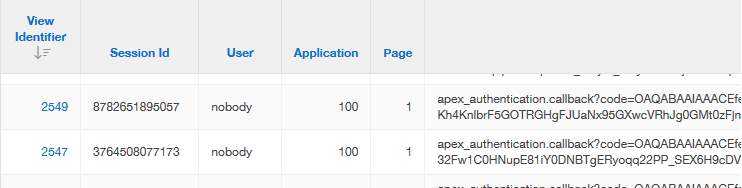
Debug example

3 - ACL


ACLs allow the database to communicate to certain hosts in the outside world. Ciprian's blog was helpful, but the ACLs weren't quite right. The ACL API has changed in 18c, the graph host was incorrect, and we only needed http, not connect.

DBMS_NETWORK_ACL_ADMIN.APPEND_HOST_ACE(
    host => 'graph.microsoft.net',
    lower_port => 443,
    ace  =>  xs$ace_type(privilege_list => xs$name_list('http'),
                        principal_name => l_user,
                        principal_type => xs_acl.ptype_db));

  DBMS_NETWORK_ACL_ADMIN.APPEND_HOST_ACE(
    host => 'login.microsoftonline.com',
    lower_port => 443,
    ace  =>  xs$ace_type(privilege_list => xs$name_list('http'),
                        principal_name => l_user,
                        principal_type => xs_acl.ptype_db));

4 - Web Credentials


It took a little while to know this is where we needed to define something prior to creating the authentication scheme, as noted in this bug description. Without it, we are unable to define the authentication scheme.
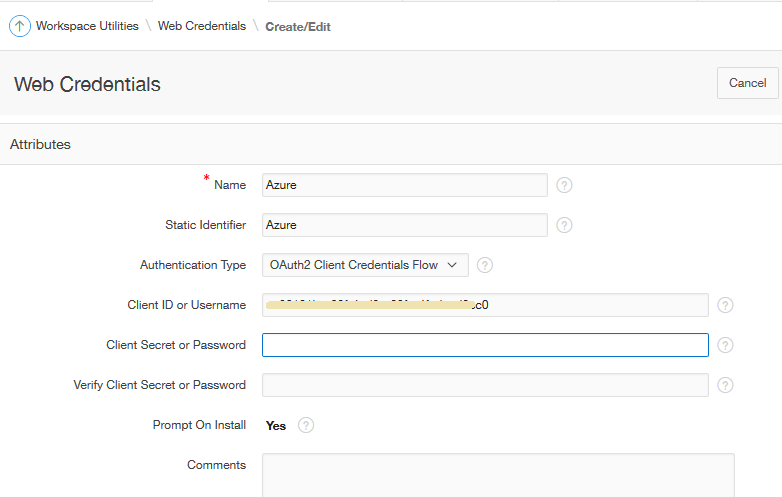
Web Credentials


<handwave> Mr Sysadmin set up a Client Secret somehow in server land.

I then pasted the long string under Application Builder -> Workspace Utilities -> Web Credentials.

5 - Create Authentication Scheme


I always find some strange satisfaction in setting up an authentication scheme, and to do one that integrates with Azure using contemporary methods was particularly gratifying.
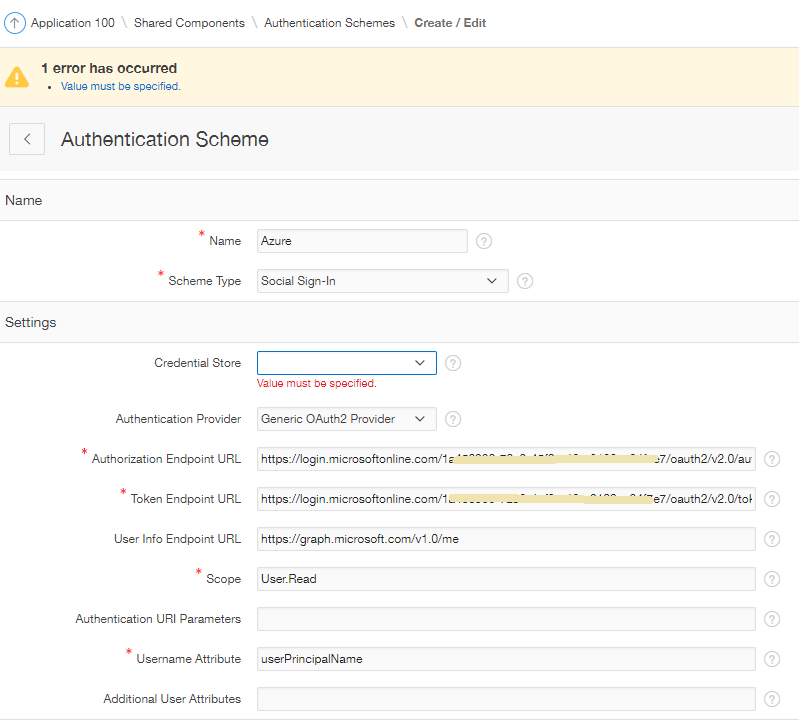
First round of settings

The User Info Endpoint URL allows us to harvest more information from Azure. By default, a small set of attributes are returned in a JSON packet, but we can extend the attributes supply by extending the URL

https://graph.microsoft.com/v1.0/me/?$select=userPrincipalName,onPremisesSamAccountName,mail,officeLocation,department,displayName,givenName,jobTitle,mobilePhone,surname,id

Post-Authentication Attributes


I found an OTN post from Christian Neumueller describing exactly how to apply the apex_json package to get attributes listed in the settings - I just made some adjustments to make it look a little prettier, and add the fields we wanted to look at.

I'd really love to see examples like this in the inline help for attributes more often.
Here is what I used in the post-authentication procedural code:

:G_USER_INFO := 'Authenticated via Azure. '||chr(10)||
  '<br>Details from Graph:<br>'||
  '<table class="t-Report-report">'||
  '<tr><td class="t-Report-cell">id:</td><td class="t-Report-cell">  '||apex_json.get_varchar2('id')||'</td></tr>'||
  '<tr><td class="t-Report-cell">userPrincipalName:</td><td class="t-Report-cell">  '||apex_json.get_varchar2('userPrincipalName')||'</td></tr>'||
  '<tr><td class="t-Report-cell">onPremisesSamAccountName:</td><td class="t-Report-cell">  '||apex_json.get_varchar2('onPremisesSamAccountName')||'</td></tr>'||
  '<tr><td class="t-Report-cell">mail:</td><td class="t-Report-cell"> '||apex_json.get_varchar2('mail')||'</td></tr>'||
  '<tr><td class="t-Report-cell">displayName:</td><td class="t-Report-cell">  '||apex_json.get_varchar2('displayName')||'</td></tr>'||
  '<tr><td class="t-Report-cell">givenName: </td><td class="t-Report-cell"> '||apex_json.get_varchar2('givenName')||'</td></tr>'    ||              
  '<tr><td class="t-Report-cell">surname: </td><td class="t-Report-cell"> '||apex_json.get_varchar2('surname')||'</td></tr>'||
  '<tr><td class="t-Report-cell">officeLocation: </td><td class="t-Report-cell"> '||apex_json.get_varchar2('officeLocation')||'</td></tr>'||
  '<tr><td class="t-Report-cell">department:</td><td class="t-Report-cell">  '||apex_json.get_varchar2('department')||'</td></tr>'||
  '<tr><td class="t-Report-cell">jobTitle:</td><td class="t-Report-cell">  '||apex_json.get_varchar2('jobTitle')||'</td></tr>'||
  '<tr><td class="t-Report-cell">mobilePhone: </td><td class="t-Report-cell"> '||apex_json.get_varchar2('mobilePhone')||'</td></tr>'||
  '<tr><td class="t-Report-cell">Access Token: </td><td class="t-Report-cell"> '||apex_json.get_varchar2('access_token')||'</td>'||
  '</table>';

I had a simple region on the home page to display the data.
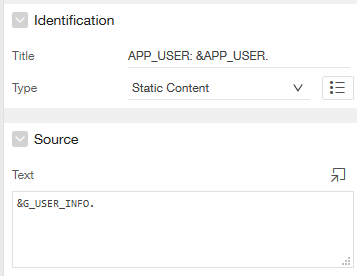
Region on Home Page, showing G_USER_INFO

Then when we launch the application, we're redirected to login.microsoftonline.com; enter our Azure credentials, accompanied with the client's splash; then see our APEX page.
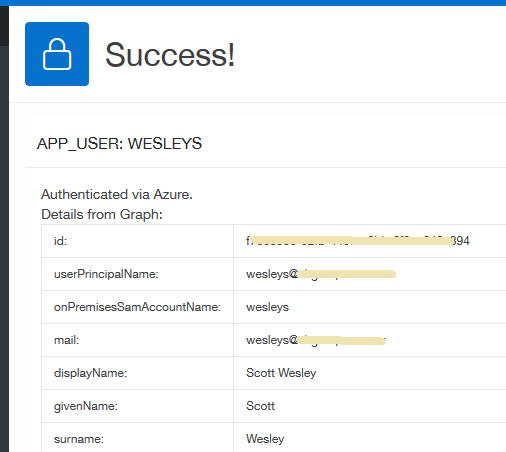
G_USER_INFO displayed at runtime

We were prompted to stay signed in, but I keep pressing No until we have a chance to experiment further.

APP_USER


APEX uses the Username Attribute to source the APP_USER variable. In our case the userPrincipalName returned an email address, but we wanted to match this up to our existing login IDs which use the WESLEYS style format.

We first tried using the onPremisesSamAccountName attribute, but that returned "wesleys"

Christian Neumueller once again provided an easy solution to ensuring our APP_USER returned the same uppercase value, by adding this to the post authentication process:

apex_custom_auth.set_user(p_user => upper(v('APP_USER')));

And in 19.1, there's already a declarative "Convert Username to Uppercase" attribute.

Logout URL


This was originally pointing to the application home page, which just re-authenticated me - which was quite handy as I refined the handling and temporary display of attributes from JSON.

We still need to experiment with authentication behaviours when it comes to remembering who you are, and logging out. For now, I know we can go to portal.office.com to log out of Azure.

No doubt there are other experiences & behaviours to refine as we move forward, but this is a nice step away from database accounts!

7 - Link Applications


This experiment was done on a fresh application, but I was able to use the principles behind sharing application authentication, to then create a button that linked to our main application - already authenticated.

I hear there is now a way to programmatically change the current authentication scheme, via a parameter. I'd like to experiment with that to see how it might change my answer when people ask if we can authenticate into the one application using two authentication schemes.

Conclusion


We had this hooked up within 2-3 hours. That can't be a normal experience, but it's still been a really good exercise in understanding how this technology works. Kind of.

It's also pretty cool that we have such declarative options for setting this up in our APEX applications.

If you want more examples to help get your configuration working, maybe filling in the blanks I left, see other posts by
- Dimitri - Social Sign-in with Google and Facebook
- Ciprian - Social Sign-in with Microsoft Azure
Adrian - Social Sign-in without a wallet
- Adrian - Certificates
- Morten - Authentication with Microsoft
- Mahmoud - Forum solution with Google

Wednesday, 16 January 2019

APEX 18.x Application Session Sharing

For quite some time I've been crafting multiple applications that, to the end user, appear as one.

This is possible with some Session Sharing attributes in relevant the Authentication Scheme, a feature agnostic to the Scheme Type.

This ultimately means you can set up two different applications that use two different methods of authentication, thereby letting in two different sets of users in the 'same' application - you just need to make some UX decisions.

APEX 18.x introduced a 'Type' option, and renamed the section from a less descriptive 'Session Cookie Attributes'.

Session Sharing Attributes

I thought this was offering something a little bit extra, but it appears to just make the process a little simpler for the likely majority.

We can still segment our applications, where users of applications with the same cookie name / colour may have links that jump seemlessly between applications, such as Earth and Mars.

Application sharing examples

This is possible only if you use the declarative 'link to different application' target, or include the session ID when you build the URL

f?p=EARTH:HOME:&SESSION.::

If the user tried to jump to Jupiter, then they will be prompted for login details. Ceres and Vesta stand alone with the default option, sharing authentication with no other apps, not even between themselves (unlike a certain spacecraft).

Upon returning to the authentication scheme for Earth, I noticed the Type actually changed back to Custom, and I saw an (undocumented) substitution string WORKSPACE_COOKIE used.

This saves us from having to nominate the cookie name, and store the literal ourselves, perhaps as a custom application substitution string. It just presumes that all apps in our workspace we nominate as such are to share authentication.

I thought I read some attempts on the forums to change the 'current' authentication scheme on the fly, but I don't see any mention in the documentation - Correction.

Thursday, 7 December 2017

Exporting an APEX page plus Shared Components

Imagine, if you will, a really large application. Perhaps it's a reporting application, and you've just created a new page (report) and an associated breadcrumb. 

Now for migration. You have a choice between exporting the entire application, or you could just export the page. But what about the associated breadcrumb? What about the LOV?

This is where the Component Export can help.

You'll find it in the Tasks menu when you start to export your application.

Tip: Keep an eye out for these Task menus, they can 'hide' interesting features
From there you can find, then check the most recently modified components to your application, then press "Add to Export" to add them to what I would imagine would be an apex_collection.

Creating this type of page would be a good learning exercise

The final confirmation, with the additional option to export as of x minutes ago.


Upon export you'll receive a file that looks just like a normal export, just with your selected components.
f102_components.sql

There are advantages to exporting only selected components. For instance, during a full application install, existing users will remove existing user sessions for the application unless you use apex_application_install.set_keep_sessions on the command line.

Though are a few reasons to take care.

For example, when I exported/imported the List for my left sidebar menu, the menu disappeared from my runtime view.
I had to re-assign the list as the navigation menu.
Shared Components - User Interface - Nagivation Menu - Navigation Menu List.

Exporting without the list was ok, so for all good for data driven (dynamic) menus. In that case the page should only appear in the menu when the relevant security tables say so.

And the export may not be as granular as you need. Or perhaps you'll forget components. Or perhaps your changes overlap with others.

Component export is fit for some purposes, and has been around forever. Give it a go.

And wouldn't you know, turns out it was a year ago today that I also felt compelled to blog about this very topic.


Thursday, 19 January 2017

Re-evaluating APEX Authorization Schemes

Authorization schemes in Oracle APEX are used to control access to page, buttons, and all sorts of other components.

In my experience, these are best defined at a privilege level, where the same privilege could be allocated to multiple business roles, but that's for another post.

In this post, I want to mention a cool API function called apex_authorization.reset_cache, which helps control the behaviour of these authorization schemes.

Preface

While googling something else I stumbled across an interesting function called apex_util.reset_authorizations, only to find it was deprecated in 5.1, replaced with the same (but renamed) function in another package.

APEX_UTIL was getting big, and even though the team was trying to manage it, 5.1 was the first time I noticed it reduce the number of procedures. Too many procedures mean some gold nuggets get lost, perhaps until they're moved to a more specific package.

I'd say we're all guilty of putting a procedure in the inappropriate package or letting a "utils" package grow too big. Me probably more than many, but there's been a lot of clean-up in 5.1. If there's any documentation you read about 5.1, let it be the release notes.

I also found the function mentioned in an old email I marked for blogging about because of an OTN forum post I was listening to. Not because of the original topic, but another deprecated/renamed procedure mentioned within.

Authorization Evaluation Point

The default evaluation point for authorization schemes is once per session. This means the first time APEX comes across a component protected by an authorization scheme, it will evaluate it and remember the result.

Authorization Scheme Evaluation Point

This default option is best for performance, but if you want to afford your users the ability to pick up changes in authorization without needing to log out then back in, then you can use one of the other options.

Re-setting authorization schemes at runtime

A cool API exists called apex_authorization.reset_cache. The documentation states
"it resets the authorization caches for the session and forces a re-evaluation when an authorization is checked next".

This means you can provide a button to the user that would clear the slate for all authorization scheme outcomes in that session and force APEX to re-evaluate any authorisation schemes it encounters.

This will be handy for me because it offers a chance to do this on demand at runtime, instead of once or 'all the time'. It also does the job across multiple applications that share authentication.

This is one of quite a few library functions now available in 5.1, in fact, this particular one has been around in some form since 4.2, but buried in apex_util.reset_authorizations.

Under the hood

If you want to see the interactions in the underlying APEX table, this query will help.
select s.*, a.application_id, a.authorization_scheme_name
from apex_050000.wwv_flow_session_authz$ s
join apex_application_authorization a
  on a.authorization_scheme_id = s.authorization_id
where session_id = 16678957299354
See, it's not magic. Just clever.

References

apex_authorization.reset_cache
Providing Security through Authorization
APEX 5.1 Release Notes

Wednesday, 21 December 2016

Declarative Favicon in 5.1

Some features you just tend to stumble upon in the builder somewhere.

Sure it's in the documentation, but not listed under new features.

Where to find declarative favicon setting in APEX 5.1
Patrick described how to do it in APEX 5.0;
Amanda for APEX 4.2;
Christian if you're still using APEX Listener;

Now we have an dedicated attribute. Neat.

Phased APEX migrations

While looking through the comments regarding 5.1 features it occured to me how many different ways the Oracle APEX team enable us to phase our applications into any new APEX version, thereby minimising risk and introducing new IDE features to developers earlier.

I've always thought APEX does a really good job of leaving our applications alone during upgrades. It normally depends on how much the boundaries have been pushed, and how much the theme has been modified, or templates added. In fact, most of the work is in upgrading the theme, which is why the Universal Theme came about.

So that that masterpiece may start the list:
  1. Universal Theme
    Designed to remove need to migrate themes in future. Instead, theme templates re-subscribed on demand as long as you kept your theme locked to the repository.
  2. Compatibility mode
    A relict from Oracle Forms, this feature allows you to prepare your app for behavioural changes between APEX versions. This great write up from Carsten describes how asynchronous developments in 5.1 may apply to your applications.
    Check this setting on any applications borne out of earlier APEX versions.
  3. jQuery Migrate
    To keep libraries lean, older functions are removed over time. Older references can sustained until they're refactored, as described by Marko.
  4. Utilities -> Upgrade Application
    APEX will leave deprecated features alone, until you're ready to upgrade each instance. The classic example is the old datepicker from 3.1. All your items called the horrible window until you replaced them all. This feature makes this process quicker and this older reference from Dimitri still applies. I may translate my mentioned of it in this presentation (as it applies to charts) to a blog post.
  5. Multiple concurrent versions
    It's not here year, but 5.2 may see the introduction of the ability to run two different APEX versions on the same database instance.
  6. apex.oracle.com
    This will always be a sandbox for the latest version or patch, so why not try your applications out in there? You can script up your tables, generate some data and import your app. Start preparing now and see how much your application won't break.
    Let's not forget apexea.oracle.com, when the latest major release is in early adopter mode.
If you can think of any others, let me know and I'll add them to the list.

Or do you have any stories of nasty surprises? I haven't heard of too many serious issues with APEX upgrades.

Edit:


#letswreckthistogether

Wednesday, 7 December 2016

APEX Component Export

A common question when it comes to migrating APEX applications is "can I just export a page".

There are more technical posts on the topic of exporting APEX applications than this one out there, eg:
HÃ¥vard Kristiansen
Christoph Ruepprich
Alan Warren
John Scott
I just wanted to clarify the concept, perhaps for those learning the tool.

So the answer? Sure you can, but what about other components related to that page? A breadcrumb; menu list entry; LOV? What about application items? Are you sure you've got everything?

So with this in mind, when you start the process export an APEX application you have a side-option to do a Component Export, which might look like this:


From here we can not just nominate the page, but identify other components to add to the export. The exported SQL is just a subset of the entire application. (I wonder when this will become JSON?)

However, the only time I consider doing this is for a reporting application where I know the only components in a new report is the page itself and a breadcrumb. The menu is dynamic so the existence of the page is enough.

Otherwise, perhaps for an operational style application, I think the risk of missing changes it too high not to do a full export.

Build options can also help you find your bundle, but even then diligence needs to be high.


Tuesday, 1 November 2016

Build Options on Report Columns

Let's say you're experimenting with a report (IR or classic) column and you would only like it to appear in you development environment.

What options do you have for hiding that column in other environments?

  1. Don't migrate the change - use your source control processes to only move it when it's ready. This isn't always practical, nor the intent, particularly since you can programatically set the status.

  2. Add server condition on database name - we can use an expression such as
    sys_context('userenv','db_name') = 'dev'This isn't bad, I have a common function I call for this sort of thing. But it's quite granular.

  3. Build Options - under-utilised silent catalyst that can help us turn a group features off/on at the flick of a switch.
In Oracle APEX 5.1, Build Options are an attribute of each column, in addition to just about every other component in the builder.

APEX 5.1 Column Attributes

Prior to APEX 5.1, column definitions were one of few components that don't have a declarative option. However, we still have the magic of dictionary views.

Pre 5.1 Build Option on Column
So we can query the application's build options and determine if the relevant record is switched on.
select null
from apex_application_build_options
where build_option_name like 'My build option'
and build_option_status = 'Include'
and application_id = :APP_ID
Again, you could put this in a re-usable function/view, not that you would need it often.

Neat.

Thursday, 28 July 2016

Application Item Prefix Usage

I was constructing a fresh app for a presentation idea and I came to think about the prefix people use for Application Items in Oracle APEX.

I've seen a few variations used, and upon asking the question on Twitter (as a poll limited to 4 options), some came back with a few other suggestions.

The final tally based on the replies (we'll see how pasting from Excel goes...)

F_ 15 Inspired by APEX team, no doubt. +1 for me
APP_ 10 Fair call, but could match built-in
G_ 6 Global, clever. One person combines this with A_ for application scope.
{project} 5 To match the prefix on your tables, right?
AI_ 3 Can't deny the provenance
{none} 3 This is dangerous, potential clash with built-ins
A_ 1 Based on item scope.

I remember some chatter recently about a community sourced standards document for APEX being kicked off on StackOverflow. Perhaps mini surveys like this can help shape projects like that, or maybe it fits into the oraopensource activities.

Either way, this sort of discussion is surely healthy for the community, eking out any important considerations in sometimes seemingly trivial matters, or "bikeshedding" is a term I heard recently.

I can't say I've tried creating application items (or substitution strings for that matter) that are the same as a pre-defined substition string, but surely it would be detrimental.

You never know, even the Oracle APEX development team may decide a thing or two from community responses. I certainly know what my next poll topic will be, now the Fire on Page Load default No campaign is over ;p

ps - more 2015 survey results to come. The next question was on instrumentation, so a few juicy points to make there.

Monday, 3 August 2015

APEX 5 Colour Contrast

During the APEX 5 early adopter I remember a bit of discussion going around regarding the colour contrast.

Edit: Related reading
"How the web became unreadable"

I would have been one of the complainers, and it's one topic I forgot to raise with the team when I met them at Kscope.

Use of APEX 5 is ramping up at my current site and I couldn't go any further without having a little play. A while ago I used some filters in my ad blocker extension to trim the fat from the OTN forums pages.


I'm come across an even better Chrome extension since then called Stylebot and now it's really easy to manipulate pages you regularly visit.

If you like having a secondary browser for development, you can use Stylish for Firefox.

For instance, when you open the extension you can nominate elements on the page then declaratively define some attributes to use every time that page loads on the specified site.

Stylebot interface
After farming the blue colours from APEX 4.2, I applied this to the region titles when editing component properties. I personally found this so much easier to scan the page and look for the attributes I need.

Modified on the left, original on the right.

Shared component properties
It's almost like the difference between quickly reading a mixed case sentence and READING SOMETHING LIKE THIS WITH NO HEIGHT DIFFERENCE WITHIN THE WORDS.

I did the same thing for the Shared Components home page, though this UI will also be revamped like the page designer at some point in the future

Shared Components
Speaking of the I gave the same treatment to the property palette in the page designer.

Page Designer properties

People have already asked for me to post my tweaks, and it turns out Stylebot allows you to share them so here is mine:
Oracle APEX 5 fitted with 4.2 contrast
This also works no worries with 18.2, and 19.x. Using dark mode in 19.2 will need a different set of CSS, though adjustments I made for the green motif in 20.1 seem to cover both light & dark.

APEX 20.1

No doubt I'll make adjustments in future as I explore the environment and see what works, I'll be sure to keep it up to date. I'm happy to hear suggestions, and perhaps news from the APEX development team that they're thinking of adding built-in styling options to the development environment, kind of like skins.

For completion, here are the styles I used so far.

@import url(http://fonts.googleapis.com/css?family=Georgia);

/* Component properties */
.a-Body .a-Main div.a-Region-header {
    background-color: #cfdef0;
    border-style: none;
    border-width: 1px;
    border-color: rgb(170, 170, 170);
}

.a-Body .a-Main h2.a-Region-title {
    font-weight: bold;
    font-family: Helvetica;
    font-size: 14px;
}

/* Shared components */
.a-Body .a-Main span.a-LinksList-label {
    font-size: 14px;
}

.a-Body .a-Main label.a-Form-label {
    font-size: 13px;
}

.a-Body .a-Main li.apex-rds-item.apex-rds-after a span {
    font-size: 13px;
}

.a-Body .a-Main li.apex-rds-item.apex-rds-first.apex-rds-selected.apex-rds-item--hint a span {
    font-size: 13px;
}

/* Frame some buttons */
.apex-page-designer div.a-Region-headerItems--buttons button {
    border-style: solid;
    border-width: 1px;
    border-color: #949494;
}

.apex-page-designer button.a-Button {
    border-width: 1px;
    border-style: none;
    border-color: #949494;
}

/* Page designer properties */

.apex-page-designer div.a-PropertyEditor-propertyGroup-header {
    background-color: #cfdef0;
}

/* Component view */
#ContentBody div.aRegionHeading {
    background-color: #e8e8e8;
}

#ContentBody div.aRegionHeading h1 {
    font-weight: bold;
}

#ContentBody tr td a
,#ContentBody tbody tr td {
    font-size: 13px;
}


/* Emphasise disabled buttons */

.apex-page-designer div button.a-Button:disabled {
    color: #d6d6d6;
}

/* Substitution string width */
#BB input[id^="SUBSTITUTION_VALUE"]
,#BB input[id^="SVAL"]{
    width: 500px;
}

/* apex 5 */
input[id^="SUBSTITUTION_STRING"]
,input[id^="SSTRING"]
{
    /*max-width: 300px ;*/
    text-align: right;
}

/* Hover designer buttons */
button.a-Button.a-Button--goToPageButton.a-Button--pillEnd:hover
,button.a-Button.a-Button--noLabel.a-Button:hover {
    background-color: #d0e4fa;
}

/* Search box */
.a-SearchBox--autoExpand .a-SearchBox-input {
    width: 170px;
    background-color: #ffffff;
}

/* Success window */
#pdNotification {left: 40px;}

/* Make locked pages stand out more in page list */
#apex_pages_irr span.a-Icon.icon-lock {
    color: #ff0000;
}
/* Widen 5.1 scrollbars */
.u-ScrollingViewport::-webkit-scrollbar{
    width: 13px ;
}

/* Hide those darn tooltips 
   18.x undo now comes under this, but I can't specify just the PD tooltips
#a_PageDesigner .ui-tooltip {display:none;}]
*/

You may also be interested in Filip's XPlug extension to further tweak the Page Designer.

See a video describing how this is done here.

Happy APEXing!

Monday, 8 September 2014

Using Post-Authentication to run process after APEX login

A frequent requirement, and hence frequent question on the forums is
How do I run procedure x after the user has logged in?
This is often required for such tasks as determining user access, such as populating a restricted Application Item relating to a role like F_IS_ADMIN based on the username defined in substitition string APP_USER

Those new to APEX and unfamiliar with certain concepts may consider using an Application Computation, firing "On New Instance (new session)"
Application Computation Frequency

It sounds fair enough, and I remember doing the same thing when I was first learning APEX. The documentation on understanding page computations states
The computation point On New Instance executes the computation when a new session (or instance) is generated
This still isn't clear, but this actually fires when you first navigate to a page in your application - any page. This means when you first open a page like /apex/f?p=100:1, which may redirect you to the login page - the 'on new instance' event has already fired since APEX needed to provide you with a new session to render the home/login page.

In other words, these events can be generally described in the following order:
  • Open home page
    1. On New Instance (new session) - APP_USER is 'nobody'
    2. Redirect to login page
  • User enters username/password and submits
    1. Pre-Authentication 
    2. Validate credentials - APP_USER now set
    3. Post-Authentication
    4. Redirect to relevant page

I think I've only used 'On New Instance' once or twice, possibly to prime content of application items - but I use 'Post-Authentication' all the time to calculate values based on the user who just logged in.

Post-Authentication is defined in the Authentication Scheme, and expects the name of a stored procedure.
Shared Components -> Authentication Scheme
This stored procedure can be defined within the Authentication Scheme -> Source -> PL/SQL code as an anonymous block:
PROCEDURE post_authentication IS
BEGIN
  -- do stuff here

  null;
END 
post_authentication;

For better performance and code management you should place it within a PL/SQL package. That way it doesn't need to be interpreted dynamically every time a user logs in.

The Post-Authentication Procedure Name attribute just needs the name of the stored procedure, no semi-colon.
apx_auth_util.post_authentication

The PL/SQL may run something like:
IF v('APP_USER') = 'WESLEYS' THEN
  apex_util.set_session_state('F_IS_ADMIN','Y');
END IF;
I understand changes are coming in APEX 5 regarding when these events fire as you navigate between applications that share authentication.

This also reminds me of a little experiment I wrote ages ago to determine the order of page/application events.