Showing posts with label Forms. Show all posts

Wednesday, 15 October 2025

Ideas as a precursor to Oracle APEX #JoelKallmanDay

 It seems if I post only once a year, it's for Joel Kallman Day...

Last year I hinted of a small side story to a remediation project that was upgrade the entire stack supporting a (mostly) Oracle Forms application.

Along the way I also had to remediate a little one-Form tool Connor McDonald build for developers, and it had some features of some note.

It should be stated this was written at a time when flip phones were all the rage - and notably before Oracle APEX gave birth to Interactive Reports.

I won't include a screenshot (for privacy concerns), but it's basically a multi-row data block allowing queries and edits of selected records - an Editable Grid, back in the heyday of Forms.

Hmm, let's see a list of default display options, plus the ability to save my own current filter - which stores the values set in Enter-Query mode - remember that?!

Saved Reports

And let's see an ability to re-order the columns, and or even hide specific columns.

Re-order columns

Yes, Connor created a customisable editable grid, in Oracle Forms, a few years before smartphones were a thing.

Editable Grid in APEX

All these highlighted features that come straight of the Oracle APEX box.

An example of great ideas that pre-date the technology that can better support them.

Or is it the ideas that drive the development of better technology?

Or perhaps a bit of both...


Thursday, 18 July 2019

Lessons from Kscope19

The vague afterglow of Kscope continues. After the long trip home, I had a few days to give the brain a debrief, make some notes & ideas, before heading off for a family holiday.
Now after a Strange Things 3 binge, I wanted to finally bust out some posts I've drafted on Kscope.

I had the privilege of two sessions at Kscope19, and I also found myself sharing the APEX Lunch & Learn panel with some gurus.

Thanks Jayson

While my sessions are available in PDF format through the conference app, the format doesn't translate well. like any Connor PDF, so below I have links to the original format

I've been using Prezi for a while, but I try not to be the nausea inducing Prezi, rather a controlled Slides type, with room for emphasis. I might give Slides a go for next year.

Oracle APEX for Forms Developers 
https://prezi.com/i52u-kdd2gmu/

Lesson 1 - Length. 
I knew it was long, I thought I could still create a fast paced morning. Too much content. I know how I need to cut, but doing is always a different story.

It's such an interesting topic, with many ways to approach the transition.

Managing Multiple APEX Applications
https://prezi.com/ddffuuil0p-a/

Lesson 2 - Preparation
As a speaker, I always have various contingencies in place. For instance, I have my presentation on a thumb drive, and it's also available via URL. I also have spare batteries for my clicker.
When I landed in SF I realised I forgot my power adaptor. The hotel kindly sorted me out on the first night, but sure enough, 5 minutes before I start, I realise my foreign power adaptor was a good 10 minute brisk pace away. 1 hour reported left on the laptop battery, while the CPU fan was busting out decibels? Nice try, how about asking any audience members for magical adaptors before attempting to start?
(Thanks again to the gentleman that sorted me out near the end)

Lesson 3 - Organisation.

It's not all about adequate amperage - I have good content, handy snippets, useful sample applications - that all should be arranged in GitHub. Gotta get organised.

I also have word documents for each presentation that I turned into a PDF for the conference app.
PDF? It's 2019, I should have this on GitHub, with some Markdown cheatsheet stuck to my monitor with my conference swag.

Lesson 4 - Serendipity

Debriefing Kscope has spawned new ideas.

I'm aiming for Boston, and I also like to aim high.

#letswreckthistogether

Thursday, 14 March 2019

My Kscope19 Sessions

The #Kscope19 session list is out!

I've scored two sessions in the Oracle Application Express (APEX) track.

APEX for Forms Developers

My APEX experience has now surpassed a reasonable run developing Oracle Forms, I think I offer something to help the vast amount of Forms developers make the transition.

Managing Multiple Applications

A lot of my APEX work has involved developing applications in modules of a whole, in part because of steady transition from Forms & Reports. I've been refining the ideas in this session for a while, I'm not sure which session I'm looking forward to the most!

Let me know if there's something in particular you'd like to hear about either of these topics.


See you in Seattle ;p

Thursday, 27 September 2018

Oracle Forms to APEX IDE Transition

If you would like a good high level run-down on why Oracle APEX is a great choice to modernise Oracle Forms, have a read of this.

After listening in on the AskTom Office Hours on this topic (make sure you also read the chat transcript), I had a few ideas for posts to help Forms developers transition to APEX, before my Forms knowledge gets too stale!

If you put the Forms & APEX IDEs together, it's not hard to see they're sown from the same cloth, so to speak.

Oracle Forms

Navigator on the left, properties on the right, layout editor in them middle. All with similar behaviours (link to my videos from a while back)

Oracle APEX 5.1, with custom skin
I thought I'd run down some components within the Forms IDE, and add some commentary.

Before you begin...


The key thing to remember when transitioning from Forms to APEX is ... empty the cup.

Web behaviour changes some UX fundamentals, but it's an environment in which you should already be rather fluent. So forget about how you build applications in Forms, and think about how you want your website to behave.

Render vs Process


Forms renders the Form to the pixel from compiled source files, and you can show/hide elements on the canvas upon certain triggers firing.

A user visiting a URL in APEX will have their HTML page dynamically generated by PL/SQL, with a variety of conditions on components that decide if they're included in the render.

After the page is delivered to the browser, Dynamic Actions then respond to events that may happen on the page before the next page submit, which allows validation and processing of all the values on the page, or a page redirect, which just opens the target, leaving page data behind.

Render, Interaction, or Page Process?

The behavioural difference to remember is that the database knows nothing about the values on the web page until you either
1) submit the page (Processing)
2) execute a PL/SQL dynamic action that submits page items to session state

PL/SQL Dynamic Action

Many of your initial problems will probably relate to forgetting to submit/return these values.

Object Navigator Components


Triggers

Straight into a topic with conceptually different behaviours between Forms & APEX. Triggers in Forms drove pretty much everything. You're responding to some event that user has manifested in some way, often driven by moving the cursor.

In a stateful environment, this behaviour is fine, and made Forms powerful. In the web environment, these triggers don't have much of a 1-to-1 translation, but the main analog here might be Dynamic Actions.

Many APEX pages might handle processing when you submit the page, so you may have validations, computations, and processes that fire, based on flexible conditions.

Interactive pages may have dynamic actions that respond to specific clicks, but not submit or refresh the entire page, just some of it. This reduces network traffic, and enables clever user experiences.

Alerts

Half your messages may come the process that fires when you submit the page, to be shown on the subsequent page.

For instance, you could set the value of a common item P0_RESULT within your process, and display it as the success message using the &ITEM. substitution syntax.

Page Process


For Dynamic Actions interacting with the database, you may want to display the same style message.
Check out this example from Martin using the Supplied API.

Or for dialog behaviour where you control button naming, you might consider using a plugin such as Alertify or Pretius Enhanced Notifications.

Alertify Dynamic Action instance

Attached Libraries

APEX takes care of the JavaScript and CSS libraries that support the Universal Theme, which supports all the components you need for flexible, dynamic applications.

You can include your own JavaScript and CSS in several ways, mostly via the page attributes.

Page CSS attributes

You can choose to add inline code, reference files that exist either in the database as a BLOB (#APP_IMAGES#), or sitting on the middle tier, typically served by ORDS, perhaps sitting on a Web Logic Server, prefixing the file location with #IMAGE_PREFIX#.

If you use a decent amount of custom JavaScript, you may wish to consider APEX Nitro.

Data Blocks

As a Forms developer, I remember spending a lot of time managing details of the data block, and they generally either broke up the page into chunks of data, or held buttons & hidden items.

In APEX, you could say similar things about Regions. Each page is broken up into a bunch of regions, which could come in many forms. Check out the Component Templates available in the Universal Theme.

You can even construct master-detail relationships in APEX. There are no Relations to define, but relationship properties are set within the Region attributes.

Editors

I don't recall using Editors much in Forms, but if you want to handle large objects of the character variety, then you might consider the OraOpenSource plugin.

Events

I don't remember using Events, but I believe they allow die-hard Forms developers to extend their application with JavaBeans.

If there is something that APEX doesn't do out of the box, it will probably be worth looking to see if anyone has built a plugin for APEX to do so. Some of these are absolute crackers. Once I did a session on consuming plugins.

LOVs

I think the Record Group element is manifested as an LOV definition now, that can be shared in a number of places.

An LOV in APEX is more coupled with the Item type. A radio group works well with a small handful of values, Select Lists for middle sized sets, and perhaps the Select2 or I really like the Modal LOV plugin for larger sets to be dynamically queried, while still mastering the keyboard entry.
Or you might even define your own modal page to fetch a value.
There is a native Popup LOV, but I don't like it.

Object Groups

Object Groups and Property Classes in Forms are little more vague than the rest, since this was the sort of thing that would be set up once in a blue moon, utilised many times.

I think a comparison for grouping objects in APEX might be item plugins, possibly project specific.

Or maybe blueprints.

Parameters

Page Items are populated between pages to pass information to the next page, such as the selected record in a report.

Declarative Page Target


Larger forms with a number of items are generally submitted as a whole, where the page process handles the data, and branches to the next page.

These values can be protected from URL tampering by session state security, at item, page, and application levels, often by default.

Popup Menus

I've seen explorations of contextual popup menus here, and here.

The APEX team have implemented them within the Page Designer - my favourite is the duplicate option.

Program Units

When I used Forms, the general mantra was to keep code out of item/block level events, and manage packaged procedure calls from within program units.

But we've all seen Forms written with a spectrum of best practices applied. This is where many of the performance problems could lie, especially poorly used post-query triggers.

For Forms to APEX migration projects, this is probably where most of your gold lies - all the business rules you want to keep. Depending on how well the application is written, you might get to re-use a lot of it, but in my experience, few Forms projects used SmartDB concepts.

If you're aiming for a certain % of re-use, don't aim too high. The code in here can be good guide for the developer in refactoring behaviour, but the APEX page(s) could end up looking and behaviour different to what you had in Forms, if only because you're now in a browser. Thought it could be because you've reviewed the business process since the Form was written 2 decades ago, or you've replaced a lot of the keystrokes with button taps.

Property Classes

Property Classes in Forms allowed the developer to utilise common attributes among each instance of a component.

In APEX we can define User Interface Defaults in the data dictionary, so that each time items or reports are created for specific tables or columns, the same features are applied by default.

As for the style of the application, classes could be applied to components that carry a particular look & feel. The Universal Theme has a default skin that can be reconfigured declaratively.

Record Groups

Record groups where just the SQL component of the LOV.

Head to an application's Shared Components, then locate LOVs. They can be dynamically driven by a SQL query, or be statically defined. Static definition allows a variety of conditions to be applied to each entry.

These LOVs can then be associated with Items such as Radio Groups & Select Lists, or with a column in a report, to translate a code to a label.

Reports

Reporting in APEX is a deep rabbit hole. Conceptually, all your reporting can now be inline - live.
Your power users can be given Interactive Reports with a number of runtime manipulation options.
Oracle JET charts can respond to clicks, allowing drill down functionality, in whatever way you want.

Or you could go down the yellow brick road and choose a tool to dynamically generate PDF documents, Excel spreadsheets, Word files etc.

Visual Attributes

Template Options seem to be a fair comparison here, where common group of settings can be tailored to each instance of a component.

Windows

Application workflow differs between Forms and APEX due to the nature of their environments.

In APEX most interactions happen within the browser window, within an inline modal (just a special looking page region), within a page modal. From APEX 5.x this became native and easy, allowing modals to have validations and branches, just like standard pages.

Menus

Forms had specific menu files, controlled by database roles, and there had to be no active users to be able to update the .mmx file.

The menu in APEX can either be across the top, or down the left side. These menus can be statically defined, or dynamically driven, even by the meta-data that is apex_application_pages view. (my link)

Static navigation entries could be controlled by authorisation schemes, or custom conditions.
Dynamic menus can have security tables integrated within the SQL.

There are a few list templates that follow the same data structure, just rendered in different ways.

There is a smaller Navigation Bar at the top right, typically starting with the login/logout buttons.

Canvas

Forms is WYSIWYG, I'm sorry for your loss. An APEX page needs to be rendered in a variety of devices sizes, so items go where the responsive templates tell them to go. You can impact this using the grid layout, but it can take a little while to get the hang of it. Showing the columns helps, particularly with item layout.

Show Layout Columns
APEX also includes a palette of components ready to drag onto the layout editor, which I primarily use to check if items/regions are set to Start New Row or not.

Properties

The Page Designer introduced in APEX 5.0 is rather reminiscent of Oracle Forms, particularly with regard to the ability to edit multiple components at once, only intersecting attributes, and obscuring heterogenous values.

As with Forms, finding the right property can be tricky, or even being aware of its existence.

I highly recommend you take note of the inline help associated with each attribute. I'm sure this content improves with every version, even without inline feedback (hint hint).

Inline Attribute Help

Let me know if you think I've forgotten something vital here, or misaligned features.

Here are some other links on the topic of Forms transition to APEX:

When Forms to APEX Projects get thorny - Rodrigo also responding to the AskTom session
Oracle Forms Migration - Some recent thoughts (that need some revision)
APEX 5 Page Designer walkthrough - my prezi session looking specifically at the Page Designer IDE.
AskTom Checklist
Office Hours Q&A
APEX for Forms Developers - Kscope presentation

Wednesday, 11 July 2018

Oracle Forms Migration

This post is one of a series on what I learned while not at Kscope18.

I realise that's a month ago now, but the mind still ponders, and I've had these lined up for a while. Just got busy with a deployment, as you do. Went nice and smooth though, APEX sure does make staggered deployments easier with build options. Underrated feature. /tangent

Anyhoo - every now and then someone on the forum asks about the Oracle Forms migration tool. I've noticed it a bit recently, I guess that's a good thing.


Oracle Forms Migration. I guess what I'm learning here is that sometimes I'm a little shocked they keep at it, but I guess you've got to play the odds. And I haven't heard what was said with this slide.

I'd like to start and alternate list:

1) Setup APEX. Of course. OracleRAD will make this a breeze.

2) Create a schema that will serve as your conduit to your existing data. Privileges become additive, adding another layer to protect your data, which may include information not for the relevant APEX application.

3) Analyse what needs to change, what's broken, what's required.

Important note - workflow in a browser will be different from Oracle Forms.

While the components, capabilities, and IDE are astonishingly similar, I would never bother converting Form->Page. You'll spend more time cleaning when you could be doing more productive building.

The web universe just works different to Forms. It offers different opportunities. For instance, it's easier to build walk-through wizards for data entry. This can be important in touch device world, offering interaction with buttons instead of virtual keyboard is a plus.

Our applications now tend to generally require less keystrokes for information to be added, it's more of an interaction of buttons.

4) Import your Forms code if you must, but only for the ability to annotate existing code while you build the fresh interface. You may get better mileage by analysing straight from Oracle Forms.

The spectrum of code you'll need to ditch/refactor/keep will vary depending on the quality of the legacy application.

Continue analysis of business rules. Are they fully known? stale? Does workflow need improvement? Maybe concessions were made during the Forms development.

5) Enhance - not always necessary, but always good to add polish. But this notion of RAD? Yep, you get pretty darn good apps without even trying to add polish. And polish with a few Dynamic Actions go a long way.

And with APEX plugins, polish comes in big, free tubs. And yes, you should embrace plugins.

6) Test. Of course. And with clicky people. People who click about for the sake of clicking stuff. They're the people that are going to find those left field holes.

7) Train. While you can never replace face-to-face explanations, hopefully your application will explain itself.

8) Rollout, and enjoy applications that aren't easily obstructed as new versions of APEX arrive.
Applications that run fast, derived directly from business data, data delivered to the right people, with a natural history of who visited what and how long it took them.

We've got a keeper.

Tuesday, 25 March 2014

APEX 5 first peek - What I missed

When tackling early adopter versions I've enjoyed having a play before reading too much about it. I did look through the EA1 feature descriptions to get a feel for the sort of things to expect, but I waited before watching David's videos to see how easy it was to adapt to the changes - even though I wasn't concentrating on the new page designer itself.

It was certainly worth watching the videos in the end because not only does he describe the new features in the page designer really well, he outlines the state of play for the early adopter release.

So while I haven't gone too deep into the new page designer functionality, here are some less obvious features I think are worth mentioning.

New context menu options

I didn't notice the new options under the right-click when viewing components in the rendering/processing accordion options. I guess I missed these because I rarely use the Tree View.

So when David Peake pointed them out in this video - I agreed it would be a simple way to improve developer productivity, and I know I'd use them all the time.
  • Duplicate 
  • Delete
  • Copy to other page
How many times have we thought - wouldn't it be great if this could be done in one click?
Well, now it's done in two - but super fast, and no wizards.
Component Context Sensitive Right-Click
Copying (& duplicating) is great, but we've always got to be sure not to encounter what we call a cut & giggle, where you forget to change something minor during the process of copying. This is made worse when APEX misses a few attributes, or doesn't change the page prefix.

I've been on a project where copying dynamic actions to other pages was done frequently, and since they're a little newer they haven't had the time to perfect minor copy glitches - similar to those that used to appear copying pages in 3.x. Time will tell if this is still an issue, but we've been promised improvement.

Undo - viewing last change

Undo is one of the first features you might spot in the new page designer, but what I didnt' realise was the tooltip text you see when there is stuff to undo. Of course, I spotted this after I logged feedback suggesting we see a list of outstanding changes when we leave an unsaved page.
Undo Tooltip
Thankfully undo also works to restore deleted components - which may be a frequent accident with the new context menu option.

Autocompletion

When editing page templates I noticed a message under the text area to press ctrl-space to activate autocompletion - nothing happened there nor when using the modal edit (EA1) - but when editing using the Text Editor in the page designer it invokes an autocomplete.
Text Editor Autocomplete
You've probably seen this in products like SQL Developer, some people love it. Personally it's the first feature I turn off because I can't stand the lag it introduces. At least here in APEX it is only on demand.

Page designer search

While I did appreciate the search application feature that came with 4.x, I'm really liking this new feature available near the gallery in the middle of the page designer.
Page Designer Search
Results are instant, and when you click on a result the component is automatically selected and properties shown. Another big productivity booster.

Multi-item updates

Former Forms developers will particularly like this one - using the CTRL key you can select multiple heterogenous components and then update common properties in the editor in one go.
Multiple components selected

The property editor (which no doubt I'll continually also call a palette) shows only common properties, and those properties that differ will be shown with a triangle/delta icon with value redacted under a blue shade.
Forms style property palette
I loved this feature in Forms because you could quickly identify any differences between items, of course in addition to making changes in bulk.

There are also little red triangles above certain properties, but I'm not sure what it indicates. In Forms we saw something like this indicate a value differing from default - but it doesn't seem that here, not are they identifying common attributes. Perhaps the APEX team might elaborate at some point, unless I forgot it mentioned in a video - anyone?

User interface

Something you may have noticed I've missed is commentary regarding other user interfaces. I've just neglected to mention it so far.

There are new features regarding the mobile UI which I'll cover in another post some other day - though there may be enough changes for a few posts.

And disappointingly for my current project interests, the tablet UI has been bumped to 5.1. This is a real shame because it's been an interesting challenge to adapt a desktop interface to a 10 inch touch screen environment. I'm keenly awaiting what goodies the APEX team may provide to make this task easier.

-- Is there something you've seen so far that has excited you that I haven't covered?

Wednesday, 19 March 2014

APEX 5 first peek - Navigation

The new Page Designer has brought with it a number of fundamental changes in how you move around the application builder.

I won't go into the designer itself because David Peake covers that well in his video - but some of the other things I noticed before watching David's videos. I will say, however, in addition to all this you'll find yourself using wizards a lot less

Moving around

If you start playing with property attribute values you'll find when it comes to moving between components & pages, we now have a warning for any unsaved changes. There have certainly been a few times when I wonder if I'm going crazy thinking - did I save? Now I'll know.
Though similar I believe to the way Oracle Forms used to behave, currently if the cursor doesn't leave an attribute before selecting another component on the page - it won't get recorded as a change.

By the way - you can check out people's feedback on the early adopter so far. I've put in a suggestion to potentially see a list of the outstanding changes we may have forgotten about, or wondering if we can ignore them all.
https://apexea.oracle.com/pls/apex/f?p=4840:5:0::NO:5:P5_ID:275492489463389040

Developer Action Bar

In regard to navigation options, this has probably undergone the most noticable change - I certainly spend a lot of time up there, pressing edit page or opening shared components - or typing a page number in the search widget.
APEX 4.2 action bar
This screenshot differs slightly when editing pages - it includes lock & export icons.

The new action panel currently has two distinctly different modes. The minimal toolbar shows the core options - on icons who's meaning we'll have to re-learn. (I hate learning new icons)

Amusingly (for me) the shared components icon is a triangle, circle & square - the original name of my blog. I also find it vaguely reminiscent of the old Electronic Arts logo.

Unfortunately the page number search doesn't allow entry when in the minimal mode - I presume this is just an early adopter bug.
When in the page designer, a swathe of options lies before us - including the all new & important save page and save/run options. This is starting to feel more & more like Oracle Forms development! In fact, if you're a former Forms programmer - watch this video from David Peake and tell me it doesn't remind you of the old days.

History conserved

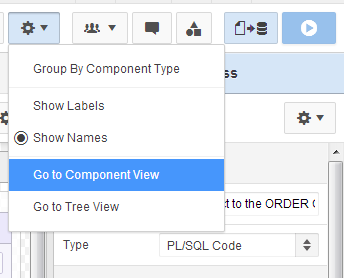
For those like me who might like to occasionally find safety in the refuge of the past, you can find the 4.x Tree View and the 3.x Component View under the cog settings icon - which has been commandeered from shared components.
I've been laughed at on Twitter in the past for enjoying the use of the Component View, but I do appreciate & think it's right that the development team kept it in.
APEX 5 settings menu
I think the Group By Component Type is a good option to include, I'd say advocates of the Tree View in particular thought it an essential feature.
APEX 4.2 rendering icons
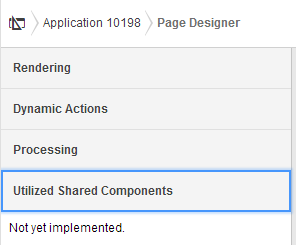
For me it kinda replaces the panel of icons to limit what we see. To be honest, the only one of these I pressed with any great frequency was the dynamic actions icon.

So I feelthis combined with the Page Designer's new accordion shows they got the options balance pretty good. Dynamic actions certainly deserve their own category.
APEX 5 Page Designer Accordion
I wonder if the page designer will get it's own pretty icon in the old navigation bar; and what it might look like - perhaps something similar to the old Oracle Designer logo?
APEX 5 EA navigation bar
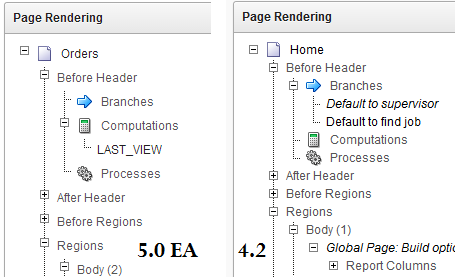
I want to add I notice the trees in the Tree View have a greater distance between nodes - anyone found that a problem? Maybe not now we have a categorised accordion?
Tree View has extra spacing
You may also notice a few additions in the context menu - I'll bring those up in another post.

The rest of the the development environment has stayed pretty much the same - albeit with flatted UI.
The Application list; Shared Components; Utilities; Administration; SQL Workshop; Team Development - all have not fundamentally changed.

Popups

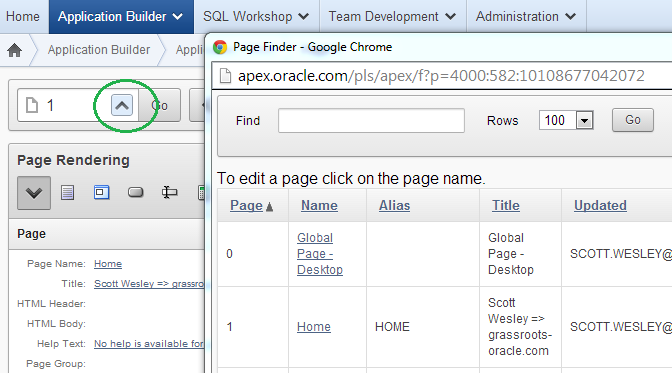
Anyone who used APEX 3.x can attest that date picker popups were annoying.
In 4.x bigger I think popup windows could use a little jQuery treatment
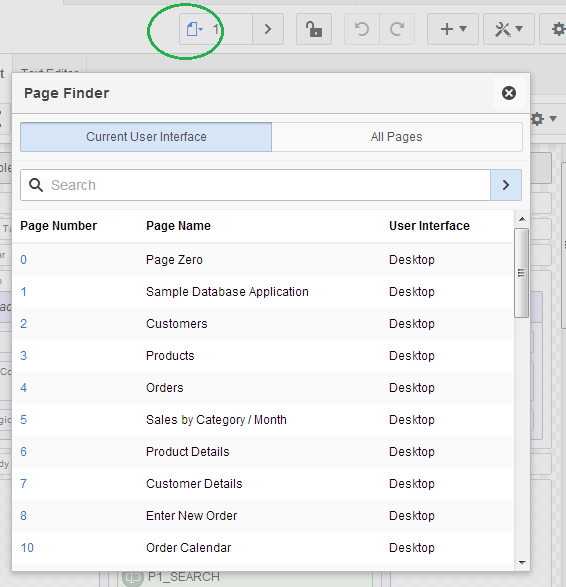
APEX 4.2 page find
... and so APEX 5 delivers. In a true test of the new modal page mode, the page finder is a good example of how this can work effectively - though I have requested the search facility auto-refreshes.

APEX 5 modal dialog
Interactive Reports now appear to be using this framework, but I won't show any screen-captures because I'd say they need a little more dressing up for EA2.

For further detail on using modals for your own applications, check out a post by Joni at iAdvise.

Runtime Developer Toolbar

Last century it was about saving keystrokes, today it's about saving mouse clicks.

If I had a dollar for every time I did this...
Now you'll find that the runtime links open in a new window - presumable thanks to the final class
<a href="f?p=4000:RUN_PAGE:15746635751085:BRANCH_TO_PAGE_ACCEPT:::FB_FLOW_PAGE_ID,FB_FLOW_ID:0,10198" class="launch-aut">

And at runtime you'll noticed the toolbar has been enhanced once again. For a start it doesn't take up the entire page width and has an option to auto-hide.
APEX 4.2 runtime

APEX 5 EA runtime
There is also a display position option, but I'd be interested to meet someone who didn't prefer it on the bottom. I also can't see myself using the show icons only option, but hey - different strokes...

The new Quick Edit feature replaces the Show Edit Links option. Now it greys out the runtime page and offers you to point a crosshairs cursor at an item or region - it will then jump back to the browser window with your application builder then highlight and open the properties component you select - cool!
Quick Edit

Conclusion

A whole suite of changes and I didn't even have a good look at the new page designer. They all made sense and all we'll need to do is get used to a few new icons - but good progress has been made in helping us be productive.


Monday, 18 March 2013

User friendly APEX date items

Back in my Oracle Forms days, we had a library function associated with our date fields that accepted a value of "t", which then returned today's date.

We had further variations on this, but I thought I'd see how I'd go at implementing this in the APEX environment.

Update - included .change() to invoke trigger
http://stackoverflow.com/questions/8437125/jquery-invoke-change-without-user-action-but-by-val-change

First, well, second after creating some date fields on my page - I defined a dynamic action "t in date"
Event: Key release
Selection type: jQuery Selector
jQuery Selector: .hasDatepicker -- this is a class automatically assigned to my dates, found simply with right-click -> Inspect element in Chrome
Condition: equal to
Value: t

Dynamic Action definition
You only require a true action, executing some JavaScript
$(this.triggeringElement).val(return_date('-')).change();
In my case I used a function to return a date formatted nicely for my Oracle environment - more details below.
Don't fire on page load, and set "Selection Type" to "Triggering Element"
JavaScript action
I must thank Tobias in the OTN forums for to return date function, but I've extended it a little to suit my tastes.
I also added a parameter so I could define another DA that accepts "y" for yesterday - and adjust my call to return_date('-',-1)

function return_date(p_delimiter, p_offset) {
  /* with help from
   https://forums.oracle.com/forums/thread.jspa?threadID=2186734
   http://stackoverflow.com/questions/894860/set-a-default-parameter-value-for-a-javascript-function
  */
  /* Default delimiter to . */
  p_delimiter = typeof p_delimiter !== 'undefined' ? p_delimiter : '.';
  p_offset    = typeof p_offset    !== 'undefined' ? p_offset : 0;

  /* Create date object */
  var myDate = new Date(Date.now());
  myDate.setDate(myDate.getDate()+p_offset);

  /* Create output string DD.MM.YYYY */
  /* Day */
  var myStr = (myDate.getDate() < 10 ? "0" + myDate.getDate().toString() : myDate.getDate().toString()) +  p_delimiter;
  /* Month */
      myStr = myStr + (myDate.getMonth()+1 < 10 ? "0" + (myDate.getMonth()+1).toString() : (myDate.getMonth()+1).toString()) + p_delimiter;
  /* Year */
      myStr = myStr + myDate.getFullYear().toString();

  /* Set value */
    return myStr;
}
Note how much more difficult it seems to default parameters in JavaScript compared to PL/SQL.

What do you think? The only problem I've found is if you tab quick enough after typing "t", the trigger does not fire.
Oh, and IE8 seems to have a problem with the date constructor - but I've all but lost my patience pandering to IE.

An example can be found here:
http://apex.oracle.com/pls/apex/f?p=SWESLEY_FORUM:6:0::NO::P6_MODE:E

Scott

Tuesday, 20 November 2012

Oracle Forms New Features

Oracle Forms is a product that has shown staying power, but because the product is aging, support is waning, and new products are coming to replace it - there is little need for new features.

Those that do come out are often esoteric - there to fit highly specific solutions, or help wire in to the newer systems.

I had to compile a list of features from 9i through 10g to 11g, and I thought I'd offer the summary here

11g New Features
External events (Queuing)
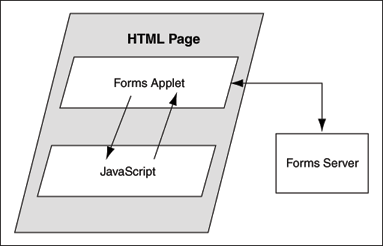
Integration with JavaScript in surrounding web page (documented)
Calling from surrounding webpage into Forms
Making use of proxy user functionality
Forms & grid control
Pluggable Java Components (PJC whitepaper)
Enhancement to Trace
Support for Oracle Diagnostic Logging
Integration with Reports

10g New Features
Runtime prestart
URL Security
SSO Upgrades
Enhanced EM support
WebUtil Patchset
New features
- GIF/JPG support
- Hide connection info from URL when testing

9i New Features
Forms Listener SErvlet
Single Sign-on Support
Improved translation
Support for character semantics
Timezone support
Development UI improvements
XML
Accessibility
Runtime improvements
Enhanced JavaBean Support
EM Integration
Obsolescence

In the interests of offering a pretty image, I thought the solution to integrating JavaScript was painted well
Oracle Fusion Middleware Documentation
I wonder what adjustments might be made to accommodate 12c? Probably something under the hood regarding pluggable databases.

So nope - not a post about new features of a product like APEX, but a consideration to a product that helped us get there.

Thursday, 15 March 2012

On Oracle's statement of direction for Forms & Reports

For anyone that may have missed it, Oracle announced their current statement of direction for Oracle Application Development Tools - Statement of Direction: Oracle Forms, Oracle Reports and Oracle Designer

Statements of direction (SOD) can be fascinating reads, here is the current one for Oracle Application Express, and my thoughts on the 4.2 & 4.1 documents.

As a former (and sometimes current) Forms developer, I read this one with interest as it pertains to the pending 12c offering from Oracle.

The product strategy still oozes SOA and Fusion Middleware, but I found some interesting snippets:

Oracle has no plan to discontinue support of Oracle Forms

Which is great - as mentioned a few paragraphs earlier:
Oracle recognizes this considerable investment and remains committed to the long-term support of these product. 
It's as ubiquitous as Cobol, which fed a few jokes in the twitter world.  While there is no rush to move forward with your Forms applications, you might be up for more pain the longer you leave a plan to move on. I've worked in environments where Cobol is still around, and while the paradigm difference is a little more vast, it can make for massive migration projects.

Oracle’s strategic reporting solution is now BI Publisher

That's a shame in a way, perhaps I'm being nostalgic, but Oracle Reports was an awesome product. Reporting solutions still seem to remain a massive question mark for some sites, at least indecision on the best solution for the relevant environment. The cost seems to scare many away from using BI publisher, I guess especially when you compare the free Application Express product side-by-side. For comparison, I wouldn't like to estimate how much investment the infrastructure is for Oracle Reports, but it might be a middle-term solution for some as they migrate the application base away from Forms to ADF or Apex.

Protect the investment you have in your existing technology by upgrading to the latest release

Please do, I've been working in multiple sites still on 3.x and it's frustrating. Not only for the developer, but for what we can efficiently provide to make the application UI friendly. The same goes for your database, and of course with your Forms environment. There haven't been too many new features since Forms 6i, however advancements have been made to support newer hardware, operating systems and interfacing back to the database.

Oracle Designer 10g was the last version of this product

Move on people. I was never a big designer user - I had the pleasure of using Headstart once, but the universe has evolved. Among other options, there is SQL Developer Data Modeler.

On Oracle's recommendations for migrating from Forms and Reports, they first place your environment in context.

If you need to integrate with Fusion Applications; have extensive business rules & UI logic within the application; general preferences to Java/JEE (among others) => then move to Oracle JDeveloper with ADF.

If most of your application logic is within PL/SQL; most of the processing is within the database, and you don't favour Java => then move to Oracle Application Express.

(On a side note, Chris Muir has a good post answering the question on how much Java is needed for ADF)

It seems the two common, major factors in this decision are
1) The scale of your project and size of your team
2) Your infrastructure & processing requirements

I'm not sure I'm really convinced on the first point. I've never been involved in a JDeveloper project, however I have been in a few small & large Forms projects. I think it really depends on the application you need to build and the team you have.

For me, the most important factor is the infrastructure you currently have, and where you want to go with that. Commenting any further is tough because most of my concentration goes into development. I do listen to what those in the know have to say, though - and it seems to be key to their decision making.

Second to that, though, understanding of the capability of both products is essential. A recent discussion with someone that had little knowledge of Apex (and they are still on 3.1) had them well inside the JDeveloper fence, likening the capability of "dinky" Apex to something like MS Access.

I'm not about to defend Apex as a product, and say it's the only destination out there for migrating away from Forms - but choose the right tool for your job at hand. Chris' blog title hits the nail on the head - one size does not fit all.

Arm yourself with the right information before deciding how/where/when to move away from Forms.  Talk with people that have been involved in both types of projects; talk with experts in the relevant areas; find out the capabilities of each product; consider the infrastructure you have & the status of your databases; & consider the team of developers you already have.

And most importantly, don't forget your users. At the end of the day, they're the ones that need to use what you build, and the workflow of the application needs to suit them. Web pages can get pretty clever these days, but your are still constrained to that browser environment. Do you they need more than what a browser can provide?

Finally, take anything your local Oracle sales rep has to save with a few grains of salt ;-) I'll re-iterate a previous point - talk with the experts, the grunts in the field who are familiar with the capabilities of each product and then re-think about the big picture.

That's my 5 cents.

Wednesday, 21 September 2011

Short Oracle Forms Survey (Whitehorses)

Still using Oracle Forms?

Why not participate in this quick Forms survey at Whitehorses.

It has 9 short questions and only takes a couple of minutes.

Get it done ;-)

Scott

Wednesday, 3 March 2010

Another Apex 4.0 feature for Forms Developers

Late last year I wrote a post about the new Tree View in Apex 4.0, and how it reminded me of the object navigator in Forms.

After reading Patrick's latest entry regarding Cascading LOVs in Apex 4.0 EA2, it reminded me of one of the things I used to do quite regularly in Forms - repopulate one Select List based on the selection of another, during when-list-changed.

Oracle writes in their Application Tools Statement of Direction that (in context of migration tools)
...
Instead, Oracle’s strategy is to provide a Java EE development environment exposing similar concepts as Forms and Reports, giving to Forms and Reports developers the opportunity to become productive in a new, but familiar environment

I think this cascading LOV is another example of that.

I defined my first Select List as an LOV with the following select:
select name d, org_id r
from   organisations
where  parent_org_id is null
order by 1


Then in the definition for the second Select List, I designate the Cascading LOV Parent Item, and refer to that item value within my second LOV definition.
Pretty simple. Even easier than Forms. The less AJAX I need to write, the happier I am.

Monday, 30 November 2009

Review - Oracle Application Express Forms Converter


Recently in the blogosphere - not just Oracle related blogs – I’ve noticed an increasing number of book reviews. Normally I’ve found these reviews are by authorities as part of the regular marketing campaign. As with other industries, new forms of marketing evolve – in this case one that facilitates professionals in the field an opportunity to provide critique on new texts.

I was recently provided the opportunity to review a book discussing how to use Oracle’s tool to convert Forms applications to Application Express: Oracle Application Express Forms Converter by Douwe Pieter van den Bos. This book, published by Packt Publishing, is the first of its kind on this subject matter, and you may have seen the cover if you regularly visit Oracle based blogs – particular specialising in Apex. This opportunity is in part due to the fact I’m presenting on this very topic at this year’s AUSOUG conference series.

It’s a tough topic. Oracle Forms has a large presence throughout the world, but it’s ageing. Support is consistently being extended, however this support is predominantly there to keep it stable. Oracle is suggesting to customers to move towards new environments such as ADF and Application Express.

Converters between technologies have been around for a long time, and Oracle offers an Oracle Forms to Application Express conversion tool. There are many facets to a conversion between technologies, and the industry is typically aware that a tool will rarely be a silver bullet. There are such fundamental differences between technologies and human interaction and guidance is always required.

Accompanying documentation with the tool is regrettably lacking. While it describes the conversion process using the product, it doesn’t go into detail about what else needs to be done - so the situation is ripe for a book offering.

When reading books, fictional, non-fictional – and the subset of that being technical manuals, I always seem to be lucky in selecting the good ones. I rarely find myself reading a bad book, which is lucky since like movies, I don’t want to stop regardless of how bad it is – curiosity killed that cat.

Unfortunately, I feel compelled to give this book a less than enthusiastic review. To the author’s credit, it’s partially due to what I feel is not only a disappointing tool, but a difficult concept to actualise as software.

The book starts very well, dictating exactly what the book offers and provides no disillusion to the reader about what the conversion itself offers. David Peake’s foreword offers insight into how the tool came to be, and the author’s preface re-iterates how much work will be required to convert the application between the two disparate technologies.

Each chapter is just like the copybook for presenters. Say what you're going to say, say it, say what you've said. I like this, personally it reconfirms what you've learnt, and it makes it a little easier to find things in future. It reads very much like a blog or OTN article, which works well for me. I remember some texts from University being very dry as it just stated facts, where if the book almost forms a conversation between the author and reader, it makes concepts easier to learn and your attention is kept.

The book stated in the preface "because this book is written for developers and analysts who know both Forms and Apex." I think this is the perfect target audience as for this subject best value would be obtained by directing attention to developers who have a decent understanding of both products. Suggest to readers whose knowledge of Application Express is low to read an Application Express specific book such as Pro Oracle Application Express by John Scott and Scott Spendolini (so many Scotts!). As a reader of this book I really want to know the ins and outs of conversion – not just the tool itself but all considerations that need to be made since the tool will only handle a small percentage of the conversion.

For this topic I feel a fair and safe assumption would be, for example, a decent understanding of how to create an LOV in Apex. The author, however, spent time discussing some of these Application Express basics which detracted from the main topic of conversion. During my presentation I stated the assumption that the audience knew how to enhance Apex – this allowed me to concentrate on the issues that would be faced during the conversion and what components needed to be targeted.
On a positive note, it does make a presumption you've got decent knowledge about the sample application they're converting, which is fine if again you consider that you want to understand the process – not a description of the sample application which is really just a catalyst. There is always a concern that the sample application is tweaked and diluted to show the strengths of the tool. In a basic sample application I created during my experimentation, I found many more issues that needed to be considered.

After a strong start where we heard how difficult a conversion process can be, I felt the chapters were finishing too quickly. For instance Chapter 5 talked about “Getting your Logic Right” - where you can edit the queries used. I found this to be the buggiest part of the process and no mention of these problems were made.

At 10 pages, Chapter 6 on the actual conversion was thin. The author talked about how we can “edit the most important parts of the application”, yet he just seemed to describe aesthetics – even then to surface level detail. I found this process to be the source of the most frustrating elements of the conversion - item types weren’t carried across; ordering of items was indeterminate; and usage of UI defaults were necessary but not mentioned in the book. For a large application, the list of pages to be generated would create more confusion for the developer than to have just created all pages from scratch. My sample application caused generation errors, but why didn’t the author didn’t cover this possibility?

Chapter 7 is when we see the author question our knowledge of Apex, presuming we don’t know its standard features. The LOV example I found demonstrated the author deviated from the topic of conversion to that of educating about Apex, which is a shame because it was a good time to highlight the fact we were missing components from the conversion; describe how to properly address it; how long it may take to do so; and how we could use annotations to continue effective management of the conversion – probably the most useful feature of the conversion tool.

I think sometimes the author gets a little off topic, even though he promised not to earlier on when stating targeted audience. For example in his final chapter he talks about security and pulling multiple applications together, too far removed from the conversion process for my liking.

Documentation on Application Express is already pretty thin, especially when comparing against the comprehensive documentation found for the database. Don’t expect this to be the manual for converting your Oracle Forms applications to Application Express - it’s a wonderful starting point to understanding how to use the tool, but not great at mitigating likely issues of your conversion.

In the interest of fairness, other reviews of this book can be found on the following blogs:
Marc Sewtz
Roel Hartman
David Peake

Monday, 28 September 2009

Advert: On-line Book Reviews

While doing some research I was directed to the online bookstore Packt Publishing. Some other online book stores have a chapter listing, or a short excerpt. At Packt you seem to be able to download a sample chapter for every book you're interested in - at least all that I had a look at.

If you're a blogger you've also got the opportunity to review books. I've chosen one to review to see if it's worthwhile and let developers like you know if it's worth it. Stay tuned over the coming months, I hope to have it reviewed by the time the 2009 AUSOUG Conference series commences.

Online reference manuals are great, but sometimes you need more than a reference. I'm not a huge fan of books that regurgitate the documentation, but a best practices book or a guide to a new concept; case study or transformation process never goes astray.